
SettleCraft
Create and manage towns claim land, set permissions, and see territory on Xaero's World Map.
Screenshots
About this Mod
Description:
SettleCraft is a server-side town management mod for Fabric 1.21.1 that lets players build communities, claim territory, and control who can do what on their land.
Getting started
Any player can create a town with /town create <name> and immediately become its Mayor. From there, claim the chunks that make up your town's territory, invite members, and configure your town however you like.
Territory
Mayors claim land chunk by chunk using /town claim while standing in the chunk they want. Claimed territory is visible on Xaero's World Map as a coloured overlay. Your own town's claims appear in blue, other towns' claims in red. Towns can hold up to 64 claimed chunks.
Permissions
Mayors have full control over what guests and members can do inside town borders. Each of the following can be toggled independently for both groups:
- Build and break blocks
- PvP
- Interact with blocks (chests, doors, buttons, etc.)
- Mob spawning
Towns on your SMP
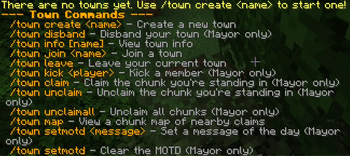
Players can join and leave towns freely. Your town name appears in chat alongside your name so everyone knows who's where. Mayors can set a Message of the Day that greets members when they log in, kick troublesome members, rename the town, transfer ownership, or disband entirely. Mayors can also ban players from other towns from entering their territory.
Commands
Use /town help in-game for the full command list. Key ones: /town create, /town join, /town leave, /town claim, /town info, /town setperm, /town ban, /town map.
Installation
SettleCraft is server-side, meaning it runs without any client installation. However, to see town territory on Xaero's World Map, players should also install it on their client. Xaero's World Map is not required, it is an optional visual enhancement.
Requires Fabric Loader 0.16.5+ and Fabric API for Minecraft 1.21.1.
Report any bugs to the discord server.
Available Versions
How to Install SettleCraft on Your Server
Order Server
Order a Minecraft Java server with at least 3 GB RAM (4 GB recommended).
Set fabric Loader
In the panel under "Egg", select the fabric loader and matching Minecraft version (1.21.11).
Install Mod
Open the mod browser in the dashboard and search for "SettleCraft". Click "Install" – done! Alternatively, upload the .jar via SFTP to the /mods folder.
Compatibility
Mod Loaders
Minecraft Versions
1.21.11, 1.21.10, 1.21.9 (+8 more)
Server-side
✓ RequiredRecommended RAM
4 GB(min. 3 GB)Frequently Asked Questions
SettleCraft server crashes on startup – what to do?
Most common cause: wrong fabric version or insufficient RAM. Check the server log (latest.log) for "OutOfMemoryError" or "Mixin" errors. With Mado Hosting: ensure at least 3 GB RAM is allocated and the loader matches the mod version (1.21.11). You can switch loaders with one click in the panel.
Is SettleCraft compatible with fabric?
SettleCraft officially supports fabric for Minecraft 1.21.11, 1.21.10, 1.21.9. The Mado dashboard automatically detects incompatible loader combinations.
Server lagging with SettleCraft – how to optimize performance?
Recommended RAM: 4 GB (per 8 players). Use /spark profiler to check if SettleCraft consumes the most tick time. Common fixes: reduce server view-distance to 8-10, install "performant" or "starlight" as supplementary mods on Forge. With Mado Hosting, your server runs on NVMe SSDs with dedicated CPU cores for minimal latency.
Similar Mods




Rent Modded Server
Install SettleCraft with just one click on your server.