
ShadowTrace
ShadowTrace is a Minecraft mod that allows server administrators to track and inspect ore mining activity using data from CoreProtect.
Screenshots
About this Mod
ShadowTrace
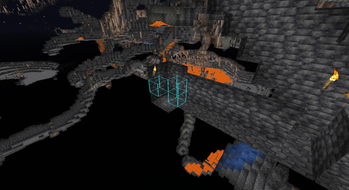
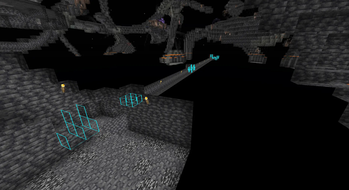
ShadowTrace is a Minecraft mod designed to give players a powerful tool for visualizing historical block data directly within the game world. The mod allows users to inspect where and when specific ore blocks were mined, helping server staff detect suspicious mining patterns and possible x-ray usage. Through client-side rendering, ShadowTrace highlights mined blocks in the 3D world with clearly visible colored outlines, making it easy to investigate and analyze block changes.
ShadowTrace is not a standalone mod - it requires the ShadowTrace server plugin to function properly. The server side plugin handles all data queries and sends relevant information to the mod via custom packets. This ensures a clean and efficient separation of logic, where the server handles data processing, and the client focuses on visualization.
Together, the ShadowTrace plugin and mod create a seamless investigative toolset tailored for moderation and anti-cheat purposes on Minecraft servers.
Download the ShadowTrace Server Plugin here.
ShadowTrace is a lightweight mod inspired by the Watson mod, offering a simpler way to visualize removed blocks in Minecraft. While Watson includes many advanced tools, ShadowTrace focuses solely on showing blocks that players have mined or removed. It integrates with CoreProtect and provides a clean, easy-to-use GUI, making it ideal for quickly spotting suspicious activity without the extra complexity.
Features
- View historical mining activity of players.
- See exact coordinates of mined blocks.
- Filter lookups by player and timeframe (e.g.
1m,1h,1d). - Renders blocks as colored outlines in the world.
- Each block type has its own distinctive color for easy identification.
- Supports up to 300 blocks per search, optimized for visibility.
- Works both for online and offline players.
- Uses a custom packet system for efficient data transfer.
- Press G to open the ShadowTrace GUI.
Config file
Add whatever color you want to the different blocks, in hex. You can also add other blocks that you want specific colors on. You can find the configuration file in .minecraft/config/shadowtrace.
{
  "copper_ore": "#bc633d",
  "gold_ore": "#ffaa00",
  "redstone_ore": "#ff0000",
  "nether_gold_ore": "#ffaa00",
  "deepslate_redstone_ore": "#ff0000",
  "deepslate_emerald_ore": "#00cd12",
  "diamond_ore": "#00f2ff",
  "iron_ore": "#e9c0a4",
  "deepslate_copper_ore": "#bc633d",
  "ancient_debris": "#851b00",
  "lapis_ore": "#002bff",
  "spawner": "#9900ff",
  "coal_ore": "#000000",
  "deepslate_iron_ore": "#e9c0a4",
  "deepslate_lapis_ore": "#002bff",
  "emerald_ore": "#00cd12",
  "deepslate_coal_ore": "#000000",
  "deepslate_gold_ore": "#ffaa00",
  "deepslate_diamond_ore": "#00f2ff"
}
Remember to restart the Minecraft client after changing the colors in the configuration file for the changes to take effect.
Available Versions
How to Install ShadowTrace on Your Server
Order Server
Order a Minecraft Java server with at least 3 GB RAM (4 GB recommended).
Set fabric Loader
In the panel under "Egg", select the fabric loader and matching Minecraft version (26.1.2).
Install Mod
Open the mod browser in the dashboard and search for "ShadowTrace". Click "Install" – done! Alternatively, upload the .jar via SFTP to the /mods folder.
Compatibility
Mod Loaders
Minecraft Versions
26.1.2, 26.1.1, 26.1 (+6 more)
Server-side
✗ UnsupportedRecommended RAM
4 GB(min. 3 GB)Frequently Asked Questions
ShadowTrace server crashes on startup – what to do?
Most common cause: wrong fabric version or insufficient RAM. Check the server log (latest.log) for "OutOfMemoryError" or "Mixin" errors. With Mado Hosting: ensure at least 3 GB RAM is allocated and the loader matches the mod version (26.1.2). You can switch loaders with one click in the panel.
Is ShadowTrace compatible with fabric?
ShadowTrace officially supports fabric for Minecraft 26.1.2, 26.1.1, 26.1. The Mado dashboard automatically detects incompatible loader combinations.
Server lagging with ShadowTrace – how to optimize performance?
Recommended RAM: 4 GB (per 8 players). Use /spark profiler to check if ShadowTrace consumes the most tick time. Common fixes: reduce server view-distance to 8-10, install "performant" or "starlight" as supplementary mods on Forge. With Mado Hosting, your server runs on NVMe SSDs with dedicated CPU cores for minimal latency.
Similar Mods




![[ETF] Entity Texture Features](https://cdn.modrinth.com/data/BVzZfTc1/af683d206d50b05258d865b0d6e4aa2f2cee12f2_96.webp)
![[EMF] Entity Model Features](https://cdn.modrinth.com/data/4I1XuqiY/6e5bbd0d06b1741bfdab6c0cfab6de8fdaf0064c_96.webp)
Rent Modded Server
Install ShadowTrace with just one click on your server.