
shared-folder-skins
Share local PNG skins from config/sharedskins with other players on a Fabric server.
Screenshots
About this Mod
Description
# Shared Folder Skins

Shared Folder Skins lets players use a local PNG skin from `config/sharedskins` and share it with other players on the same Fabric server.

It is meant for small servers, friends, private modpacks, LAN worlds, and anyone who wants quick shared skins without external accounts, web services, launchers, or resource pack setup.

## Features

- Loads PNG skins from `config/sharedskins`
- Shares your selected skin with other players who also have the mod installed
- Works on Fabric servers and integrated singleplayer worlds
- Supports classic and slim arm models
- Supports HD skins from `64x64` up to `2048x2048`
- Updates while connected when you replace or remove the PNG
- Includes an in-game skin picker in the pause menu
- Saves the selected skin in `config/sharedskins/selected.txt`
- Preserves capes and elytra textures

## Setup

Install the matching jar on the server and on every client that should send or see shared skins.

Start the client once. The mod creates:

```text
config/sharedskins
Put a PNG skin in that folder.
Recommended file names:
skin.png
skin_slim.png
skin_slim.png uses the slim arm model. If no skin is manually selected, the mod checks these names first:
skin_slim.png
slim.png
skin.png
If none of those exist, it uses the first PNG in the folder.
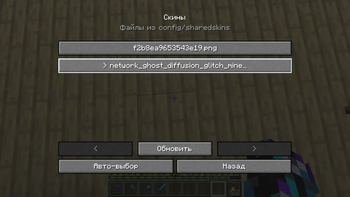
In-game skin picker
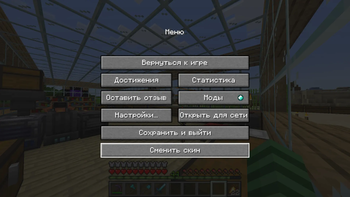
Open the pause menu and press:
Change Skin
Pick any PNG from config/sharedskins to apply it immediately.
Use auto-select to return to the default file priority.
Requirements
- Fabric Loader
- Fabric API
- Java 17 for Minecraft 1.20 to 1.20.4
- Java 21 for Minecraft 1.20.5 and newer
Supported versions
This release line supports:
1.20 - 1.21.11
Use the jar that matches your exact Minecraft version.
Notes
- A vanilla server cannot relay shared skins. The server must have the mod installed.
- Other players must also have the mod installed to see shared skins.
- PNG files larger than
8 MiBare ignored. - The mod only replaces the player body skin. Capes and elytra textures stay unchanged.
Available Versions
How to Install shared-folder-skins on Your Server
Order Server
Order a Minecraft Java server with at least 3 GB RAM (4 GB recommended).
Set fabric Loader
In the panel under "Egg", select the fabric loader and matching Minecraft version (1.21.11).
Install Mod
Open the mod browser in the dashboard and search for "shared-folder-skins". Click "Install" – done! Alternatively, upload the .jar via SFTP to the /mods folder.
Compatibility
Mod Loaders
Minecraft Versions
1.21.11, 1.21.10, 1.21.9 (+16 more)
Server-side
✓ RequiredRecommended RAM
4 GB(min. 3 GB)Frequently Asked Questions
shared-folder-skins server crashes on startup – what to do?
Most common cause: wrong fabric version or insufficient RAM. Check the server log (latest.log) for "OutOfMemoryError" or "Mixin" errors. With Mado Hosting: ensure at least 3 GB RAM is allocated and the loader matches the mod version (1.21.11). You can switch loaders with one click in the panel.
Is shared-folder-skins compatible with fabric?
shared-folder-skins officially supports fabric for Minecraft 1.21.11, 1.21.10, 1.21.9. The Mado dashboard automatically detects incompatible loader combinations.
Server lagging with shared-folder-skins – how to optimize performance?
Recommended RAM: 4 GB (per 8 players). Use /spark profiler to check if shared-folder-skins consumes the most tick time. Common fixes: reduce server view-distance to 8-10, install "performant" or "starlight" as supplementary mods on Forge. With Mado Hosting, your server runs on NVMe SSDs with dedicated CPU cores for minimal latency.
Similar Mods




Rent Modded Server
Install shared-folder-skins with just one click on your server.