
Shear Shrooms
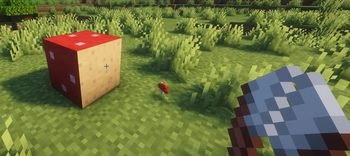
Right click mushroom blocks with shears to snip faces down to the hidden pore texture, press a mushroom on to grow the cap back. No new blocks, pure vanilla blockstates. Fabric mod + Paper plugin.
Screenshots
About this Mod
Give your giant mushrooms a haircut.
Every mushroom block in the game already knows how to look bare. The pore
texture has been hiding in its blockstate since forever, you just never had a
way to get at it. Shear Shrooms hands you the scissors: right click any face
of a red mushroom block, brown mushroom block, or mushroom stem with shears
and that face snips down to the pore texture, popping off a mushroom as it
goes. Change your mind? Press a matching mushroom against the bare face and
the cap grows right back.
That is the whole mod, and that is the point. No new blocks, no items, no
resource pack, no config. It flips the blockstates vanilla already ships,
which buys you two lovely things:
- Put it on your server and every player gets it instantly, even on a
completely untouched vanilla client. - Builds made with it are plain vanilla blocks. Uninstall and your mushroom
mansion stays exactly as you sculpted it.
Builders get a clean new palette out of blocks they already farm: poreless
stems as pillars, mixed cap-and-pore walls, mushroom furniture with the right
texture on every visible face.
The fine print you will actually like:
- Perfectly fair economy. A snip gives one mushroom, regrowing costs one.
Nothing to dupe, nothing to lose. - Stems regrow with either mushroom color (they drop nothing when sheared,
there is no stem item to give you). - Shears spend 1 durability per snip, Unbreaking works, creative is free.
- Sneak and right click to bypass the mod whenever you want pure vanilla
behavior, like planting a mushroom on top.
Three downloads, pick your platform: Fabric for 1.21.x, Fabric for 26.1.x,
and one Paper/Spigot plugin jar that runs on both 1.21.x and 26.1.x servers.
Original concept by derexxd (u/DereChen) on Reddit (r/minecraftsuggestions) -
https://www.reddit.com/r/minecraftsuggestions/comments/1tub1bj/. Built by BeansNToast.
Available Versions
How to Install Shear Shrooms on Your Server
Order Server
Order a Minecraft Java server with at least 3 GB RAM (4 GB recommended).
Set bukkit Loader
In the panel under "Egg", select the bukkit loader and matching Minecraft version (26.1.2).
Install Mod
Open the mod browser in the dashboard and search for "Shear Shrooms". Click "Install" – done! Alternatively, upload the .jar via SFTP to the /mods folder.
Compatibility
Mod Loaders
Minecraft Versions
26.1.2, 26.1.1, 26.1 (+11 more)
Server-side
✓ RequiredRecommended RAM
4 GB(min. 3 GB)Frequently Asked Questions
Shear Shrooms server crashes on startup – what to do?
Most common cause: wrong bukkit version or insufficient RAM. Check the server log (latest.log) for "OutOfMemoryError" or "Mixin" errors. With Mado Hosting: ensure at least 3 GB RAM is allocated and the loader matches the mod version (26.1.2). You can switch loaders with one click in the panel.
Is Shear Shrooms compatible with bukkit and fabric and paper and purpur and spigot?
Shear Shrooms officially supports bukkit, fabric, paper, purpur, spigot for Minecraft 26.1.2, 26.1.1, 26.1. The Mado dashboard automatically detects incompatible loader combinations.
Server lagging with Shear Shrooms – how to optimize performance?
Recommended RAM: 4 GB (per 8 players). Use /spark profiler to check if Shear Shrooms consumes the most tick time. Common fixes: reduce server view-distance to 8-10, install "performant" or "starlight" as supplementary mods on Forge. With Mado Hosting, your server runs on NVMe SSDs with dedicated CPU cores for minimal latency.
Similar Mods

![[ETF] Entity Texture Features](https://cdn.modrinth.com/data/BVzZfTc1/af683d206d50b05258d865b0d6e4aa2f2cee12f2_96.webp)
![[EMF] Entity Model Features](https://cdn.modrinth.com/data/4I1XuqiY/6e5bbd0d06b1741bfdab6c0cfab6de8fdaf0064c_96.webp)



Rent Modded Server
Install Shear Shrooms with just one click on your server.