
Show Me
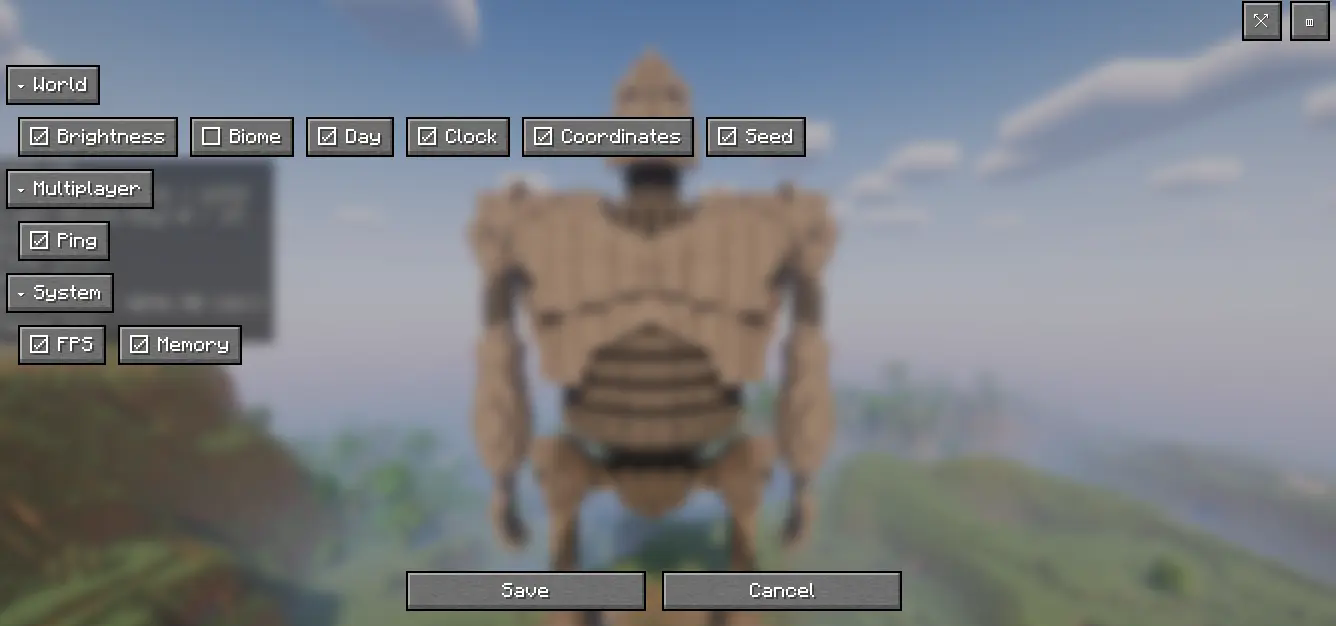
Show only the stats you want (FPS, coords, days, etc.)—modular HUD
Screenshots


About this Mod
🌐 Supported Languages
Show Me is now available in multiple languages to enhance the player experience:
- 🇺🇸 English (EN-US)
- 🇧🇷 Portuguese (Brazil - PT-BR)
- 🇪🇸 Spanish (Spain - ES-ES) ✅ New!
All HUD texts, menus, and settings are fully translated.
Language is selected automatically based on the Minecraft client language.
🇺🇸 EN-US
Show Me is a lightweight, fully customizable HUD for players who find the F3 screen too noisy. Instead of a massive debug panel, you choose exactly what to display and where.
✨ Features
- Modular Display: Show only what you want – FPS, Coordinates, Brightness, Biome, World Day, Time of Day, Ping, World Seed, RAM usage, and more.
- Two View Modes: Normal or Compact.
- Live Settings: Adjust everything in-game, no restart required.
- Customizable HUD: Drag and drop to position HUD elements anywhere on the screen.
- Clean Visuals: Readable fonts and minimalistic style.
- Hotkeys: Quickly hide/show or open settings.
🧭 Quick Start
- Open the Show Me settings in-game.
- Select your preferred modules (e.g., FPS + Coordinates).
- Choose Normal or Compact mode and position the HUD where you like.
- Play!
⌨️ Default Hotkeys
- Hide/Show HUD: X
- Open Settings: Z
🇪🇸 ES-ES
Show Me es un HUD ligero y totalmente personalizable para jugadores que consideran que la pantalla F3 es demasiado cargada. En lugar de un panel de depuración enorme, tú decides exactamente qué mostrar y dónde.
✨ Características
- Visualización Modular: Muestra solo lo que quieras – FPS, Coordenadas, Nivel de luz, Bioma, Día del mundo, Hora del día, Ping, Seed del mundo, Uso de RAM y más.
- Dos Modos de Vista: Normal o Compacto.
- Configuración en Vivo: Ajusta todo dentro del juego, sin necesidad de reiniciar.
- HUD Personalizable: Arrastra y coloca los elementos del HUD en cualquier parte de la pantalla.
- Estética Limpia: Tipografías legibles y estilo minimalista.
- Teclas Rápidas: Oculta/muestra el HUD o abre la configuración al instante.
🧭 Inicio Rápido
- Abre la configuración de Show Me dentro del juego.
- Selecciona los módulos que prefieras (por ejemplo: FPS + Coordenadas).
- Elige el modo Normal o Compacto y coloca el HUD donde más te guste.
- ¡A jugar!
⌨️ Teclas Rápidas por Defecto
- Ocultar/Mostrar HUD: X
- Abrir Configuración: Z
🇧🇷 PT-BR
Show Me é um HUD leve e totalmente personalizável para jogadores que acham a tela F3 muito poluída. Em vez de um painel de depuração gigante, você escolhe exatamente o que exibir e onde.
✨ Características
- Exibição Modular: Mostre apenas o que quiser – FPS, Coordenadas, Brilho, Bioma, Dia do Mundo, Horário do Dia, Ping, Seed do Mundo, Uso de RAM e muito mais.
- Dois Modos de Visualização: Normal ou Compacto.
- Configuração ao Vivo: Ajuste tudo dentro do jogo, sem precisar reiniciar.
- HUD Personalizável: Arraste e posicione os elementos do HUD em qualquer lugar da tela.
- Visual Limpo: Fontes legíveis e estilo minimalista.
- Teclas de Atalho: Oculte/mostre rapidamente ou abra as configurações.
🧭 Início Rápido
- Abra as configurações do Show Me no jogo.
- Selecione os módulos desejados (ex.: FPS + Coordenadas).
- Escolha o modo Normal ou Compacto e posicione o HUD onde preferir.
- Jogue!
⌨️ Teclas de Atalho Padrão
- Ocultar/Exibir HUD: X
- Abrir Configurações: Z
Available Versions
How to Install Show Me on Your Server
Order Server
Order a Minecraft Java server with at least 3 GB RAM (4 GB recommended).
Set fabric Loader
In the panel under "Egg", select the fabric loader and matching Minecraft version (1.21.10).
Install Mod
Open the mod browser in the dashboard and search for "Show Me". Click "Install" – done! Alternatively, upload the .jar via SFTP to the /mods folder.
Compatibility
Mod Loaders
Minecraft Versions
1.21.10, 1.21.9, 1.21.8 (+2 more)
Server-side
✗ UnsupportedRecommended RAM
4 GB(min. 3 GB)Frequently Asked Questions
Show Me server crashes on startup – what to do?
Most common cause: wrong fabric version or insufficient RAM. Check the server log (latest.log) for "OutOfMemoryError" or "Mixin" errors. With Mado Hosting: ensure at least 3 GB RAM is allocated and the loader matches the mod version (1.21.10). You can switch loaders with one click in the panel.
Is Show Me compatible with fabric?
Show Me officially supports fabric for Minecraft 1.21.10, 1.21.9, 1.21.8. The Mado dashboard automatically detects incompatible loader combinations.
Server lagging with Show Me – how to optimize performance?
Recommended RAM: 4 GB (per 8 players). Use /spark profiler to check if Show Me consumes the most tick time. Common fixes: reduce server view-distance to 8-10, install "performant" or "starlight" as supplementary mods on Forge. With Mado Hosting, your server runs on NVMe SSDs with dedicated CPU cores for minimal latency.
Similar Mods




Rent Modded Server
Install Show Me with just one click on your server.