Screenshots
About this Mod
ENG
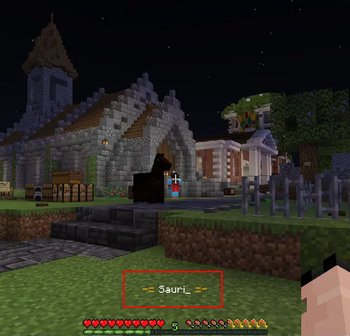
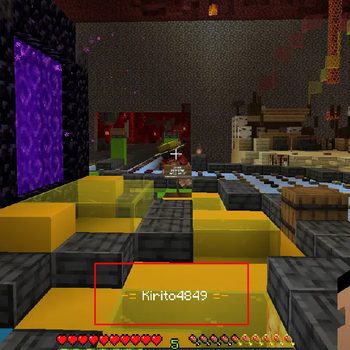
With the Show Yourself mod, you can find out the player's nickname simply by right-clicking on it. Suitable for servers on which nicknames are hidden above the players. Usually on such servers there is already a plugin for this that allows you to do this, but it works at a very small distance, and you don’t always want to approach a strange player to find out his nickname. In the config, you can specify at what distance this mod will work (up to 64 blocks).
RU
С модом Show Yourself вы сможете узнать ник игрока, просто кликнув по нему ПКМ. Подходит для серверов, на которых скрыты ники над игроками. Обычно на таких серверах для этого уже стоит плагин, который позволяет это делать, однако он работает на очень маленьком расстоянии, поэтому не всегда удобно подходить к игроку, чтобы узнать его ник. В конфиге можно указать, на каком расстоянии будет работать этот мод (до 64 блоков).
Discord
Available Versions
How to Install Show Yourself on Your Server
Order Server
Order a Minecraft Java server with at least 3 GB RAM (4 GB recommended).
Set fabric Loader
In the panel under "Egg", select the fabric loader and matching Minecraft version (1.21.9).
Install Mod
Open the mod browser in the dashboard and search for "Show Yourself". Click "Install" – done! Alternatively, upload the .jar via SFTP to the /mods folder.
Compatibility
Mod Loaders
Minecraft Versions
1.21.9, 1.21.8, 1.21.7 (+15 more)
Server-side
✗ UnsupportedRecommended RAM
4 GB(min. 3 GB)Frequently Asked Questions
Show Yourself server crashes on startup – what to do?
Most common cause: wrong fabric version or insufficient RAM. Check the server log (latest.log) for "OutOfMemoryError" or "Mixin" errors. With Mado Hosting: ensure at least 3 GB RAM is allocated and the loader matches the mod version (1.21.9). You can switch loaders with one click in the panel.
Is Show Yourself compatible with fabric?
Show Yourself officially supports fabric for Minecraft 1.21.9, 1.21.8, 1.21.7. The Mado dashboard automatically detects incompatible loader combinations.
Server lagging with Show Yourself – how to optimize performance?
Recommended RAM: 4 GB (per 8 players). Use /spark profiler to check if Show Yourself consumes the most tick time. Common fixes: reduce server view-distance to 8-10, install "performant" or "starlight" as supplementary mods on Forge. With Mado Hosting, your server runs on NVMe SSDs with dedicated CPU cores for minimal latency.
Similar Mods




![[ETF] Entity Texture Features](https://cdn.modrinth.com/data/BVzZfTc1/af683d206d50b05258d865b0d6e4aa2f2cee12f2_96.webp)
![[EMF] Entity Model Features](https://cdn.modrinth.com/data/4I1XuqiY/6e5bbd0d06b1741bfdab6c0cfab6de8fdaf0064c_96.webp)
Rent Modded Server
Install Show Yourself with just one click on your server.