
Shulker Network
This mod adds management of all shulkerboxes in your inventory without the need to place them.
Screenshots
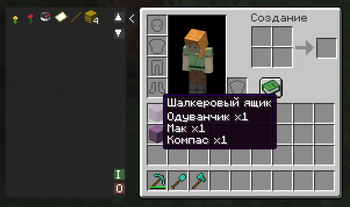
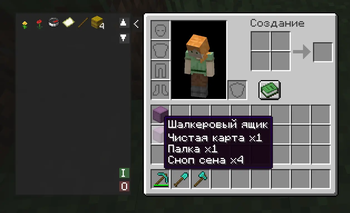
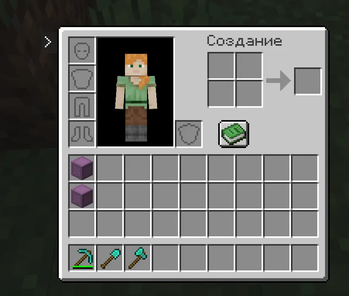
About this Mod
📦 Shulker Network
Shulker Network is a compact and powerful utility for managing your shulker boxes directly from your inventory. Stop wasting time placing boxes on the ground! Now, the entire contents of your shulkers are accessible in a single click through a convenient side panel.
✨ Key Features
• ⚡ Instant Access: A retractable side panel next to your inventory displays all items stored in shulker boxes currently held in your inventory.
• 🖱️ Smart Interaction:
o Left Click (LMB): Instantly extract an item from a shulker directly into your inventory.
o Right Click (RMB): Quickly deposit the selected item from your hotbar into the shulker network.
• 📥 "I" Button (Input): Automatically bulk-deposits your entire main inventory (excluding the hotbar) into your shulkers. The system intelligently prioritizes merging with existing partial stacks first.
• 📤 "O" Button (Output): Instantly unloads all items from your shulkers into your available inventory slots.
• 📜 Easy Navigation: Supports a large number of items with dedicated scroll buttons (▲/▼) to navigate through your resources.
• 📦 Compact Design: Optimized item icons allow you to view up to 77 stacks at once, minimizing the need for scrolling.
🛠 How to Use
- Open your inventory (default key E).
- Click the small > button on the left side of the inventory window to expand the panel.
- Interact with the item grid to extract resources or use the I / O buttons for bulk transfers.
- If you need more screen space, simply click the < button to collapse the panel at any time.
⚙️ Requirements
To run this mod, you will need:
• Architectury API
• Fabric API (for the Fabric version)
Available Versions
How to Install Shulker Network on Your Server
Order Server
Order a Minecraft Java server with at least 3 GB RAM (4 GB recommended).
Set fabric Loader
In the panel under "Egg", select the fabric loader and matching Minecraft version (1.20.1).
Install Mod
Open the mod browser in the dashboard and search for "Shulker Network". Click "Install" – done! Alternatively, upload the .jar via SFTP to the /mods folder.
Compatibility
Mod Loaders
Minecraft Versions
1.20.1
Server-side
✓ RequiredRecommended RAM
4 GB(min. 3 GB)Frequently Asked Questions
Shulker Network server crashes on startup – what to do?
Most common cause: wrong fabric version or insufficient RAM. Check the server log (latest.log) for "OutOfMemoryError" or "Mixin" errors. With Mado Hosting: ensure at least 3 GB RAM is allocated and the loader matches the mod version (1.20.1). You can switch loaders with one click in the panel.
Is Shulker Network compatible with fabric and forge?
Shulker Network officially supports fabric, forge for Minecraft 1.20.1. Note: Forge and Fabric mods are NOT cross-compatible – pick one loader and stick with it. The Mado dashboard automatically detects incompatible loader combinations.
Server lagging with Shulker Network – how to optimize performance?
Recommended RAM: 4 GB (per 8 players). Use /spark profiler to check if Shulker Network consumes the most tick time. Common fixes: reduce server view-distance to 8-10, install "performant" or "starlight" as supplementary mods on Forge. With Mado Hosting, your server runs on NVMe SSDs with dedicated CPU cores for minimal latency.
Similar Mods




Rent Modded Server
Install Shulker Network with just one click on your server.