
ShulkerLayers
Pack shulker boxes inside shulker boxes. Configurable nesting depth via a layer-based system.
About this Mod
ShulkerLayers
A Fabric mod for Minecraft that lets you pack shulker boxes inside shulker boxes, with a configurable nesting depth.
What it does
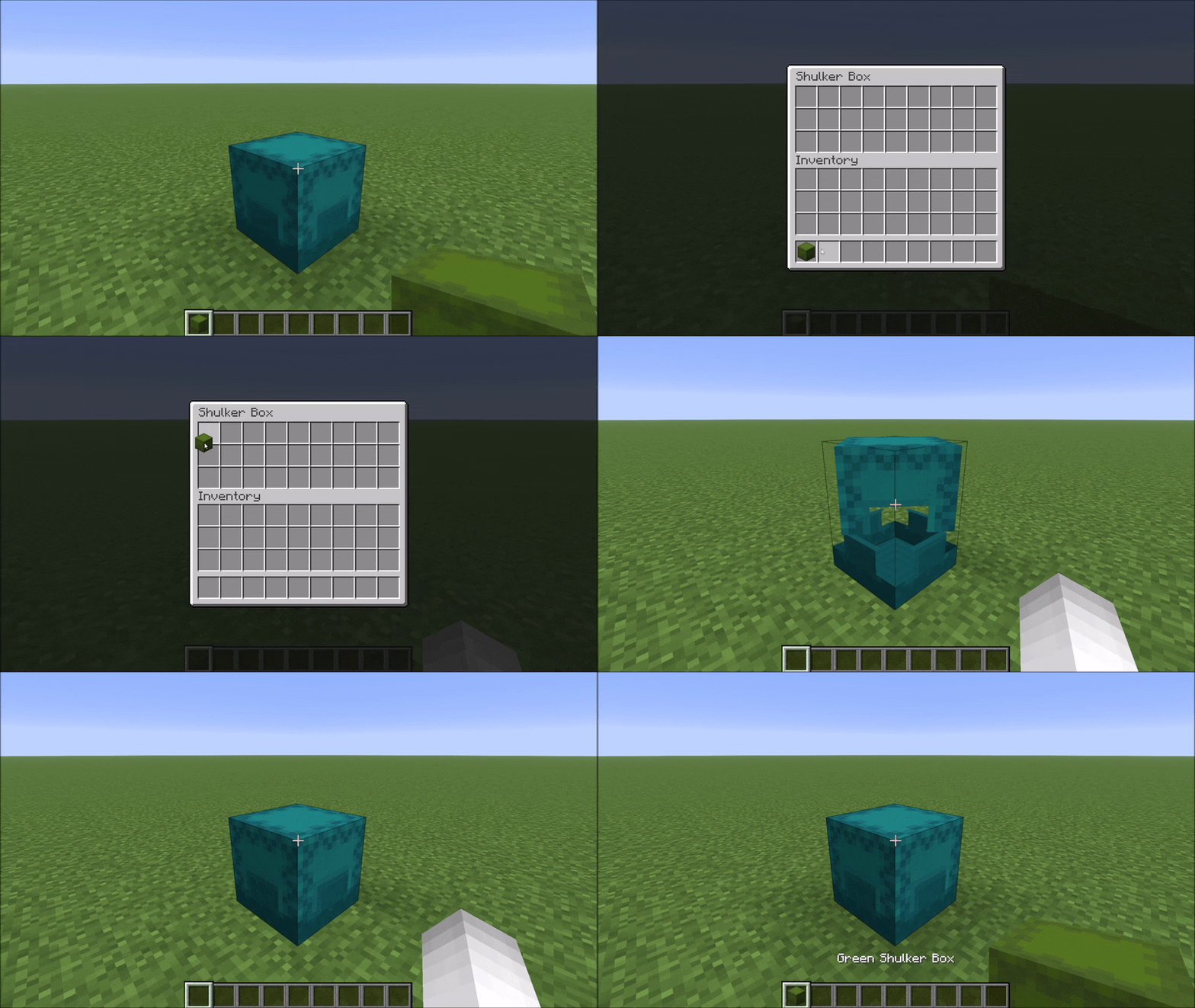
Vanilla Minecraft blocks placing a shulker box into another shulker box. ShulkerLayers lifts that restriction in a controlled way: every shulker box gets a hidden layer value, and a higher-layer box can hold lower-layer boxes inside it. This lets you build compact, organized storage without spiraling into infinite recursion.
How it works
- Layers. Every shulker box has an integer
layer(0 by default). A regular crafted/looted shulker box is layer 0. - Upgrade recipe. Surround any shulker box with shulker shells in a
+pattern (same as the original shulker box recipe) to bump its layer up by 1. The output keeps the input box's color, contents, and custom name. - Nesting rule. A box may be placed inside another shulker box only if the inner box's layer is lower than the outer box's layer. So a layer-0 box fits into a layer-1 box; a layer-1 box fits into a layer-2 box; and so on. Boxes of equal or higher layer are rejected. This guarantees you can never nest infinitely.
- Tooltip. A box with layer ≥ 1 shows its layer in its tooltip.
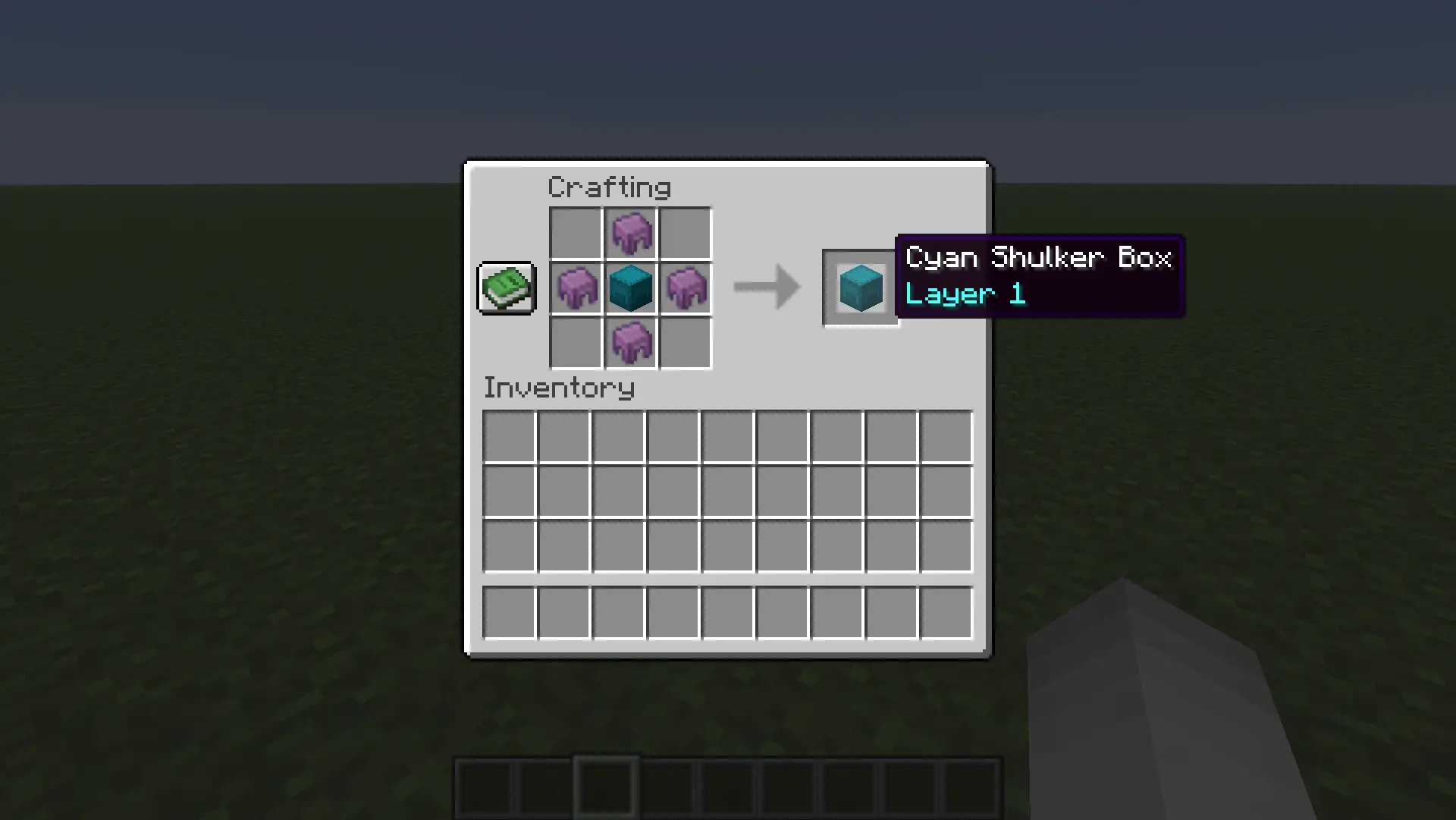
The upgrade recipe (where S = shulker shell, B = any shulker box):
  S
S B S
  S
Configuration
A config file is created at <game>/config/shulkerlayers.json on first launch:
{
  "maxDepth": 3
}
| Key | Type | Default | Range | Description |
|---|---|---|---|---|
maxDepth |
int | 3 |
0 – 64 | Highest layer a shulker box can be upgraded to. 0 effectively disables the recipe. |
Mod Menu support is planned for the 26.2 release.
Available Versions
How to Install ShulkerLayers on Your Server
Order Server
Order a Minecraft Java server with at least 3 GB RAM (4 GB recommended).
Set fabric Loader
In the panel under "Egg", select the fabric loader and matching Minecraft version (26.2-snapshot-6).
Install Mod
Open the mod browser in the dashboard and search for "ShulkerLayers". Click "Install" – done! Alternatively, upload the .jar via SFTP to the /mods folder.
Compatibility
Mod Loaders
Minecraft Versions
26.2-snapshot-6
Server-side
✓ RequiredRecommended RAM
4 GB(min. 3 GB)Frequently Asked Questions
ShulkerLayers server crashes on startup – what to do?
Most common cause: wrong fabric version or insufficient RAM. Check the server log (latest.log) for "OutOfMemoryError" or "Mixin" errors. With Mado Hosting: ensure at least 3 GB RAM is allocated and the loader matches the mod version (26.2-snapshot-6). You can switch loaders with one click in the panel.
Is ShulkerLayers compatible with fabric?
ShulkerLayers officially supports fabric for Minecraft 26.2-snapshot-6. The Mado dashboard automatically detects incompatible loader combinations.
Server lagging with ShulkerLayers – how to optimize performance?
Recommended RAM: 4 GB (per 8 players). Use /spark profiler to check if ShulkerLayers consumes the most tick time. Common fixes: reduce server view-distance to 8-10, install "performant" or "starlight" as supplementary mods on Forge. With Mado Hosting, your server runs on NVMe SSDs with dedicated CPU cores for minimal latency.
Similar Mods




Rent Modded Server
Install ShulkerLayers with just one click on your server.