
SideChat
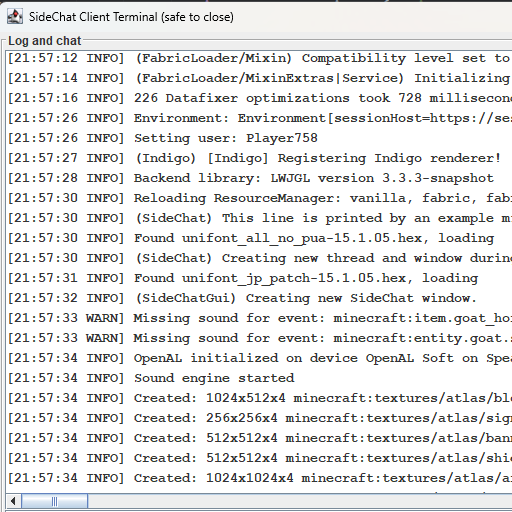
Creates a client console / client terminal to monitor and respond to in-game Chat!
Screenshots
About this Mod
Hi! Welcome to SideChat. I play on a LAN world with my brother often, and sometimes we ALT-Tab out of the game but still want an easy way to monitor chat; this was my solution.
Re-open the window with CTRL+ALT+SHIFT+L
Need to commission a mod? add me on discord: jason13
Configuration (sidechat.json)
| Option | Description | Default |
|---|---|---|
enabled |
Whether the mod should function at all | true |
fontStyle |
0 = PLAIN, 1 = BOLD, 2 = ITALIC |
0 |
fontSize |
Size of the terminal text | 12 |
openEarly |
Open the window as soon as the mod loads | true |
onlyInWorld |
Open/close the window based on whether you're in-game | false |
startWidth |
Initial window width before resizing | 896 |
startHeight |
Initial window height before resizing | 504 |
Terminal Commands
All commands are prefixed with #/ (e.g. #/stop).
Window
| Command | Description |
|---|---|
#/stop |
Close the SideChat window |
#/stop game |
Close Minecraft entirely |
#/close |
Alias for stop |
#/shutdown |
Alias for stop |
Audio
| Command | Description |
|---|---|
#/mute |
Set master volume to 0 |
#/mute <source> |
Mute a specific sound source |
Sources: master music record weather block hostile neutral player ambient voice
Terminal Appearance
| Command | Description |
|---|---|
#/font size <n> |
Set terminal font size (e.g. 12) |
#/font style <n> |
Set terminal font style: 0=PLAIN, 1=BOLD, 2=ITALIC |
Game Settings
| Command | Values | Notes |
|---|---|---|
#/gamma <n> |
0.0 – 1.0 |
Screen brightness. 0.0=moody, 1.0=bright. Default: 0.5 |
#/fov <n> |
30 – 110 |
Field of view. Default: 70 |
#/render <n> |
2 – 32 |
Render distance in chunks. Default: 10 |
#/fps <n> |
10 – 260 |
Framerate limit. 260=unlimited |
#/narrator <mode> |
off all chat system |
Narrator mode |
#/chat <mode> |
full system hidden |
Chat visibility filter |
#/graphics <mode> |
fast fancy fabulous |
Graphics quality |
#/particles <mode> |
all decreased minimal |
Particle density |
Available Versions
How to Install SideChat on Your Server
Order Server
Order a Minecraft Java server with at least 3 GB RAM (4 GB recommended).
Set fabric Loader
In the panel under "Egg", select the fabric loader and matching Minecraft version (1.21.1).
Install Mod
Open the mod browser in the dashboard and search for "SideChat". Click "Install" – done! Alternatively, upload the .jar via SFTP to the /mods folder.
Compatibility
Mod Loaders
Minecraft Versions
1.21.1, 1.21
Server-side
✗ UnsupportedRecommended RAM
4 GB(min. 3 GB)Frequently Asked Questions
SideChat server crashes on startup – what to do?
Most common cause: wrong fabric version or insufficient RAM. Check the server log (latest.log) for "OutOfMemoryError" or "Mixin" errors. With Mado Hosting: ensure at least 3 GB RAM is allocated and the loader matches the mod version (1.21.1). You can switch loaders with one click in the panel.
Is SideChat compatible with fabric and neoforge?
SideChat officially supports fabric, neoforge for Minecraft 1.21.1, 1.21. The Mado dashboard automatically detects incompatible loader combinations.
Server lagging with SideChat – how to optimize performance?
Recommended RAM: 4 GB (per 8 players). Use /spark profiler to check if SideChat consumes the most tick time. Common fixes: reduce server view-distance to 8-10, install "performant" or "starlight" as supplementary mods on Forge. With Mado Hosting, your server runs on NVMe SSDs with dedicated CPU cores for minimal latency.
Similar Mods




![[ETF] Entity Texture Features](https://cdn.modrinth.com/data/BVzZfTc1/af683d206d50b05258d865b0d6e4aa2f2cee12f2_96.webp)
![[EMF] Entity Model Features](https://cdn.modrinth.com/data/4I1XuqiY/6e5bbd0d06b1741bfdab6c0cfab6de8fdaf0064c_96.webp)
Rent Modded Server
Install SideChat with just one click on your server.