
Sidekick
Your creative companion — extended inventory, noclip, teleport, and other superpowers for Creative mode.
Screenshots




About this Mod
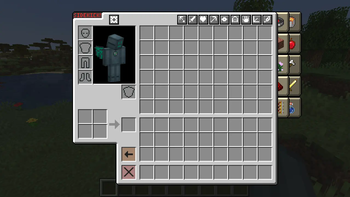
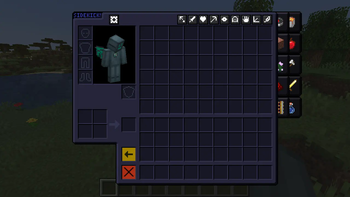
Sidekick is a complete overhaul of the Creative inventory, and a large collection of useful
superpowers to make creative building a breeze.
Starting as Not Enough Creativity, my first major 1.16+ mod inspired by Not Enough Items' Creative+
mode, Sidekick has been entirely rewritten for better mod compatibility, a smoother experience, and
a well-designed protocol intended to be implementable by other mods and even plugins.
The Creative+ inventory uses Survival inventory code rather than Creative, meaning it is mostly
server-side and isn't prone to the jank and desync that the vanilla Creative inventory has.
Additionally, you get access to the 2x2 crafting grid — useful for dyeing items and the like.
All of the vanilla creative tabs are still available within the Creative+ inventory, but they
are tucked away to a background tab panel for an inventory-focused workflow, and have a fairly
different UX to the vanilla system — intended for quicker access and being slightly better about
large amounts of Creative tabs.
Above the inventory, a collection of toggleable Powers can be found, which are:
- No Item Pickup - Disable pickup of stray items on the ground, to keep your inventory clear.
- Instant Kill - Greatly increase your punch damage to get rid of pesky mobs without carrying a sword around.
- Enable Health - Enable damage and show your health bar. You still can't die, except by the usual things that kill Creative players.
- No Break Delay - Disable the Creative break delay, to break blocks like a gold pick through netherrack.
- Full Bright - Ignore lighting, making everything appear fully lit. Does not change the fog.
- Phase - Freely pass through blocks like a Spectator.
- Long Reach - Increase your reach from 4-ish blocks to 12 blocks.
- Free Flight - Fly like old Classic mods, rather than the momentum-based vanilla system. Select full-3D or plane-lock in Options.
- Super Speed - Quadruples your flight speed.
Additionally, Sidekick offers a few configurable options that apply globally rather than per-world:
- Plane Lock - Ignore your vertical facing when moving in Free Flight mode, similar to vanilla flight.
- Pick Swap - Items that are displaced by pickblock are put into the extended inventory for later use, rather than deleted.
- Disable Animations - Disable the transitions and animations, for maximum no-nonsense efficiency.
- UI Sounds - Play audible feedback where vanilla doesn't.
- Creative Tabs - Show the vanilla creative tabs. May be undesirable for an item sidebar workflow.
- Delete Mode - Shift-clicking the Destroy Item button enters Destroy Mode instead of deleting everything. Disable for vanilla behavior.
- Night Owl - Make the Sidekick GUI darker, instead of pure vanilla style.
Available Versions
How to Install Sidekick on Your Server
Order Server
Order a Minecraft Java server with at least 3 GB RAM (4 GB recommended).
Set bukkit Loader
In the panel under "Egg", select the bukkit loader and matching Minecraft version (1.21.1).
Install Mod
Open the mod browser in the dashboard and search for "Sidekick". Click "Install" – done! Alternatively, upload the .jar via SFTP to the /mods folder.
Compatibility
Mod Loaders
Minecraft Versions
1.21.1, 1.20.4, 1.20.3 (+13 more)
Server-side
✓ RequiredRecommended RAM
4 GB(min. 3 GB)Frequently Asked Questions
Sidekick server crashes on startup – what to do?
Most common cause: wrong bukkit version or insufficient RAM. Check the server log (latest.log) for "OutOfMemoryError" or "Mixin" errors. With Mado Hosting: ensure at least 3 GB RAM is allocated and the loader matches the mod version (1.21.1). You can switch loaders with one click in the panel.
Is Sidekick compatible with bukkit and fabric and forge and neoforge and paper and purpur and quilt and spigot?
Sidekick officially supports bukkit, fabric, forge, neoforge, paper, purpur, quilt, spigot for Minecraft 1.21.1, 1.20.4, 1.20.3. Note: Forge and Fabric mods are NOT cross-compatible – pick one loader and stick with it. The Mado dashboard automatically detects incompatible loader combinations.
Server lagging with Sidekick – how to optimize performance?
Recommended RAM: 4 GB (per 8 players). Use /spark profiler to check if Sidekick consumes the most tick time. Common fixes: reduce server view-distance to 8-10, install "performant" or "starlight" as supplementary mods on Forge. With Mado Hosting, your server runs on NVMe SSDs with dedicated CPU cores for minimal latency.
Similar Mods




![[ETF] Entity Texture Features](https://cdn.modrinth.com/data/BVzZfTc1/af683d206d50b05258d865b0d6e4aa2f2cee12f2_96.webp)
![[EMF] Entity Model Features](https://cdn.modrinth.com/data/4I1XuqiY/6e5bbd0d06b1741bfdab6c0cfab6de8fdaf0064c_96.webp)
Rent Modded Server
Install Sidekick with just one click on your server.