
Sign Edit Lite
Add color and formatting options to signs.
Screenshots
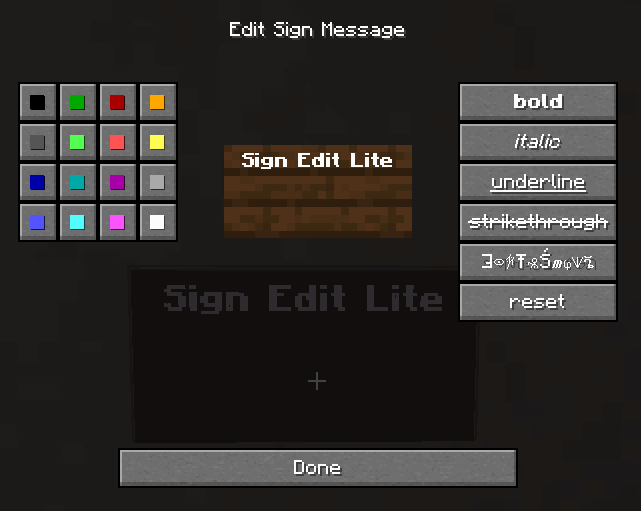
About this Mod
Sign Edit Lite (Fabric and NeoForge)
Add color and formatting options to signs.

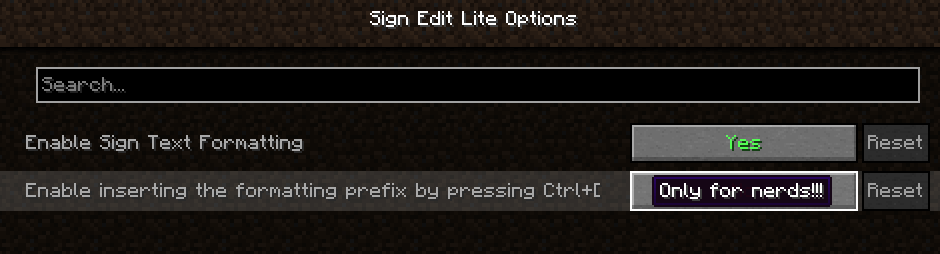
The mod comes with usual Mod Menu integration.

An additional extra for nerds, who prefer typing raw formatting codes, is the option to enable the insertion of the formatting character '§' by pressing Ctrl+[.
Requires (Fabric)
- Fabric API
- Cloth Config API
- Optional, but recommended Mod Menu
License
Standard MIT license. Feel free to learn from it and incorporate it in your own projects.
Some parts of the code are based on the source code of Text Utilities, which is LGPL-3 licensed.
Source code
Available on GitLab or on GitHub.
The source code has lots of comments to help learning Minecraft modding.
Related projects
- Text Utilities adds color and formatting options to signs, book and anvils, but unfortunately it has not been updated to Minecraft 1.21.5 version at the time of writing, and it is a Fabric only mod.
- Iron Signs adds vibrant, high contrast, painted signs, which can be colored and formatted similarily. It also enables coloring and formatting Vanilla wooden signs exactly tha same way as this mod. I wonder who wrote that mod.
Thanks
Thanks to Chaws for making available the source code of Text Utilities.
See also
My other mods on Modrinth and on CurseForge.
Available Versions
How to Install Sign Edit Lite on Your Server
Order Server
Order a Minecraft Java server with at least 3 GB RAM (4 GB recommended).
Set fabric Loader
In the panel under "Egg", select the fabric loader and matching Minecraft version (26.1.1).
Install Mod
Open the mod browser in the dashboard and search for "Sign Edit Lite". Click "Install" – done! Alternatively, upload the .jar via SFTP to the /mods folder.
Compatibility
Mod Loaders
Minecraft Versions
26.1.1, 26.1, 1.21.11 (+16 more)
Server-side
✓ RequiredRecommended RAM
4 GB(min. 3 GB)Frequently Asked Questions
Sign Edit Lite server crashes on startup – what to do?
Most common cause: wrong fabric version or insufficient RAM. Check the server log (latest.log) for "OutOfMemoryError" or "Mixin" errors. With Mado Hosting: ensure at least 3 GB RAM is allocated and the loader matches the mod version (26.1.1). You can switch loaders with one click in the panel.
Is Sign Edit Lite compatible with fabric and neoforge?
Sign Edit Lite officially supports fabric, neoforge for Minecraft 26.1.1, 26.1, 1.21.11. The Mado dashboard automatically detects incompatible loader combinations.
Server lagging with Sign Edit Lite – how to optimize performance?
Recommended RAM: 4 GB (per 8 players). Use /spark profiler to check if Sign Edit Lite consumes the most tick time. Common fixes: reduce server view-distance to 8-10, install "performant" or "starlight" as supplementary mods on Forge. With Mado Hosting, your server runs on NVMe SSDs with dedicated CPU cores for minimal latency.
Similar Mods

![[ETF] Entity Texture Features](https://cdn.modrinth.com/data/BVzZfTc1/af683d206d50b05258d865b0d6e4aa2f2cee12f2_96.webp)
![[EMF] Entity Model Features](https://cdn.modrinth.com/data/4I1XuqiY/6e5bbd0d06b1741bfdab6c0cfab6de8fdaf0064c_96.webp)



Rent Modded Server
Install Sign Edit Lite with just one click on your server.