
Simple Chat Bubbles
Simple Chat Bubbles adds lightweight, clean chat bubbles above players’ heads so you can see who said what in-world, without constantly checking the chat window.
Screenshots
About this Mod

VERY IMPORTANT! ⚠️
CURRENTLY CHAT BUBBLES SHOW WHILE HAVING A INVISIBLE POTION! FIXING IT!
Intro!
This mod gives you the ability to see what other people said on top of there heads!! Neat isn't it? Whether you are playing on a massive multiplayer network or surviving alone in a hardcore world, this mod ensures your friends see exactly what you're up to in style. It's the ultimate bridge between your game and your social circle! By bringing messages directly into the game world, you no longer have to squint at the chat box in the corner while trying to dodge a Creeper or finish a build.
Configs 🔨
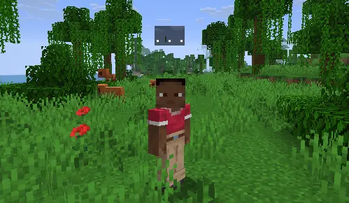
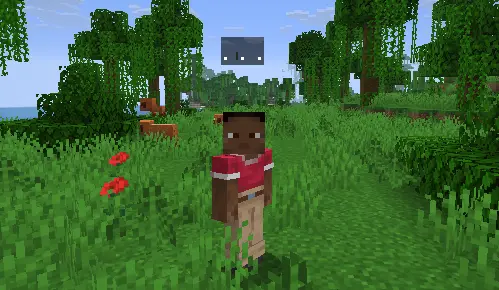
Typing Dots: Typing dots show above your head as you type! It adds a dynamic ". . ." animation to let other players know a response is coming. No more awkward silences—your friends will see you are active and typing in real-time.
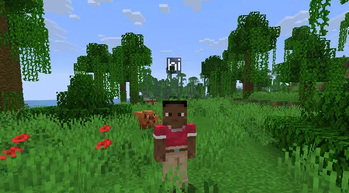
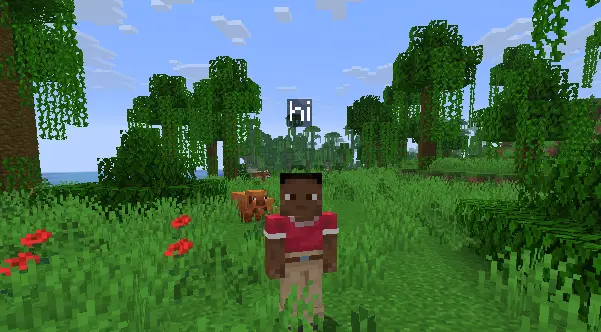
Chat Bubbles: Automatically shows the chat above your head. Every message is wrapped in a clean, modern bubble that fits perfectly with the Minecraft aesthetic.
Fov Correction: No more giant bubbles on Quake Pro! The mod intelligently scales bubbles based on your field of view settings so they always look just right.
Multiplayer Ready: Works on all servers, even if the server doesn't have the mod! The mod "scrapes" your local chat hud to find player names and render bubbles above them instantly.
Smart Perspective: Local player bubbles are automatically hidden in first-person view to keep your screen clear, but they show up perfectly when you switch to F5 (third-person) mode.
Images! 🎥
Typing Dots Preview
Chat Bubbles Preview
Utlites!

MUST HAVE
⚠️ You need to have installed fabric.
Most chat bubble mods are "all or nothing." They either crowd your screen with messy, intrusive UI or look completely outdated and basic. Simple Chat Bubbles is designed to be ultra-lightweight so it won't impact your FPS, all while giving you the cleanest, most polished look for your in-game conversations.
Available Versions
How to Install Simple Chat Bubbles on Your Server
Order Server
Order a Minecraft Java server with at least 3 GB RAM (4 GB recommended).
Set fabric Loader
In the panel under "Egg", select the fabric loader and matching Minecraft version (1.21.11).
Install Mod
Open the mod browser in the dashboard and search for "Simple Chat Bubbles". Click "Install" – done! Alternatively, upload the .jar via SFTP to the /mods folder.
Compatibility
Mod Loaders
Minecraft Versions
1.21.11, 1.21.10, 1.21.9 (+5 more)
Server-side
✗ UnsupportedRecommended RAM
4 GB(min. 3 GB)Frequently Asked Questions
Simple Chat Bubbles server crashes on startup – what to do?
Most common cause: wrong fabric version or insufficient RAM. Check the server log (latest.log) for "OutOfMemoryError" or "Mixin" errors. With Mado Hosting: ensure at least 3 GB RAM is allocated and the loader matches the mod version (1.21.11). You can switch loaders with one click in the panel.
Is Simple Chat Bubbles compatible with fabric?
Simple Chat Bubbles officially supports fabric for Minecraft 1.21.11, 1.21.10, 1.21.9. The Mado dashboard automatically detects incompatible loader combinations.
Server lagging with Simple Chat Bubbles – how to optimize performance?
Recommended RAM: 4 GB (per 8 players). Use /spark profiler to check if Simple Chat Bubbles consumes the most tick time. Common fixes: reduce server view-distance to 8-10, install "performant" or "starlight" as supplementary mods on Forge. With Mado Hosting, your server runs on NVMe SSDs with dedicated CPU cores for minimal latency.
Similar Mods




Rent Modded Server
Install Simple Chat Bubbles with just one click on your server.