
Simple Copper Wrench
Rotate blocks easily with the Copper Wrench – the perfect tool for builders and redstone engineers.
About this Mod
The Copper Wrench adds a simple yet powerful tool to Minecraft that allows you to rotate blocks in any direction without breaking them. Whether you're building intricate structures, aligning decorative blocks, or fine-tuning redstone contraptions, this wrench gives you full control over block orientation. Stop wasting time breaking and replacing blocks – with the Copper Wrench, precise placement has never been easier.
Ideal for both survival and creative gameplay, the Copper Wrench is lightweight, easy to use, and compatible with most directional blocks, including stairs, furnaces, dispensers, pistons, and more. It’s a must-have for any builder who wants efficiency, accuracy, and style in their world.
Features:
Adds the Copper Wrench.
Rotate blocks in all directions with a single click.
Works on most blocks with directional properties.
Enhances building and redstone projects without breaking immersion.
Installation:
Make sure you have Fabric Loader 1.xx.x installed.
Download copper_wrench-1.0.0-fabric-1.21.8.jar.
Place the .jar file into your mods folder.
Launch Minecraft with the Fabric profile.
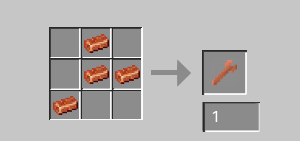
Crafting Recipe:
Copper Wrench:
|-4x Copper Ingots
|-Crafting layout:
Other information
This mod was made using MCreator.
Available Versions
How to Install Simple Copper Wrench on Your Server
Order Server
Order a Minecraft Java server with at least 3 GB RAM (4 GB recommended).
Set fabric Loader
In the panel under "Egg", select the fabric loader and matching Minecraft version (1.21.8).
Install Mod
Open the mod browser in the dashboard and search for "Simple Copper Wrench". Click "Install" – done! Alternatively, upload the .jar via SFTP to the /mods folder.
Compatibility
Mod Loaders
Minecraft Versions
1.21.8
Server-side
✓ RequiredRecommended RAM
4 GB(min. 3 GB)Frequently Asked Questions
Simple Copper Wrench server crashes on startup – what to do?
Most common cause: wrong fabric version or insufficient RAM. Check the server log (latest.log) for "OutOfMemoryError" or "Mixin" errors. With Mado Hosting: ensure at least 3 GB RAM is allocated and the loader matches the mod version (1.21.8). You can switch loaders with one click in the panel.
Is Simple Copper Wrench compatible with fabric?
Simple Copper Wrench officially supports fabric for Minecraft 1.21.8. The Mado dashboard automatically detects incompatible loader combinations.
Server lagging with Simple Copper Wrench – how to optimize performance?
Recommended RAM: 4 GB (per 8 players). Use /spark profiler to check if Simple Copper Wrench consumes the most tick time. Common fixes: reduce server view-distance to 8-10, install "performant" or "starlight" as supplementary mods on Forge. With Mado Hosting, your server runs on NVMe SSDs with dedicated CPU cores for minimal latency.
Similar Mods




![[ETF] Entity Texture Features](https://cdn.modrinth.com/data/BVzZfTc1/af683d206d50b05258d865b0d6e4aa2f2cee12f2_96.webp)

Rent Modded Server
Install Simple Copper Wrench with just one click on your server.