
Simple Custom Early Loading
Mod that allows to customize the Neoforge early loading
Screenshots
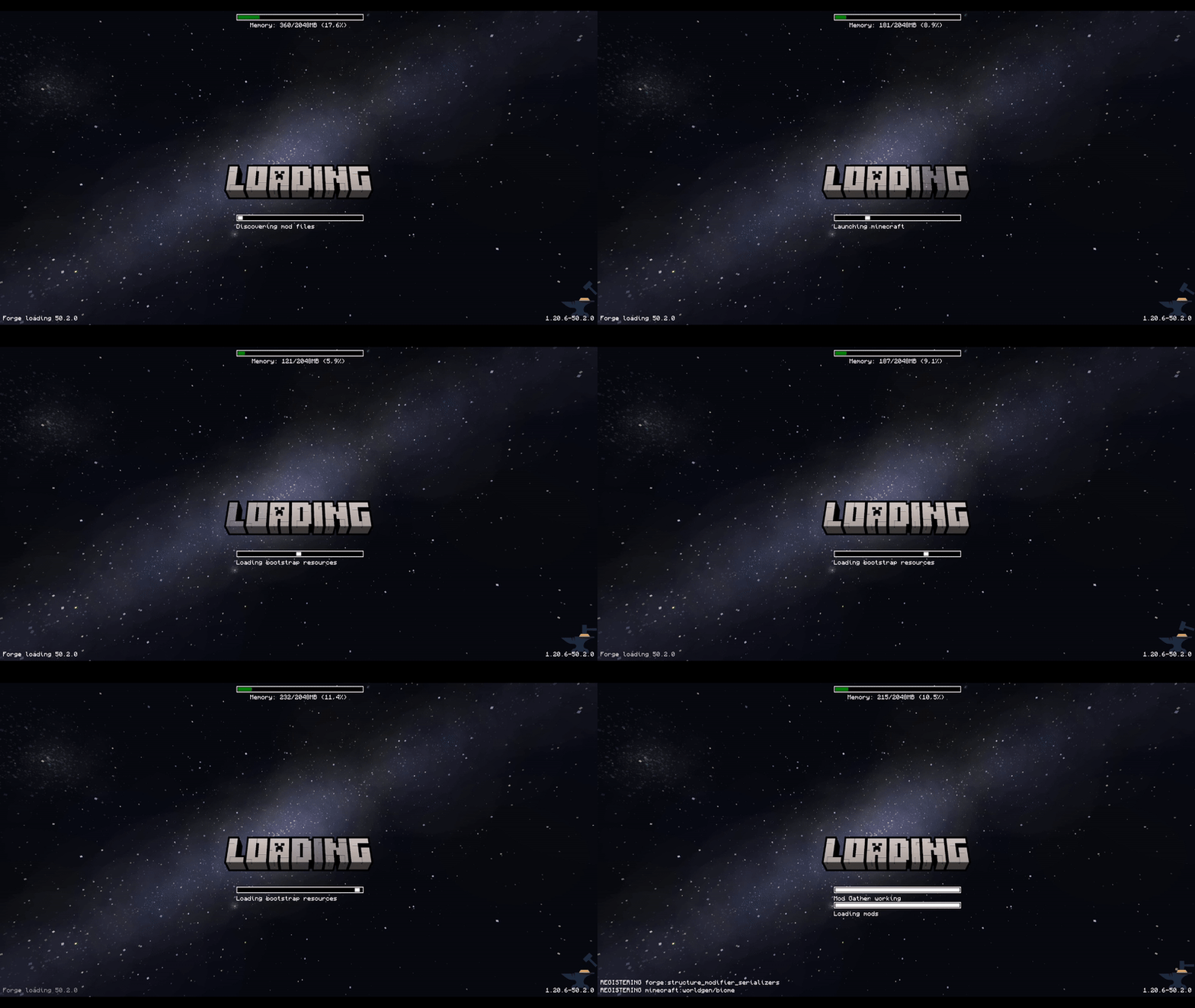
About this Mod
This mod allows the customization of Neoforge's early loading screen.


There is also a quite "hacky" version for Forge 1.20.1, 1.20.2, 1.20.4, 1.20.6.
I do not plan to continue supporting any other Forge versions due to technical reasons.
For newer versions, please use the NeoForge.
Currently, the window is not able to dynamically change its resolution when the window is resized.
I won't allow removing the Mojang logo.
Features:
- add and position custom images (see supported image formats)
- toggle and change the position of the progress bar
- toggle performance bar
- toggle NeoForge's fox
- toggle bottom left log
- toggle NeoForge's version (bottom right)
Installation - NeoForge:
- place the jar in the mods folder
- modify the
config/fml.tomlfile
# Early window provider
earlyWindowProvider = "SimpleCustomEarlyLoading"
# ... Other options ...
# Optionally set the window to be maximized
earlyWindowMaximized = true
Installation - Forge:
- place the jar in the mods folder
- forge version requires default
config/fml.tomlvalue
#Early window provider
earlyWindowProvider = "fmlearlywindow"
3 - Optional: update options.txt: darkMojangStudiosBackground:true
Unfortunately, the override is applied quite late, which may result in the original red early loading (or a white screen) to "flash" on the very game start. I can't do anything about that.
However, the red color of the original loading can be changed using darkMojangStudiosBackground:true in options.txt.
Supported image formats:
Animated images:
- APNG - must be created without unchanged pixels detection (each frame is rendered from scratch).
The animation will respect the image timing and repeat count.
Static images:
- JPEG baseline & progressive (12 bpc/arithmetic not supported, same as stock IJG lib
- PNG 1/2/4/8/16-bit-per-channel
- TGA (not sure what subset, if a subset)
- BMP non-1bpp, non-RLE
- PSD (composited view only, no extra channels, 8/16 bit-per-channel)
- GIF (renders only single static frame, use APNG instead)
- HDR (radiance rgbE format)
- PIC (Softimage PIC)
- PNM (PPM and PGM binary only)
Configuration / Source code
For configuration instructions and the source code check the GitHub repository.
Available Versions
How to Install Simple Custom Early Loading on Your Server
Order Server
Order a Minecraft Java server with at least 3 GB RAM (4 GB recommended).
Set forge Loader
In the panel under "Egg", select the forge loader and matching Minecraft version (1.21.4).
Install Mod
Open the mod browser in the dashboard and search for "Simple Custom Early Loading". Click "Install" – done! Alternatively, upload the .jar via SFTP to the /mods folder.
Compatibility
Mod Loaders
Minecraft Versions
1.21.4, 1.21.3, 1.21.2 (+6 more)
Server-side
✗ UnsupportedRecommended RAM
4 GB(min. 3 GB)Frequently Asked Questions
Simple Custom Early Loading server crashes on startup – what to do?
Most common cause: wrong forge version or insufficient RAM. Check the server log (latest.log) for "OutOfMemoryError" or "Mixin" errors. With Mado Hosting: ensure at least 3 GB RAM is allocated and the loader matches the mod version (1.21.4). You can switch loaders with one click in the panel.
Is Simple Custom Early Loading compatible with forge and neoforge?
Simple Custom Early Loading officially supports forge, neoforge for Minecraft 1.21.4, 1.21.3, 1.21.2. The Mado dashboard automatically detects incompatible loader combinations.
Server lagging with Simple Custom Early Loading – how to optimize performance?
Recommended RAM: 4 GB (per 8 players). Use /spark profiler to check if Simple Custom Early Loading consumes the most tick time. Common fixes: reduce server view-distance to 8-10, install "performant" or "starlight" as supplementary mods on Forge. With Mado Hosting, your server runs on NVMe SSDs with dedicated CPU cores for minimal latency.
Similar Mods

![[ETF] Entity Texture Features](https://cdn.modrinth.com/data/BVzZfTc1/af683d206d50b05258d865b0d6e4aa2f2cee12f2_96.webp)
![[EMF] Entity Model Features](https://cdn.modrinth.com/data/4I1XuqiY/6e5bbd0d06b1741bfdab6c0cfab6de8fdaf0064c_96.webp)



Rent Modded Server
Install Simple Custom Early Loading with just one click on your server.