
Simple Death Coordinates
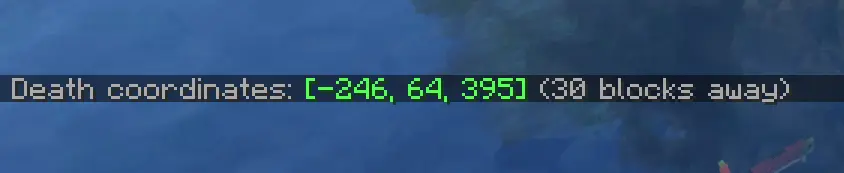
Never lose your items again. Logs your death coordinates and distance in chat, click to copy for quick navigation.
About this Mod
Never lose your items again.
This lightweight mod automatically logs your death coordinates and distance in chat upon respawn, featuring a click-to-copy function for quick and easy navigation.
✨ Features
Vanilla Style Integration: The notifications are designed to mimic the look and feel of native /locate or game system messages. Keeping your HUD clean and authentic.
Instant Coordinates: Automatically displays your exact XYZ location the moment you respawn.
Distance Tracker: Shows exactly how far you are from your death point so you can plan your recovery.
Click-to-Copy: Simply click the chat message to copy your coordinates to the clipboard for easy use with waypoints or teleports.
Lightweight: No extra menus, no clutter—just the information you need, exactly when you need it.
🧩 How to use
Die in the game while exploring or building.
Upon respawning, check your chat for the automatically generated death message, styled just like a standard system notification.
Click on the coordinates in the chat to copy them to your clipboard.
Paste the coordinates into your favorite waypoint mod, map tool, or use them to teleport back if you have the necessary permissions!
⚙️ Compatibility & Technical Details
Vanilla-Friendly: The UI does not use custom inventory screens or complex pop-ups. It utilizes the standard Minecraft chat component system, ensuring full compatibility with other mods and custom chat interfaces.
Performance: Optimized for minimal resource usage, ensuring zero impact on your FPS or game logic.
Version Support: Works on any server (even if it's not installed on the server-side), making it the perfect tool for survival multiplayer and single-player worlds alike.
Available Versions
How to Install Simple Death Coordinates on Your Server
Order Server
Order a Minecraft Java server with at least 3 GB RAM (4 GB recommended).
Set fabric Loader
In the panel under "Egg", select the fabric loader and matching Minecraft version (26.1.2).
Install Mod
Open the mod browser in the dashboard and search for "Simple Death Coordinates". Click "Install" – done! Alternatively, upload the .jar via SFTP to the /mods folder.
Compatibility
Mod Loaders
Minecraft Versions
26.1.2
Server-side
✗ UnsupportedRecommended RAM
4 GB(min. 3 GB)Frequently Asked Questions
Simple Death Coordinates server crashes on startup – what to do?
Most common cause: wrong fabric version or insufficient RAM. Check the server log (latest.log) for "OutOfMemoryError" or "Mixin" errors. With Mado Hosting: ensure at least 3 GB RAM is allocated and the loader matches the mod version (26.1.2). You can switch loaders with one click in the panel.
Is Simple Death Coordinates compatible with fabric and neoforge and quilt?
Simple Death Coordinates officially supports fabric, neoforge, quilt for Minecraft 26.1.2. The Mado dashboard automatically detects incompatible loader combinations.
Server lagging with Simple Death Coordinates – how to optimize performance?
Recommended RAM: 4 GB (per 8 players). Use /spark profiler to check if Simple Death Coordinates consumes the most tick time. Common fixes: reduce server view-distance to 8-10, install "performant" or "starlight" as supplementary mods on Forge. With Mado Hosting, your server runs on NVMe SSDs with dedicated CPU cores for minimal latency.
Similar Mods




Rent Modded Server
Install Simple Death Coordinates with just one click on your server.