
Simple FPS Overlay
Clean FPS overlay, drag it anywhere, tweak it your way ~no clutter, just vibes.
Screenshots
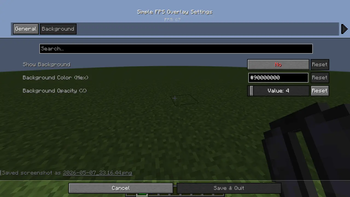
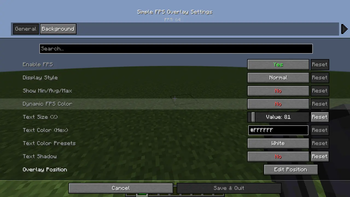
About this Mod
✨ Simple FPS Overlay ✨
Minimalist • Customizable • Lightweight
A clean and elegant FPS display mod for Minecraft 1.21 (Fabric). Designed for players who want to keep track of their performance without cluttering their screen.
🚀 Key Features
🖱️ Interactive Position Editor
Forget manual coordinates. Press 'U', click Edit Position, and simply drag and drop the overlay anywhere on your screen. It features smart-snapping to corners for a perfect fit!
🎨 Total Visual Control
- Dual Color System: Choose from high-visibility Presets (Red, Green, Blue, etc.) or type any Hex Code for infinite color possibilities.
- Dynamic FPS Color: Let the mod speak to you. Text color shifts automatically from Green (60+) to Yellow (30+) to Red (<30) based on your performance.
- Background Styling: Toggle a sleek background box with a dedicated Opacity Slider (0-100%) to match your HUD's aesthetic.
📐 Flexible Layouts
- Display Styles: Switch between a clean Normal look or a professional Brackets style
[ FPS: 144 ]. - Text Scaling: A smooth slider allows you to scale the text from 50% to 500% of its original size.
- Advanced Stats: Optional toggle to show your Min/Avg/Max FPS alongside the current counter.
🎮 Controls
| Keybind | Action |
|---|---|
U |
Open Settings Menu |
Mouse Drag |
Move Overlay (in Editor Mode) |
ESC |
Save & Close |
🛠️ Technical Details
- Platform: Fabric
- Minecraft Version: 1.21
- Requirements:
- Fabric API
- Cloth Config API
- Java Version: 21
Crafted with ❤️ for a cleaner Minecraft experience.
Available Versions
How to Install Simple FPS Overlay on Your Server
Order Server
Order a Minecraft Java server with at least 3 GB RAM (4 GB recommended).
Set fabric Loader
In the panel under "Egg", select the fabric loader and matching Minecraft version (1.21.11).
Install Mod
Open the mod browser in the dashboard and search for "Simple FPS Overlay". Click "Install" – done! Alternatively, upload the .jar via SFTP to the /mods folder.
Compatibility
Mod Loaders
Minecraft Versions
1.21.11, 1.21.10, 1.21.9 (+9 more)
Server-side
✗ UnsupportedRecommended RAM
4 GB(min. 3 GB)Frequently Asked Questions
Simple FPS Overlay server crashes on startup – what to do?
Most common cause: wrong fabric version or insufficient RAM. Check the server log (latest.log) for "OutOfMemoryError" or "Mixin" errors. With Mado Hosting: ensure at least 3 GB RAM is allocated and the loader matches the mod version (1.21.11). You can switch loaders with one click in the panel.
Is Simple FPS Overlay compatible with fabric?
Simple FPS Overlay officially supports fabric for Minecraft 1.21.11, 1.21.10, 1.21.9. The Mado dashboard automatically detects incompatible loader combinations.
Server lagging with Simple FPS Overlay – how to optimize performance?
Recommended RAM: 4 GB (per 8 players). Use /spark profiler to check if Simple FPS Overlay consumes the most tick time. Common fixes: reduce server view-distance to 8-10, install "performant" or "starlight" as supplementary mods on Forge. With Mado Hosting, your server runs on NVMe SSDs with dedicated CPU cores for minimal latency.
Similar Mods




![[ETF] Entity Texture Features](https://cdn.modrinth.com/data/BVzZfTc1/af683d206d50b05258d865b0d6e4aa2f2cee12f2_96.webp)
![[EMF] Entity Model Features](https://cdn.modrinth.com/data/4I1XuqiY/6e5bbd0d06b1741bfdab6c0cfab6de8fdaf0064c_96.webp)
Rent Modded Server
Install Simple FPS Overlay with just one click on your server.