
KeyBinds Profiles Simplified
Effortlessly save, load, and manage multiple keybind configurations without ever leaving the game. Perfect for switching between PvP, Parkour, and casual Survival setups instantly.
Screenshots
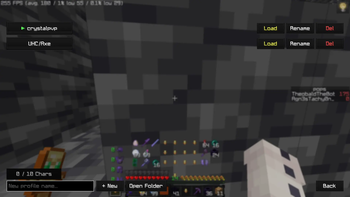
About this Mod
⌨️ Simple Keybind Profiles
Simple Keybind Profiles is a lightweight, client-side Fabric mod designed for players who need to switch between different control schemes instantly. Whether you are jumping from a high-intensity Crystal PvP match to a casual SMP session, this mod ensures your keys are always exactly where you need them.
🚀 Features
- Unlimited Profiles: Create and save multiple keybind configurations for different gamemodes (UHC, Crystal, Pot, Creative, etc.).
- Instant Switching: Load your favorite profiles with a single click from the GUI or via a quick chat command.
- Easy Sharing: Use the "Open Folder" button to find your
.jsonprofile files. Swap them with friends or backup your settings effortlessly. - In-Game Management: Create, rename, and delete profiles directly within the Minecraft UI—no need to restart your game.
- Mod Menu Integration: Fully compatible with Mod Menu. Access your profiles directly from your mod list.
🛠 How to Use
- Open the Profile Screen (via Mod Menu or your designated keybind).
- Type a name in the box and click + New to save your current in-game bindings.
- Click Load on any saved profile to apply it instantly.
- Use
/keybindconfigs <name>if you prefer using the chat console!
📂 Portability
All profiles are stored in .minecraft/keybind-configs/. To share a setup, simply send the JSON file to a friend, and they can drop it right into their folder!
Technical Details
- Platform: Fabric
- Environment: Client-side only
- Version: Minecraft 1.21.1+
Developed by Ka1denz.
Available Versions
How to Install KeyBinds Profiles Simplified on Your Server
Order Server
Order a Minecraft Java server with at least 3 GB RAM (4 GB recommended).
Set fabric Loader
In the panel under "Egg", select the fabric loader and matching Minecraft version (1.21.11).
Install Mod
Open the mod browser in the dashboard and search for "KeyBinds Profiles Simplified". Click "Install" – done! Alternatively, upload the .jar via SFTP to the /mods folder.
Compatibility
Mod Loaders
Minecraft Versions
1.21.11
Server-side
✗ UnsupportedRecommended RAM
4 GB(min. 3 GB)Frequently Asked Questions
KeyBinds Profiles Simplified server crashes on startup – what to do?
Most common cause: wrong fabric version or insufficient RAM. Check the server log (latest.log) for "OutOfMemoryError" or "Mixin" errors. With Mado Hosting: ensure at least 3 GB RAM is allocated and the loader matches the mod version (1.21.11). You can switch loaders with one click in the panel.
Is KeyBinds Profiles Simplified compatible with fabric?
KeyBinds Profiles Simplified officially supports fabric for Minecraft 1.21.11. The Mado dashboard automatically detects incompatible loader combinations.
Server lagging with KeyBinds Profiles Simplified – how to optimize performance?
Recommended RAM: 4 GB (per 8 players). Use /spark profiler to check if KeyBinds Profiles Simplified consumes the most tick time. Common fixes: reduce server view-distance to 8-10, install "performant" or "starlight" as supplementary mods on Forge. With Mado Hosting, your server runs on NVMe SSDs with dedicated CPU cores for minimal latency.
Similar Mods




![[ETF] Entity Texture Features](https://cdn.modrinth.com/data/BVzZfTc1/af683d206d50b05258d865b0d6e4aa2f2cee12f2_96.webp)

Rent Modded Server
Install KeyBinds Profiles Simplified with just one click on your server.