
Simple Edits
Adds 5 items that help with building to minecraft. Tutorial (1.1.0): https://www.youtube.com/watch?v=l2cXye38H4c
Screenshots
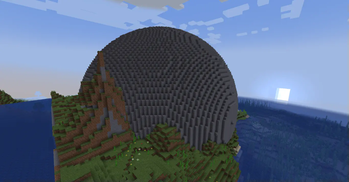
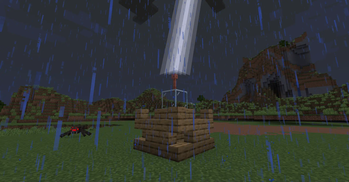
About this Mod
SimpleEdits
SimpleEdits is a Minecraft mod that adds tools for editing blocks in the game. It provides a selection wand for replacing blocks, a block state changer for modifying certain block states, and a water drain wand for removing water from an area.
Video
Tutorial (1.1.0): https://www.youtube.com/watch?v=l2cXye38H4c
Features
- Selection Wand: Allows players to select and replace blocks within a specified area.
- Block State Changer: Enables players to change the state of certain blocks, such as rotating stairs or changing slab types.
- Water Drain Wand: Drains water in a selected area.
- Chisel: Allows players to chisel blocks that have a chisel variant (ex. sandstone, tuff, stone).
- Shape Wand: Creates shapes based on the one selected (check usage for commands).
Installation
- Ensure you have Minecraft 1.20 or 1.21.1 installed. And the corresponding version of Fabric.
- Download the SimpleEdits mod from the releases page.
- Follow this tutorial to install the mod: How to install Fabric mods.
Usage
Selection Wand
Usage:
- Right-click on a block to set the first position.
- Right-click on another block to set the second position.
- It fills the area with the block type you have selected (default is set to air).
Commands:
/undo: Undo the last block replacement./block <block_type>: Set the block type for replacement./clearpos: Clear the selected positions.
Block State Changer
- Usage: Right-click on a block to change its state (ex. rotation, pos). Works with stairs and slabs only!
Water Drain Wand
- Usage: Use the wand on a block adjacent to water to drain the water in the selected area.
- Note: The wand should only be used for small patches of water! A large body of water may cause lag!
Chisel
- Usage: Right-click on a block to chisel it. Works with blocks that have a chisel variant (ex. sandstone, tuff, stone).
- Note: The chisel will only work on blocks that have a chisel variant!
Shape Wand
- Usage: Right-click on a area to fill it with the shape you have selected.
- Commands:
/shape <shape>: Set the shape for the wand./block <block_type>: Set the block type for the shape./radius <radius>: Set the radius for the shape./undoshape: Undo the last shape fill.
Brush
- Usage: Hold Right-click to fill a area
- Commands
/brush <size> <block_type> <brush_type><size>a number ranges from 1 to 10, where 1 is the lowest and 10 is the highest- 1 makes 3^3 area so a 10 make a 30^3 area
<block_type>there are suggestions enabled<brush_type>2 types,- Cubic, A cubic brush
- Spherical, a spherical brush
Available Versions
How to Install Simple Edits on Your Server
Order Server
Order a Minecraft Java server with at least 3 GB RAM (4 GB recommended).
Set fabric Loader
In the panel under "Egg", select the fabric loader and matching Minecraft version (1.21.1).
Install Mod
Open the mod browser in the dashboard and search for "Simple Edits". Click "Install" – done! Alternatively, upload the .jar via SFTP to the /mods folder.
Compatibility
Mod Loaders
Minecraft Versions
1.21.1
Server-side
✓ RequiredRecommended RAM
4 GB(min. 3 GB)Frequently Asked Questions
Simple Edits server crashes on startup – what to do?
Most common cause: wrong fabric version or insufficient RAM. Check the server log (latest.log) for "OutOfMemoryError" or "Mixin" errors. With Mado Hosting: ensure at least 3 GB RAM is allocated and the loader matches the mod version (1.21.1). You can switch loaders with one click in the panel.
Is Simple Edits compatible with fabric?
Simple Edits officially supports fabric for Minecraft 1.21.1. The Mado dashboard automatically detects incompatible loader combinations.
Server lagging with Simple Edits – how to optimize performance?
Recommended RAM: 4 GB (per 8 players). Use /spark profiler to check if Simple Edits consumes the most tick time. Common fixes: reduce server view-distance to 8-10, install "performant" or "starlight" as supplementary mods on Forge. With Mado Hosting, your server runs on NVMe SSDs with dedicated CPU cores for minimal latency.
Similar Mods




![[ETF] Entity Texture Features](https://cdn.modrinth.com/data/BVzZfTc1/af683d206d50b05258d865b0d6e4aa2f2cee12f2_96.webp)
![[EMF] Entity Model Features](https://cdn.modrinth.com/data/4I1XuqiY/6e5bbd0d06b1741bfdab6c0cfab6de8fdaf0064c_96.webp)
Rent Modded Server
Install Simple Edits with just one click on your server.