
SimpleNotes
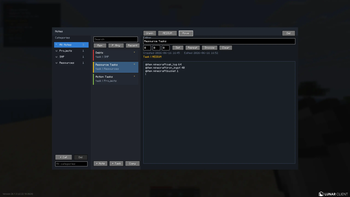
notes is a small client side fabric mod for keeping minecraft plans in minecraft.
Screenshots
About this Mod
Notes
notes is a small client side fabric mod for keeping minecraft plans in minecraft.
i wanted it to feel like a simple notepad you can open while playing allowing you to write down build ideas, pin a few tasks to the HUD, track materials, and close it without leaving the world or relying on a server or you being able to find the same .txt file again!
if any suggestions are wanted either make a github issue or dm me on discord at @izzi.ed
everything is saved locally in your current minecraft instance at:
config/notemod/notes.json
that file is plain JSON, so you can save it, back it up move it to another directory or edit it manually!
What It Does
- categories for grouping notes, like projects, smp, or resources
- standard notes for plain text
- task notes for checklists, priorities, reminders, and material tracking
- search across titles, note text, categories, priorities, and task text
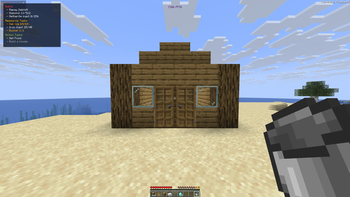
- A pinned HUD view for notes you want visible while playing
- an edit ui Position button for moving the pinned HUD by dragging it or typing exact X/Y coords
- local reminders with in game messages, optional sound, and custom hour/minute/second timing
- no server, account, cloud sync, or internet connection required
Opening Notes
default keybinds:
N - Open Notes
H - Show or hide pinned notes on the HUD
inside the Notes screen:
Ctrl+N - New note
Ctrl+D - Duplicate note
Delete - Delete selected note
reminders use the little H / M / S boxes in the editor. type the delay you want, then press "set" for a one time reminder, repeat for a repeating reminder, or snooze to push the current reminder back by that amount
the edit UI position button lets you move the pinned HUD. you can drag the preview around or type exact X/Y coordinates
Writing Tasks
the editor keeps your text editable. checklist and progress syntax stays as normal text while you are editing.
checklist examples:
[ ] Gather obsidian
[ ] Find fortress
[x] Build portal // completed
manual progress examples:
Stone: 1243 / 5000
Glass: 382 / 1000
Logs: 256 / 2000
tracked item examples:
@item minecraft:gold_ingot 20
@item minecraft:oak_log 128
@item diamond 12
tracked item lines count the matching item in your player inventory. when the target is complete, the count turns gold in the HUD
while editing an item tracker, press the TAB to autocomplete item ids. for example:
@item gold
can complete to a matching minecraft item id.
Building
this project targets:
minecraft 26.1.2
fabric Loader 0.19.3
java 25
though it will be updated to newer versions and maybe ported to older versions if people wish!
Build with:
./gradlew build
this is made using JDK 25 so try using the same :>
Credits
Krumbit (Lunar Dev) - encouraging me to learn java in the first place :>
Ahmed / Batman (Lunar Admin) - giving me ideas that people would appreciate so I have a task to create :>
Dragon (Lunar Staff) - also extra encouragement <3
Cait (Lunar Staff) - also giving encouragement as they wish to use this :>>>
Box - Answering any questions about Java or modding in general even late in the night :> and giving some code snippets to help
Honorable Mentions
ChatGPT - for helping me with questions but not giving code directly
everyone who has released public code on github which i could use as examples for certain features <3
and ofc everyone else who gave encouragement and support during the development process <3
Love you all <3
time taken - 6 hours total
Available Versions
How to Install SimpleNotes on Your Server
Order Server
Order a Minecraft Java server with at least 3 GB RAM (4 GB recommended).
Set fabric Loader
In the panel under "Egg", select the fabric loader and matching Minecraft version (26.1.2).
Install Mod
Open the mod browser in the dashboard and search for "SimpleNotes". Click "Install" – done! Alternatively, upload the .jar via SFTP to the /mods folder.
Compatibility
Mod Loaders
Minecraft Versions
26.1.2
Server-side
✗ UnsupportedRecommended RAM
4 GB(min. 3 GB)Frequently Asked Questions
SimpleNotes server crashes on startup – what to do?
Most common cause: wrong fabric version or insufficient RAM. Check the server log (latest.log) for "OutOfMemoryError" or "Mixin" errors. With Mado Hosting: ensure at least 3 GB RAM is allocated and the loader matches the mod version (26.1.2). You can switch loaders with one click in the panel.
Is SimpleNotes compatible with fabric?
SimpleNotes officially supports fabric for Minecraft 26.1.2. The Mado dashboard automatically detects incompatible loader combinations.
Server lagging with SimpleNotes – how to optimize performance?
Recommended RAM: 4 GB (per 8 players). Use /spark profiler to check if SimpleNotes consumes the most tick time. Common fixes: reduce server view-distance to 8-10, install "performant" or "starlight" as supplementary mods on Forge. With Mado Hosting, your server runs on NVMe SSDs with dedicated CPU cores for minimal latency.
Similar Mods




Rent Modded Server
Install SimpleNotes with just one click on your server.