
SimpleQoL
One mod that adds multiple, configurable, quality of life features such as Zoom, Freelook, Borderless Fullscreen, Full bright, and Custom Crosshairs!
Screenshots
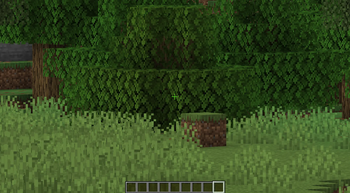
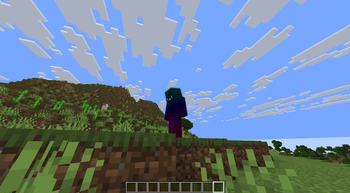
About this Mod
SimpleQoL
One mod. Six features. Zero bloat.
SimpleQoL bundles the quality-of-life features you'd normally need five separate mods for — all in one lightweight client-side package with a clean in-game config screen.
✨ Features
🔍 Zoom
Hold C to zoom in, just like OptiFine.
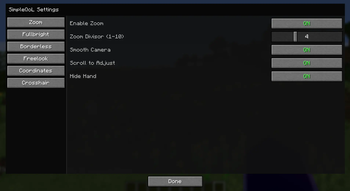
- Scroll wheel adjusts zoom level while held
- Smooth FOV interpolation in and out
- Optional smooth camera mode while zooming
- Hides your hand while zoomed for a cleaner view
- Fully configurable: divisor, scroll toggle, smooth camera toggle
🌟 Fullbright
Press B to toggle maximum brightness instantly.
- Saves your previous gamma setting and restores it on disable
- Never writes the high gamma value to
options.txt— your settings stay clean - One keypress on, one keypress off
🖥️ Borderless Fullscreen
Press F11 to toggle true borderless windowed mode.
- Uses GLFW directly — no hacks, no flicker
- Saves and restores your previous window position and size
- Alt-tab friendly
👁️ Freelook
Hold V to look around freely without rotating your player body.
- Camera snaps back to your movement direction when released
- Great for scouting, building, and parkour
📍 Coordinates HUD
A clean, always-visible overlay showing where you are.
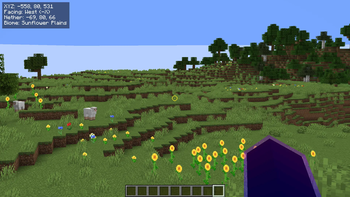
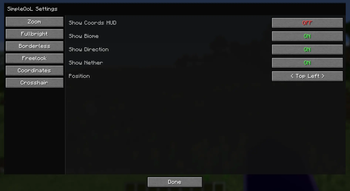
- Displays XYZ position, facing direction, biome name
- Shows your Nether/Overworld coordinate equivalent automatically
- Choose from 4 screen corners (Top Left, Top Right, Bottom Left, Bottom Right)
- Hides automatically when F3 is open
- Toggle via keybind or config screen
➕ Crosshair Customizer
Replace the vanilla crosshair with something that's actually yours.
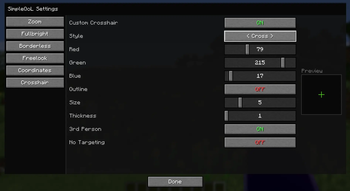
- 5 styles: Default, Cross, Dot, Circle, Circle + Dot
- Full RGB color picker with opacity control
- Adjustable size and thickness
- Optional black outline for visibility on any background
- Hide in third person view
- Hide when not targeting a block or entity
⚙️ Config
All settings are accessible in-game via the Mod Menu gear icon — no need to edit any files. Config is saved to <gamedir>/config/simpleqol.json and persists across sessions.
Every keybind is rebindable in the standard Controls menu.
📦 Dependencies
| Mod | Required |
|---|---|
| Fabric Loader 0.16.14+ | ✅ |
| Fabric API | ✅ |
| Mod Menu | ✅ |
More features on the way! If you have any issues or suggestions, let me know in my discord!
Available Versions
How to Install SimpleQoL on Your Server
Order Server
Order a Minecraft Java server with at least 3 GB RAM (4 GB recommended).
Set fabric Loader
In the panel under "Egg", select the fabric loader and matching Minecraft version (26.1.2).
Install Mod
Open the mod browser in the dashboard and search for "SimpleQoL". Click "Install" – done! Alternatively, upload the .jar via SFTP to the /mods folder.
Compatibility
Mod Loaders
Minecraft Versions
26.1.2, 26.1.1, 26.1
Server-side
✗ UnsupportedRecommended RAM
4 GB(min. 3 GB)Frequently Asked Questions
SimpleQoL server crashes on startup – what to do?
Most common cause: wrong fabric version or insufficient RAM. Check the server log (latest.log) for "OutOfMemoryError" or "Mixin" errors. With Mado Hosting: ensure at least 3 GB RAM is allocated and the loader matches the mod version (26.1.2). You can switch loaders with one click in the panel.
Is SimpleQoL compatible with fabric?
SimpleQoL officially supports fabric for Minecraft 26.1.2, 26.1.1, 26.1. The Mado dashboard automatically detects incompatible loader combinations.
Server lagging with SimpleQoL – how to optimize performance?
Recommended RAM: 4 GB (per 8 players). Use /spark profiler to check if SimpleQoL consumes the most tick time. Common fixes: reduce server view-distance to 8-10, install "performant" or "starlight" as supplementary mods on Forge. With Mado Hosting, your server runs on NVMe SSDs with dedicated CPU cores for minimal latency.
Similar Mods




![[ETF] Entity Texture Features](https://cdn.modrinth.com/data/BVzZfTc1/af683d206d50b05258d865b0d6e4aa2f2cee12f2_96.webp)
![[EMF] Entity Model Features](https://cdn.modrinth.com/data/4I1XuqiY/6e5bbd0d06b1741bfdab6c0cfab6de8fdaf0064c_96.webp)
Rent Modded Server
Install SimpleQoL with just one click on your server.