
Skill Issue
A mod which discourages you to get into dangerous or bad situations
Screenshots
About this Mod
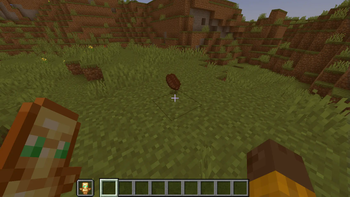
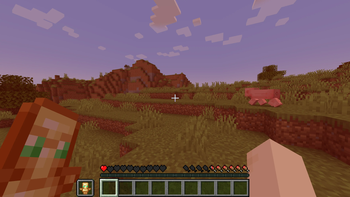
This client-side mod is purposed to warn the player when getting in dangerous situations by for example coloring in the screen or kicking you out of the game when an issue is given. At the time of writing, this includes six different situations:
- The player's health falls to 8 (four hearts)
- The player's food level falls to 8 (four drumsticks)
- The player has no totem in the offhand
- The player has no shield in the offhand
- The player has no food in the hotbar
- The player falls in lava without further safety means (the mod kicks you out of the game with your coordinates so you can plan and/or call friends for help)
- The player falls from a high place (same action as 6.)
The shown color effect is differently colored per issue and the issue with the highest internal priority applies its color. Additionally, you can choose the issues you want to be shaded in an extensive issue menu, accessible per default with the key H!
In the future:
- More issues will be added
- Current issues in detail will be shown on another screen
Please note that the mod is still under development and is more of a hobby project of mine!
Available Versions
How to Install Skill Issue on Your Server
Order Server
Order a Minecraft Java server with at least 3 GB RAM (4 GB recommended).
Set fabric Loader
In the panel under "Egg", select the fabric loader and matching Minecraft version (1.21).
Install Mod
Open the mod browser in the dashboard and search for "Skill Issue". Click "Install" – done! Alternatively, upload the .jar via SFTP to the /mods folder.
Compatibility
Mod Loaders
Minecraft Versions
1.21
Server-side
✗ UnsupportedRecommended RAM
4 GB(min. 3 GB)Frequently Asked Questions
Skill Issue server crashes on startup – what to do?
Most common cause: wrong fabric version or insufficient RAM. Check the server log (latest.log) for "OutOfMemoryError" or "Mixin" errors. With Mado Hosting: ensure at least 3 GB RAM is allocated and the loader matches the mod version (1.21). You can switch loaders with one click in the panel.
Is Skill Issue compatible with fabric?
Skill Issue officially supports fabric for Minecraft 1.21. The Mado dashboard automatically detects incompatible loader combinations.
Server lagging with Skill Issue – how to optimize performance?
Recommended RAM: 4 GB (per 8 players). Use /spark profiler to check if Skill Issue consumes the most tick time. Common fixes: reduce server view-distance to 8-10, install "performant" or "starlight" as supplementary mods on Forge. With Mado Hosting, your server runs on NVMe SSDs with dedicated CPU cores for minimal latency.
Similar Mods




![[ETF] Entity Texture Features](https://cdn.modrinth.com/data/BVzZfTc1/af683d206d50b05258d865b0d6e4aa2f2cee12f2_96.webp)
![[EMF] Entity Model Features](https://cdn.modrinth.com/data/4I1XuqiY/6e5bbd0d06b1741bfdab6c0cfab6de8fdaf0064c_96.webp)
Rent Modded Server
Install Skill Issue with just one click on your server.