
Skin Sync
A Fabric client mod for downloading and managing player skins in multiplayer
Screenshots
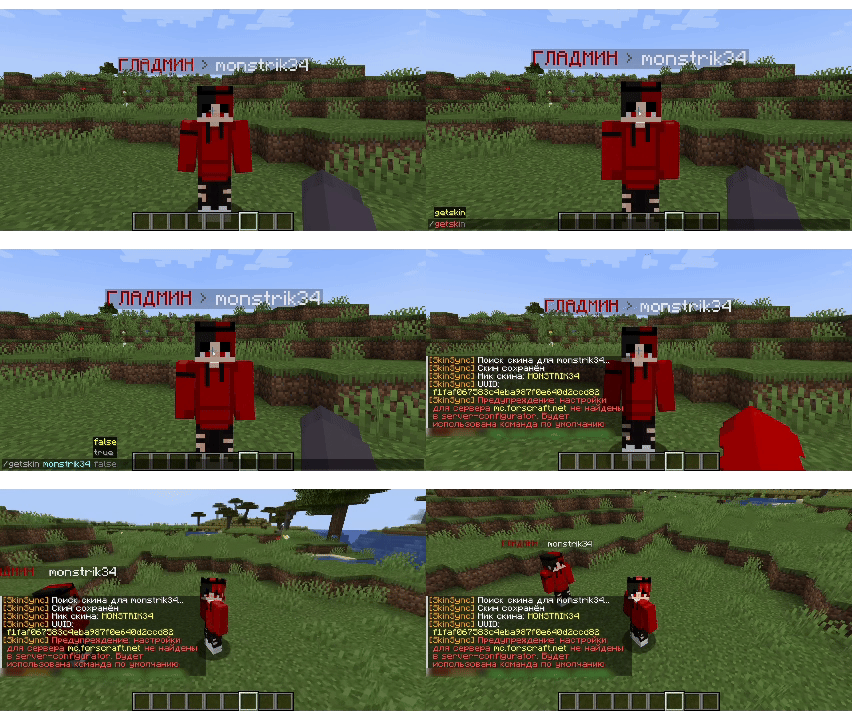
About this Mod
🎭 SkinSync
A Fabric client mod for downloading and managing player skins in multiplayer.
English · Русский
English
✨ Features
- 📥 Download skins — Save any player's skin to your local files with a single command
- 🎯 Auto-set skins — Automatically apply downloaded skins via server-specific commands
- 🔧 Multi-server support — Configure different command templates for each server
- ⌨️ Smart suggestions — Tab-complete with online player names out of the box
- 🖱️ Clickable links — Copy file paths and skin names directly from chat
💻 Usage
/getskin <player> [auto set]
| Argument | Required | Description |
|---|---|---|
player |
✅ | Username of the player whose skin you want to save |
auto set |
❌ | Set to true to automatically apply the skin via server command |
Example:
/getskin Notch
/getskin Notch true
⚙️ Configuration
Server-specific configuration is stored in config/skin-sync/server-configurator.json:
{
  "default": {
    "auto-set-skin-command": "skin set {skin}"
  },
  "mc.example.com": {
    "auto-set-skin-command": "/setskin {skin}"
  }
}
| Field | Description |
|---|---|
default |
Fallback command template used when no server-specific config exists |
| Server address | Per-server command template (format: host) |
{skin} |
Placeholder replaced with the player's nickname |
Downloaded skins are saved to config/skin-sync/skins/<player>_<uuid>.png
⚠️ Notes
- This mod works only in multiplayer — singleplayer is not supported
- All commands are client-side only — other players don't need this mod
Russian
✨ Возможности
- 📥 Скачивание скинов — Сохраняйте скины любых игроков одной командой
- 🎯 Авто-применение — Автоматическая установка скинов через команды сервера
- 🔧 Несколько серверов — Разные шаблоны команд для каждого сервера
- ⌨️ Умные подсказки — Автодополнение с никами игроков онлайн
- 🖱️ Кликабельные ссылки — Копируйте пути и названия прямо из чата
💻 Использование
/getskin <игрок> [авто установка]
| Аргумент | Обязателен | Описание |
|---|---|---|
игрок |
✅ | Ник игрока, чей скин нужно сохранить |
авто установка |
❌ | Укажите true для автоматической установки через команду сервера |
Пример:
/getskin Notch
/getskin Notch true
⚙️ Настройка
Конфигурация хранится в config/skin-sync/server-configurator.json:
{
  "default": {
    "auto-set-skin-command": "skin set {skin}"
  },
  "mc.example.com": {
    "auto-set-skin-command": "/setskin {skin}"
  }
}
| Поле | Описание |
|---|---|
default |
Шаблон команды по умолчанию |
| Адрес сервера | Шаблон для конкретного сервера (формат: host) |
{skin} |
Заменяется на ник игрока |
Скачанные скины сохраняются в config/skin-sync/skins/<игрок>_<uuid>.png
⚠️ Примечания
- Мод работает только на мультиплеере — одиночная игра не поддерживается
- Все команды на стороне клиента — другим игрокам мод не нужен
Available Versions
How to Install Skin Sync on Your Server
Order Server
Order a Minecraft Java server with at least 3 GB RAM (4 GB recommended).
Set fabric Loader
In the panel under "Egg", select the fabric loader and matching Minecraft version (1.20.6).
Install Mod
Open the mod browser in the dashboard and search for "Skin Sync". Click "Install" – done! Alternatively, upload the .jar via SFTP to the /mods folder.
Compatibility
Mod Loaders
Minecraft Versions
1.20.6, 1.20.5, 1.20.4 (+3 more)
Server-side
✗ UnsupportedRecommended RAM
4 GB(min. 3 GB)Frequently Asked Questions
Skin Sync server crashes on startup – what to do?
Most common cause: wrong fabric version or insufficient RAM. Check the server log (latest.log) for "OutOfMemoryError" or "Mixin" errors. With Mado Hosting: ensure at least 3 GB RAM is allocated and the loader matches the mod version (1.20.6). You can switch loaders with one click in the panel.
Is Skin Sync compatible with fabric?
Skin Sync officially supports fabric for Minecraft 1.20.6, 1.20.5, 1.20.4. The Mado dashboard automatically detects incompatible loader combinations.
Server lagging with Skin Sync – how to optimize performance?
Recommended RAM: 4 GB (per 8 players). Use /spark profiler to check if Skin Sync consumes the most tick time. Common fixes: reduce server view-distance to 8-10, install "performant" or "starlight" as supplementary mods on Forge. With Mado Hosting, your server runs on NVMe SSDs with dedicated CPU cores for minimal latency.
Similar Mods




Rent Modded Server
Install Skin Sync with just one click on your server.