
SkinMC: Minecraft Capes
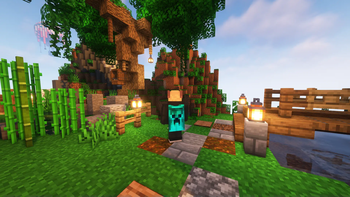
SkinMC Mod allows you to upload a custom Minecraft cape — completely for free. Visible for anyone using the mod in-game.
Screenshots
About this Mod

SkinMC-Mod: Free Minecraft Capes
Create your cape on SkinMC. Wear it in-game with the SkinMC Mod.
Requirements
- Minecraft 1.21.11, 1.21.4
- Fabric or NeoForge (choose one; use the matching mod build)
- https://modrinth.com/mod/architectury-api
Features

- Displays your SkinMC Minecraft Cape in-game in singleplayer and multiplayer
- Choose how capes are shown: SkinMC overrides default capes, default only, or SkinMC only
- Shift + right-click a player to open their SkinMC profile (optional, can be turned off)
- Works on both Fabric and NeoForge
Configuration
Settings are in Mod Menu (Fabric) or the mod list config button (NeoForge), under SkinMC Cape Settings. You can also edit config/skinmc_mod.json:
| Option | Description |
|---|---|
| Cape display | SkinMC overrides (default) — SkinMC capes replace Mojang/OptiFine capes when set; Default only — only show Mojang/OF capes; SkinMC only — only show SkinMC capes (hide default when no SkinMC cape) |
| Shift + right-click player | When enabled, shift + right-clicking a player opens their SkinMC profile |
How to install it
The SkinMC Mod is available for Fabric and NeoForge. Pick the loader that matches your setup.
- Download the latest release from https://skinmc.net/p/mod (choose the Fabric or NeoForge version).
- Install a mod loader:
- Put the SkinMC mod
.jarfile into your Minecraftmodsfolder.
How to get a cape
- Go to https://skinmc.net
- Sign up / Sign in
- Link your Minecraft account via Microsoft
- Go to Account, then choose SkinMC Capes
- Select a cape .png file and hit upload and use
You can also create your own cape in the SkinMC Cape Editor.
Links
- Upload a cape: https://skinmc.net/account/capes
- Discord: https://skinmc.net/go/discord
Where to get capes from?
You can find a large selection of Minecraft capes on the following pages, or make your own:
- https://skinmc.net/capes/custom
- https://www.planetminecraft.com/mob-skins/?op2=8
- SkinMC Cape Editor — create your own custom cape
- Feel free to add more here!
What format does it support?
Currently capes must be
- .png, .jpg, .jpeg
- 64x32px
Contribute
Contribute code on GitHub or submit your ideas for future versions!
License
This project is licensed under the GNU Lesser General Public License v2.1 (LGPL-2.1).
Credits
This mod is built with Architectury, which enables a single codebase to run on both Fabric and NeoForge.
Do you need support?
Please open a support ticket
Available Versions
How to Install SkinMC: Minecraft Capes on Your Server
Order Server
Order a Minecraft Java server with at least 3 GB RAM (4 GB recommended).
Set fabric Loader
In the panel under "Egg", select the fabric loader and matching Minecraft version (1.21.11).
Install Mod
Open the mod browser in the dashboard and search for "SkinMC: Minecraft Capes". Click "Install" – done! Alternatively, upload the .jar via SFTP to the /mods folder.
Compatibility
Mod Loaders
Minecraft Versions
1.21.11, 1.21.4, 1.20.1 (+3 more)
Server-side
✗ UnsupportedRecommended RAM
4 GB(min. 3 GB)Frequently Asked Questions
SkinMC: Minecraft Capes server crashes on startup – what to do?
Most common cause: wrong fabric version or insufficient RAM. Check the server log (latest.log) for "OutOfMemoryError" or "Mixin" errors. With Mado Hosting: ensure at least 3 GB RAM is allocated and the loader matches the mod version (1.21.11). You can switch loaders with one click in the panel.
Is SkinMC: Minecraft Capes compatible with fabric and neoforge?
SkinMC: Minecraft Capes officially supports fabric, neoforge for Minecraft 1.21.11, 1.21.4, 1.20.1. The Mado dashboard automatically detects incompatible loader combinations.
Server lagging with SkinMC: Minecraft Capes – how to optimize performance?
Recommended RAM: 4 GB (per 8 players). Use /spark profiler to check if SkinMC: Minecraft Capes consumes the most tick time. Common fixes: reduce server view-distance to 8-10, install "performant" or "starlight" as supplementary mods on Forge. With Mado Hosting, your server runs on NVMe SSDs with dedicated CPU cores for minimal latency.
Similar Mods

![[ETF] Entity Texture Features](https://cdn.modrinth.com/data/BVzZfTc1/af683d206d50b05258d865b0d6e4aa2f2cee12f2_96.webp)
![[EMF] Entity Model Features](https://cdn.modrinth.com/data/4I1XuqiY/6e5bbd0d06b1741bfdab6c0cfab6de8fdaf0064c_96.webp)



Rent Modded Server
Install SkinMC: Minecraft Capes with just one click on your server.