![Skull [Portable]](https://cdn.modrinth.com/data/x5rDcrvh/68af4607afd63a7caac80e4411935e9bd7bc5321_96.webp)
Skull [Portable]
Obtain and Customize Player Heads in Survival!
Screenshots
About this Mod
Skull [Portable]
Obtain and Customize Player Heads in Survival!
📥How to Install
Choose if you want to download the pure Data Pack version or the Mod version and follow the steps accordingly.
Data Pack
- 1) Download the Datapack
- 2) Chose the world you want to install the Data Pack in and navigate to its "datapacks" folder
- 3) Copy the downloaded Data Pack file (Skull [Portable]) into this folder
- 4) Join the world and run
/reloadcommand
Mod
- 1) Download the Mod
- 2) Navigate to your
modsfolder (for the vanilla launcher the path is.minecraft/mods - 3) Put the downloaded .jar file (Skull [Portable]) into this folder
- 4) Join the world and run
/reloadcommand
📖Features
Skull [Portable] allow you to Craft and Customize player heads using just a Book
and Quill.
How to craft and customize a Player Head
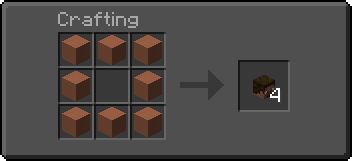
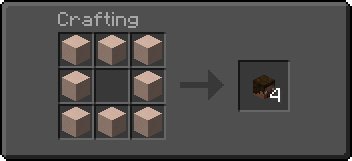
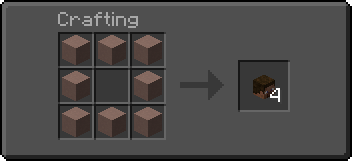
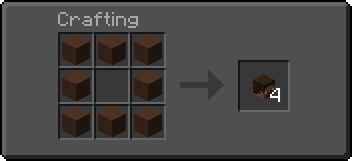
🎭Craft a Blank Player Head
A Blank Player Head can be crafted using any of the following materials:
|  |
📋Customize a Player Head using a texture value
- 1) Head over Minecraft Heads
- 2) Choose a head and open its relative page; Then, scroll to the
For Developersand copy thevaluefield - 3) Paste the copied
valuein a Book and Quill - 4) Hold the desired number of player heads in your off-hand
- 5) Hold the book with the
valuein your main-hand - 6) Swap hands to customize the head (Default key to swap hands is
F)
🔖Customize a Player Head using a player name
- 1) Sign a Book and Quill with the name of the player
- 2) Hold the desired number of player heads in your off-hand
- 3) Hold the signed book in your main-hand
- 4) Swap hands to customize the head (Default key to swap hands is
F)
YouTube Showcase
Settings
You can access the settings upon reloading by clicking on the [Config] button or by running the following command -> /function skull_portable:config
The settings menu includes the following:
- [Player head] Replace signed book after use: (defaults to
True) - [Custom Head] Erase book pages after use: (defaults to
True)
📤How to Uninstall
Data Pack
To uninstall the Data Pack run the command /function skull_portable:uninstall. When the uninstallation process is completed a confirmation message will be sent in the chat.
Mod
To uninstall the Mod version you need to run /function skull_portable:uninstall command. Then you close the game and remove the jar file from your .minecraft/mods folder.
🔗External links


Available Versions
How to Install Skull [Portable] on Your Server
Order Server
Order a Minecraft Java server with at least 3 GB RAM (4 GB recommended).
Set datapack Loader
In the panel under "Egg", select the datapack loader and matching Minecraft version (26.1.2).
Install Mod
Open the mod browser in the dashboard and search for "Skull [Portable]". Click "Install" – done! Alternatively, upload the .jar via SFTP to the /mods folder.
Compatibility
Mod Loaders
Minecraft Versions
26.1.2, 26.1.1, 26.1 (+23 more)
Server-side
✓ RequiredRecommended RAM
4 GB(min. 3 GB)Frequently Asked Questions
Skull [Portable] server crashes on startup – what to do?
Most common cause: wrong datapack version or insufficient RAM. Check the server log (latest.log) for "OutOfMemoryError" or "Mixin" errors. With Mado Hosting: ensure at least 3 GB RAM is allocated and the loader matches the mod version (26.1.2). You can switch loaders with one click in the panel.
Is Skull [Portable] compatible with datapack and fabric and forge and neoforge and quilt?
Skull [Portable] officially supports datapack, fabric, forge, neoforge, quilt for Minecraft 26.1.2, 26.1.1, 26.1. Note: Forge and Fabric mods are NOT cross-compatible – pick one loader and stick with it. The Mado dashboard automatically detects incompatible loader combinations.
Server lagging with Skull [Portable] – how to optimize performance?
Recommended RAM: 4 GB (per 8 players). Use /spark profiler to check if Skull [Portable] consumes the most tick time. Common fixes: reduce server view-distance to 8-10, install "performant" or "starlight" as supplementary mods on Forge. With Mado Hosting, your server runs on NVMe SSDs with dedicated CPU cores for minimal latency.
Similar Mods

![[ETF] Entity Texture Features](https://cdn.modrinth.com/data/BVzZfTc1/af683d206d50b05258d865b0d6e4aa2f2cee12f2_96.webp)
![[EMF] Entity Model Features](https://cdn.modrinth.com/data/4I1XuqiY/6e5bbd0d06b1741bfdab6c0cfab6de8fdaf0064c_96.webp)



Rent Modded Server
Install Skull [Portable] with just one click on your server.