
Sleep Through The Night
Immersive Sleeping with horror-like vibes. Wake up as if getting up in bed.
Screenshots
About this Mod
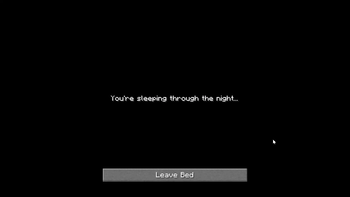
Sleep Through The Night transforms the vanilla sleeping experience into something far more immersive. Instead of instantly skipping to day, the screen fades to black as your character drifts off — complete with a smooth camera tilt as if you're lying down. A soft cricket ambience plays in the background as the night passes.
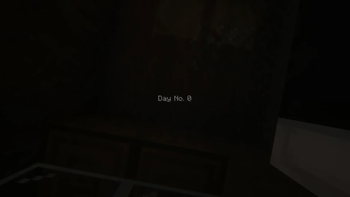
When morning arrives, the camera slowly tilts back upright as if you're sitting up from bed, the screen gently fades back in, and a day counter appears showing how many days you've survived.
Features
- 🌙 Smooth fade-to-black animation when going to sleep
- 💤 "You're sleeping through the night..." message displayed while sleeping
- 🦗 Ambient cricket sounds play as the night passes
- ☀️ Wake-up animation — camera tilts from lying down to sitting upright
- 📅 Day counter shown on screen when waking up (e.g. Day No. 3)
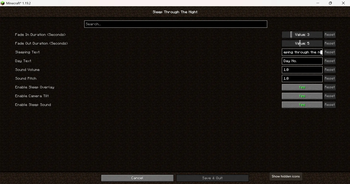
- 🎛️ Fully configurable — timings, text, sound, and individual feature toggles
Requirements
- Configured mod (Forge) (optional — required for in-game config screen)
- Cloth Config API (Fabric)
⚙️ Configurable Options
Sleep Through The Night comes with a built-in configuration file that lets you tailor the sleeping experience to your liking. Requires the Configured mod to edit in-game via Mods → Sleep Through The Night → Configure.
- Timing Control how long the fade animations last. Set the fade-in duration for when you fall asleep and the fade-out duration for when you wake up, each adjustable between 1 and 10 seconds.
- Text Customize the messages displayed on screen. Change what it says while you're sleeping and the prefix shown on the day counter when you wake up.
- Sound Adjust the volume and pitch of the ambient sleep sound to fit your preferred atmosphere.
- Features Toggle individual features on or off entirely — disable the black screen overlay, the camera tilt effect, or the sleep ambience sound independently without needing to remove the mod.
FAQs
Q. I can't configure the mod, how do I fix it?
If you have the Configured mod but you can't configure the mod, that means the version you have doesn't have configuration available yet. So, how do you check if the mod has a configuration?
Answer: You have to use 1.1+ versions such as Forge 1.20.1-1.1.1 , I added configuration to this updates. If you are using 1.0.+, it will not work. **
Q. My day counter is stuck at 0, what do I do?
Answer: The implementation was started with NeoFroge 1.21.8, when I did the backport, the day counter logic no longer worked with the older versions so I had to redo that. Here are the versions where the day counter works:
- NeoForge 1.21.8 - Version 1.0.0+
- NeoForge 1.21.1 - Version 1.1.1+
- Forge 1.20.1 - Version 1.1.1+
- Forge 1.19.2 - Version 1.1.1.+
- Fabric 1.19.2 - Version 1.1.0+
Note: Just make sure you have the up-to-date versions.
Available Versions
How to Install Sleep Through The Night on Your Server
Order Server
Order a Minecraft Java server with at least 3 GB RAM (4 GB recommended).
Set fabric Loader
In the panel under "Egg", select the fabric loader and matching Minecraft version (1.21.8).
Install Mod
Open the mod browser in the dashboard and search for "Sleep Through The Night". Click "Install" – done! Alternatively, upload the .jar via SFTP to the /mods folder.
Compatibility
Mod Loaders
Minecraft Versions
1.21.8, 1.21.1, 1.20.1 (+1 more)
Server-side
✗ UnsupportedRecommended RAM
4 GB(min. 3 GB)Frequently Asked Questions
Sleep Through The Night server crashes on startup – what to do?
Most common cause: wrong fabric version or insufficient RAM. Check the server log (latest.log) for "OutOfMemoryError" or "Mixin" errors. With Mado Hosting: ensure at least 3 GB RAM is allocated and the loader matches the mod version (1.21.8). You can switch loaders with one click in the panel.
Is Sleep Through The Night compatible with fabric and forge and neoforge?
Sleep Through The Night officially supports fabric, forge, neoforge for Minecraft 1.21.8, 1.21.1, 1.20.1. Note: Forge and Fabric mods are NOT cross-compatible – pick one loader and stick with it. The Mado dashboard automatically detects incompatible loader combinations.
Server lagging with Sleep Through The Night – how to optimize performance?
Recommended RAM: 4 GB (per 8 players). Use /spark profiler to check if Sleep Through The Night consumes the most tick time. Common fixes: reduce server view-distance to 8-10, install "performant" or "starlight" as supplementary mods on Forge. With Mado Hosting, your server runs on NVMe SSDs with dedicated CPU cores for minimal latency.
Similar Mods




Rent Modded Server
Install Sleep Through The Night with just one click on your server.