
SleepTimer
Complete time management: time, moon phases, day/night alerts, and more
Screenshots
About this Mod
⏰ SleepTimer
🌟 Main features
📊 Instant information (H key)
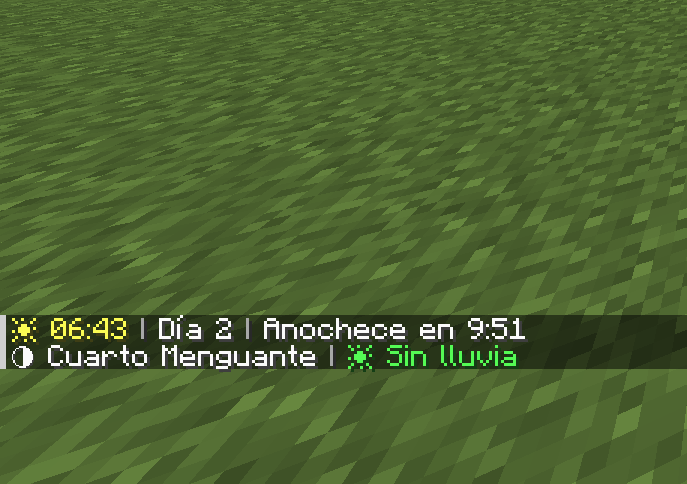
Press H at any time to see:
- ⏰ Current time in 24-hour format (e.g., 2:30 p.m.)
- 📅 Day of the world (e.g., Day 5)
- 🌅 Time until sunset/sunrise (e.g., Sunset in 3:42)
- 🌙 Current moon phase (Full Moon, First Quarter, New Moon, etc.)
- 💧 Rain/storm duration (e.g., Raining for 2:15)
🛏️ Smart bed timer
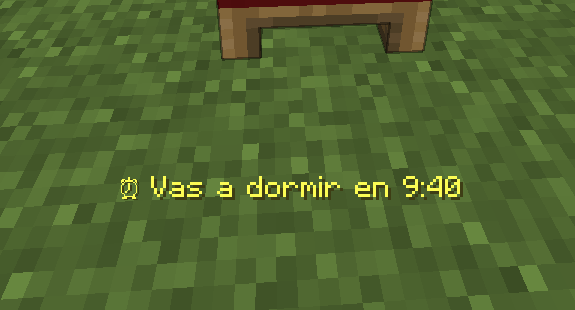
When you click on a bed during the day, a message appears indicating
exactly how long it will be before you can sleep (e.g., “⏰ You can sleep in 4:23”)
⚠️ Automatic alerts
- Nightfall: Alert 1 minute before nightfall
- Sunrise: Notification when it is safe to go out
- Optional sounds: Bells accompanying alerts
✏️ 100% customizable messages
Don't like the default messages? Change them!
- Write your own texts for each alert
- Use color codes (§e=yellow, §a=green, §c=red, §b=blue, §6=orange)
- Use %s to insert the time wherever you want
Examples:
§e⏰ You can sleep in %s→ “⏰ You can sleep in 3:42”§cGo to bed in %s!→ “Go to bed in 3:42!”§b%s left to dream→ “3:42 left to dream”
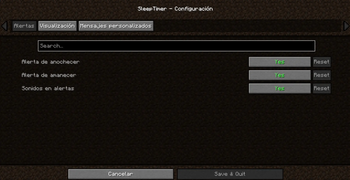
⚙️ Fully configurable
Open the configuration menu from:
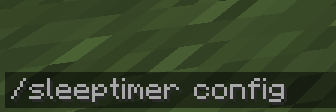
- Command:
/sleeptimer config - Mods menu: Mods → SleepTimer → ⚙️ Config
Category: Alerts
| Option | Description |
|---|---|
| Sunset alert | Notification 1 minute before sunset |
| Sunrise alert | Notification at sunrise |
| Alert sounds | Play sound with alerts |
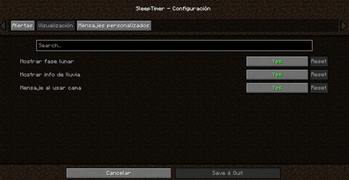
Category: Display
| Option | Description |
|---|---|
| Show moon phase | View moon phase when pressing H |
| Show rain info | View rain time when pressing H |
| Message when using bed | Show sleep time when clicking on bed |
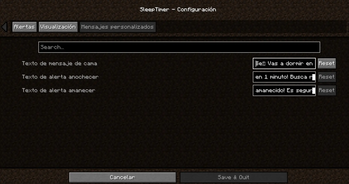
Category: Custom messages
| Option | Description |
|---|---|
| Bed message text | Customize the message when using the bed (use %s for the time) |
| Sunset alert text | Customize the sunset alert |
| Sunrise alert text | Customize the sunrise alert |
⌨️ Customizable key
Don't like the H key? Change it easily:
- Go to Options → Controls
- Find the “SleepTimer” category
- Click on the current key
- Press the new key you prefer
🌍 Multilingual
Fully translated into 13 languages:
| Language | Code |
|---|---|
| 🇪🇸 Spanish | es_es |
| 🇬🇧 English | en_us |
| 🇫🇷 French | fr_fr |
| 🇩🇪 German | de_de |
| 🇵🇹 Portuguese (Brazil) | pt_br |
| 🇮🇹 Italian | it_it |
| 🇯🇵 Japanese | ja_jp |
| 🇷🇺 Russian | ru_ru |
| 🇨🇳 Chinese (Simplified) | zh_cn |
| 🇰🇷 Korean | ko_kr |
| 🇵🇱 Polish | pl_pl |
| 🇹🇷 Turkish | tr_tr |
| 🇳🇱 Dutch | nl_nl |
The mod automatically detects your Minecraft language.
📦 Installation
- Install Fabric Loader
- Download Fabric API
- Download SleepTimer
- Place both mods in the
.minecraft/modsfolder - Enjoy!
ℹ️ Note: Cloth Config API is included in the mod, you don't need to download it separately.
🎮 Requirements
| Requirement | Version |
|---|---|
| Minecraft | 1.20.1-1.20.6 |
| Fabric Loader | 0.18.4+ |
| Fabric API | Latest version |
🎨 Available color codes
For use in your custom messages:
| Code | Color |
|---|---|
| §0 | Black |
| §1 | Dark blue |
| §2 | Dark green |
| §3 | Cyan |
| §4 | Dark red |
| §5 | Purple |
| §6 | Orange |
| §7 | Gray |
| §8 | Dark gray |
| §9 | Blue |
| §a | Green |
| §b | Light blue |
| §c | Red |
| §d | Pink |
| §e | Yellow |
| §f | White |
Formats:
| Code | Effect |
|---|---|
| §l | Bold |
| §o | Italic |
| §n | Underline |
| §m | |
| §r | Reset format |
📸 Screenshots
Information when pressing H

Bedtime message

Settings menu


🐛 Report bugs
Found a problem?
- Write to me on Discord: Tracats787
- Describe the problem and how to reproduce it
📜 License
This mod is open source under the CC0-1.0 license.
🙏 Credits
- Developer: Tracats787
- Configuration API: Cloth Config by shedaniel
❤️ Do you like the mod?
- 💚 Like it on Modrinth/CurseForge
- 📢 Share it with your friends!
Available Versions
How to Install SleepTimer on Your Server
Order Server
Order a Minecraft Java server with at least 3 GB RAM (4 GB recommended).
Set fabric Loader
In the panel under "Egg", select the fabric loader and matching Minecraft version (1.21.11).
Install Mod
Open the mod browser in the dashboard and search for "SleepTimer". Click "Install" – done! Alternatively, upload the .jar via SFTP to the /mods folder.
Compatibility
Mod Loaders
Minecraft Versions
1.21.11, 1.21.10, 1.21.9 (+11 more)
Server-side
✗ UnsupportedRecommended RAM
4 GB(min. 3 GB)Frequently Asked Questions
SleepTimer server crashes on startup – what to do?
Most common cause: wrong fabric version or insufficient RAM. Check the server log (latest.log) for "OutOfMemoryError" or "Mixin" errors. With Mado Hosting: ensure at least 3 GB RAM is allocated and the loader matches the mod version (1.21.11). You can switch loaders with one click in the panel.
Is SleepTimer compatible with fabric?
SleepTimer officially supports fabric for Minecraft 1.21.11, 1.21.10, 1.21.9. The Mado dashboard automatically detects incompatible loader combinations.
Server lagging with SleepTimer – how to optimize performance?
Recommended RAM: 4 GB (per 8 players). Use /spark profiler to check if SleepTimer consumes the most tick time. Common fixes: reduce server view-distance to 8-10, install "performant" or "starlight" as supplementary mods on Forge. With Mado Hosting, your server runs on NVMe SSDs with dedicated CPU cores for minimal latency.
Similar Mods




Rent Modded Server
Install SleepTimer with just one click on your server.