
SlideShowPlus
An enhanced version of SlideShow that can project images and text in the game
Screenshots
About this Mod
Slide Show Plus
Minecraft Version: 1.21
License: BSD-3-Clause
Mod Loader: NeoForge
A Minecraft Mod developed based on SlideShow, which adds several practical features to the original project, bringing more convenience to your slideshow presentation experience.
📖 Project Introduction
Slide Show Plus is an enhanced slideshow presentation mod. It not only retains all the core functions of the original SlideShow but also adds many practical new features.
It is designed to serve the public elective course Ecological Wisdom in Poetry taught by Professor Wendoudou from Central South University, with technical support provided by the CSU-MC community.
🔗 Original Project Reference
This mod is developed based on SlideShow, and all original functions are retained. You can refer to the original project to learn about basic usage methods.
✨ New Features
1. 📝 Slide Description Text
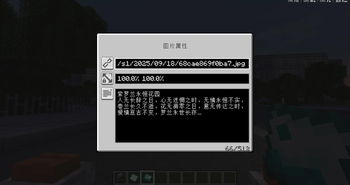
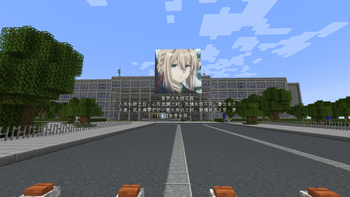
- Custom Description: Add customizable description text to slides, supporting automatic line breaks.
- Dynamic Display: When holding a slide item, the description text is displayed above the projector, centered.
- Intelligent Rendering: The text supports rotation following the player's camera, and the projector is rendered transparently for easy viewing.
- Real-Time Update: The description text is dynamically updated according to the currently playing slide.
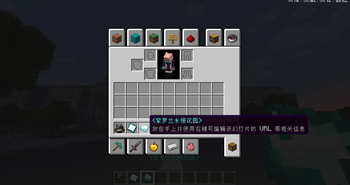
- Automatic Naming: Rename the slide item automatically based on the description text.
2. 🗺️ Xaero Maps Integration
- Minimap Support: Fully compatible with Xaero's Minimap and Xaero's World Map.
- Entity Radar: When the entity radar is enabled, the projector's position and title text are displayed.
- Intelligent Title: The title text is automatically taken from the first line of the description text of the currently playing slide.
- Convenient Positioning: Quickly find the positions of all projectors on the map.
3. 🔍 Beacon Beam Localization
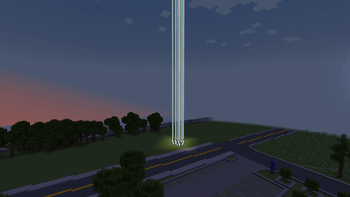
- Visual Guidance: When holding a projector, all projectors within 256 blocks emit a beam similar to that of a beacon.
- Remote Positioning: Facilitates quick positioning of projectors from a long distance.
🚀 Installation Guide
Prerequisites
- Minecraft 1.21.1
- NeoForge Mod Loader
- Java 21
Installation Steps
- Ensure the NeoForge Mod Loader is installed.
- Download the Slide Show Plus mod file.
- Place the mod file into the
modsfolder of Minecraft. - Launch the game to start using the mod.
Compatibility
- ✅ Xaero's Minimap
- ✅ Xaero's World Map
- ✅ Most other mods
📚 Usage Instructions
Basic Usage
- Craft a projector and slides (refer to the original SlideShow tutorial).
- Right-click the slide to add description text.
- Place the slide into the projector to start playing.
- Hold the projector to view the guiding beam.
Advanced Features
- Description Text: Supports multi-line text; the first line is automatically used as the map title and slide item name.
- Map Markers: View the positions of all projectors in Xaero's Maps.
- Beam Localization: View the positions of nearby projectors when holding a projector.
🎯 Version Information
- Current Version: Developed based on SlideShow Version 0.9.8
- Minecraft Version: 1.21
- Mod Loader: NeoForge
🤝 Contribution
Community contributions are welcome! If you have great ideas or find issues, you can:
- Submit issues and pull requests to the original repository or this repository.
📄 License
This project is distributed under the BSD-3-Clause License, consistent with the original project SlideShow.
🙏 Acknowledgments
Special thanks to the following projects and individuals:
- The original SlideShow project and all its contributors
- The TeaConMC team
- The author of the Xaero mods for providing excellent map solutions
- All players who tested and used this mod
📞 Support
If you encounter any problems or have suggestions, please:
- Submit an Issue on GitHub
Note: This mod is an enhanced version of SlideShow. Before using it, please ensure you understand the basic usage of the original SlideShow.
Available Versions
How to Install SlideShowPlus on Your Server
Order Server
Order a Minecraft Java server with at least 3 GB RAM (4 GB recommended).
Set neoforge Loader
In the panel under "Egg", select the neoforge loader and matching Minecraft version (1.21.1).
Install Mod
Open the mod browser in the dashboard and search for "SlideShowPlus". Click "Install" – done! Alternatively, upload the .jar via SFTP to the /mods folder.
Compatibility
Mod Loaders
Minecraft Versions
1.21.1
Server-side
✓ RequiredRecommended RAM
4 GB(min. 3 GB)Frequently Asked Questions
SlideShowPlus server crashes on startup – what to do?
Most common cause: wrong neoforge version or insufficient RAM. Check the server log (latest.log) for "OutOfMemoryError" or "Mixin" errors. With Mado Hosting: ensure at least 3 GB RAM is allocated and the loader matches the mod version (1.21.1). You can switch loaders with one click in the panel.
Is SlideShowPlus compatible with neoforge?
SlideShowPlus officially supports neoforge for Minecraft 1.21.1. The Mado dashboard automatically detects incompatible loader combinations.
Server lagging with SlideShowPlus – how to optimize performance?
Recommended RAM: 4 GB (per 8 players). Use /spark profiler to check if SlideShowPlus consumes the most tick time. Common fixes: reduce server view-distance to 8-10, install "performant" or "starlight" as supplementary mods on Forge. With Mado Hosting, your server runs on NVMe SSDs with dedicated CPU cores for minimal latency.
Similar Mods

![[ETF] Entity Texture Features](https://cdn.modrinth.com/data/BVzZfTc1/af683d206d50b05258d865b0d6e4aa2f2cee12f2_96.webp)
![[EMF] Entity Model Features](https://cdn.modrinth.com/data/4I1XuqiY/6e5bbd0d06b1741bfdab6c0cfab6de8fdaf0064c_96.webp)



Rent Modded Server
Install SlideShowPlus with just one click on your server.