
Slime Tweaker
Small mod that adds a gamerule and config to change the size of spawned slimes.
Screenshots
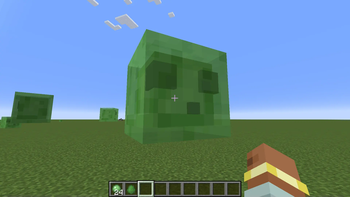
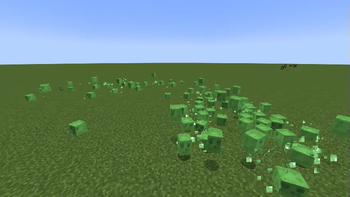
About this Mod

Slime Tweaker
Slime Tweaker adds a gamerule to change the size of natural spawning slimes and config to modify more specific values relating to the spawning of slimes. I made this mod to solve an extremely specific problem I was having.
maxSlimeSize Gamerule
Running gamerule maxSlimeSize (number) modifies the max size of slimes than can spawn, capped at 7. The default max slime size is 2 and this can be changed in the config (if you're confused on why these numbers are like this keep reading).
Config
Config can be found in config/slimetweaker-common.toml. The default slime size can be changed there.
Also, when a slime spawns there is a chance, modified by the level difficulty, for it to grow one size larger. This is normally just capped at medium sized slimes, but it can be raised in the config. Setting the value to 0 disables this.
Wait does this affect magma cubes?
The logic for working out magma cube sizes (or any other mob that would extend the Slime class) just copies the slime code so, yes.
Wait I thought it was impossible for slimes of size 2 to spawn?
Yes, the Minecraft Wiki states that slimes only spawn with NBT tag Size of 0, 1, and 3 (small, medium, and big). You might think they're just skipping size 2 but it's actually down to the logic of sizing slimes. There are really 3 different slime sizes is used the code.
First there's what I'm calling the "Base" size, which is what the maxSlimeSize gamerule uses. The normal slimes are "Base" size 0, 1, and 2. You can set the gamerule to be any integer but slimes will not spawn if they are negative and will be capped at 7 in practice.
Then there's what I'm calling the "Actual" size, which is what the Minecraft code is using. For "Actual" size the number is 1 bit shifted left by a "Base" size number of bits, which due to math is like putting 2 to the power of that number, thus turning (0, 1, 2) into (1, 2, 4). Slimes of "Base" sizes (3, 4, 5) would become (8, 16, 32) respectively. This is why the cap is at 7, as "Actual" slime sizes are capped at 127 (2^7 = 128). Slimes bigger than that make the game very laggy,"
Lastly there's the one most of you are familiar with, what I'm calling the "NBT" size, which is how the size is read and displayed with NBT. This is the size you see when you use /data or /summon. Essentially it is just the "Actual" size minus 1, so (1, 2, 4) becomes (0, 1, 3). So when you summon a slime of "NBT" size 2 you are summoning a slime that would be impossible to spawn naturally. When a slime of "Base" size 7 (or higher) is spawned it's "NBT" size is capped at 126.
Why is it like this?
Well I don't know really, I'm not Mojang, but I suspect it is because when you kill a slime it creates 2-4 slimes of half the size. This still works even with slimes of each "Base" size.
Does that mean only 8 different sizes of slimes can spawn without commands?
Yes, without using /summon, setting the max size to 7 means only slimes of "NBT" size 0, 1, 3, 7, 15, 31, 63, and 126 spawn.
So what was that problem you were having?
So I'm working on making a survival modpack for a superflat world, and in my testing I found that players would simply die quickly to medium and big slimes. I wanted to fix this without removing slimes as slime balls are needed, so after failing to find a mod that modified slime sizes I decided to make it myself. Tiny slimes don't deal damage, so if every slime is tiny then no one dies! Well, at least before it turns night and they get shot by a skeleton.
Available Versions
How to Install Slime Tweaker on Your Server
Order Server
Order a Minecraft Java server with at least 3 GB RAM (4 GB recommended).
Set neoforge Loader
In the panel under "Egg", select the neoforge loader and matching Minecraft version (1.21.1).
Install Mod
Open the mod browser in the dashboard and search for "Slime Tweaker". Click "Install" – done! Alternatively, upload the .jar via SFTP to the /mods folder.
Compatibility
Mod Loaders
Minecraft Versions
1.21.1, 1.21
Server-side
✓ RequiredRecommended RAM
4 GB(min. 3 GB)Frequently Asked Questions
Slime Tweaker server crashes on startup – what to do?
Most common cause: wrong neoforge version or insufficient RAM. Check the server log (latest.log) for "OutOfMemoryError" or "Mixin" errors. With Mado Hosting: ensure at least 3 GB RAM is allocated and the loader matches the mod version (1.21.1). You can switch loaders with one click in the panel.
Is Slime Tweaker compatible with neoforge?
Slime Tweaker officially supports neoforge for Minecraft 1.21.1, 1.21. The Mado dashboard automatically detects incompatible loader combinations.
Server lagging with Slime Tweaker – how to optimize performance?
Recommended RAM: 4 GB (per 8 players). Use /spark profiler to check if Slime Tweaker consumes the most tick time. Common fixes: reduce server view-distance to 8-10, install "performant" or "starlight" as supplementary mods on Forge. With Mado Hosting, your server runs on NVMe SSDs with dedicated CPU cores for minimal latency.
Similar Mods




Rent Modded Server
Install Slime Tweaker with just one click on your server.