
Smart warnings
Smart Warnings is a lightweight utility mod that provides intelligent survival alerts without cluttering gameplay. Get notified when night falls or when your inventory is almost full, helping you stay focused on exploration and survival.
Screenshots
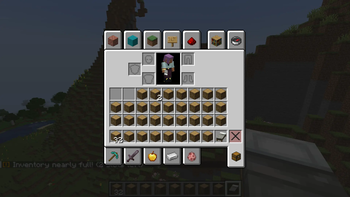
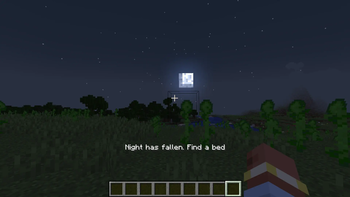
About this Mod
Smart Warnings
Smart Warnings is a lightweight quality-of-life utility mod designed to provide useful survival alerts without overwhelming the player or cluttering the HUD.
Built for simplicity, performance, and immersion, the mod delivers important warnings only when they matter — helping players stay focused on exploration, combat, mining, and survival.
FEATURES
Sleep Reminder
Receive a short actionbar warning when night falls, reminding you to find a bed before danger increases.
Inventory Almost Full Warning
Get notified when your inventory is running out of free space, helping prevent lost loot during mining, exploration, or long journeys.
DESIGN GOALS
- Lightweight and performance friendly
- Minimal HUD clutter
- Simple and immersive warnings
- Multiplayer compatible
- Vanilla-friendly gameplay enhancement
CURRENT VERSION
Version 0.1 includes:
- Sleep Reminder
- Inventory Full Warning
Planned future features may include:
- Hostile Nearby Warning
- Low Health Warning
- Tool Durability Warning
- Hunger Warning
- Armor Durability Warning
- Weather Alerts
- Environmental Hazard Warnings
- And more...
COMPATIBILITY
- Minecraft Forge 1.20.1
- Singleplayer & Multiplayer supported
More features and warning systems are planned for future updates.
Available Versions
How to Install Smart warnings on Your Server
Order Server
Order a Minecraft Java server with at least 3 GB RAM (4 GB recommended).
Set fabric Loader
In the panel under "Egg", select the fabric loader and matching Minecraft version (1.21.11).
Install Mod
Open the mod browser in the dashboard and search for "Smart warnings". Click "Install" – done! Alternatively, upload the .jar via SFTP to the /mods folder.
Compatibility
Mod Loaders
Minecraft Versions
1.21.11, 1.21.10, 1.21.9 (+2 more)
Server-side
✓ RequiredRecommended RAM
4 GB(min. 3 GB)Frequently Asked Questions
Smart warnings server crashes on startup – what to do?
Most common cause: wrong fabric version or insufficient RAM. Check the server log (latest.log) for "OutOfMemoryError" or "Mixin" errors. With Mado Hosting: ensure at least 3 GB RAM is allocated and the loader matches the mod version (1.21.11). You can switch loaders with one click in the panel.
Is Smart warnings compatible with fabric and forge and neoforge?
Smart warnings officially supports fabric, forge, neoforge for Minecraft 1.21.11, 1.21.10, 1.21.9. Note: Forge and Fabric mods are NOT cross-compatible – pick one loader and stick with it. The Mado dashboard automatically detects incompatible loader combinations.
Server lagging with Smart warnings – how to optimize performance?
Recommended RAM: 4 GB (per 8 players). Use /spark profiler to check if Smart warnings consumes the most tick time. Common fixes: reduce server view-distance to 8-10, install "performant" or "starlight" as supplementary mods on Forge. With Mado Hosting, your server runs on NVMe SSDs with dedicated CPU cores for minimal latency.
Similar Mods




![[ETF] Entity Texture Features](https://cdn.modrinth.com/data/BVzZfTc1/af683d206d50b05258d865b0d6e4aa2f2cee12f2_96.webp)
![[EMF] Entity Model Features](https://cdn.modrinth.com/data/4I1XuqiY/6e5bbd0d06b1741bfdab6c0cfab6de8fdaf0064c_96.webp)
Rent Modded Server
Install Smart warnings with just one click on your server.