
SmartShot
A client-side mod for advanced screenshot management.
Screenshots
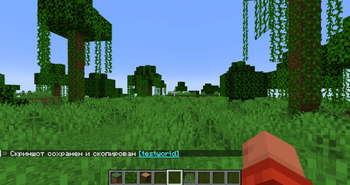

About this Mod
SmartShot
A client mod that turns a chaotic folder of screenshots into an organized library.
Key Features:
- Sort by World: The mod automatically creates a separate folder for each single-player world or server inside your screenshots folder.
- Coordinates in the filename: Your exact coordinates (X, Y, Z) are automatically saved in the filename. Now you can always return to the location of a beautiful shot or find a base using a screenshot.
- Interactive chat: A clickable message appears in the chat immediately after pressing a key.
- Clean shots: The mod automatically hides the interface (HUD) when taking a screenshot and restores it in a fraction of a second.
- Quick access: In addition to saving to a folder, the screenshot is copied to the clipboard for user convenience.
By default, the “smart” screenshot is assigned to the F4 key.
You can always reassign it in the “Settings” -> ‘Controls’ -> “SmartShot Mod” section.
SmartShot
Клиентский мод, который превращает хаотичную папку со скриншотами в организованную библиотеку.
Основные функции:
- Сортировка по мирам: Мод автоматически создает отдельную папку для каждого одиночного мира или сервера внутри вашей папки screenshots.
- Координаты в названии: В имя файла автоматически записываются ваши точные координаты (X, Y, Z). Теперь вы всегда сможете вернуться на место красивого кадра или найти базу по скриншоту.
- Интерактивный чат: Сразу после нажатия клавиши в чате появляется кликабельное сообщение.
- Чистые кадры: Мод автоматически скрывает интерфейс (HUD) в момент снимка, и возвращает его обратно за долю секунды.
- Быстрый доступ: Помимо сохранения в папку, скриншот сохраняется в буфер обмена для удобства пользователя.
По умолчанию создание «умного» скриншота назначено на клавишу F4.
Вы всегда можете переназначить её в разделе «Настройки» -> «Управление» -> «SmartShot Mod».
Available Versions
How to Install SmartShot on Your Server
Order Server
Order a Minecraft Java server with at least 3 GB RAM (4 GB recommended).
Set fabric Loader
In the panel under "Egg", select the fabric loader and matching Minecraft version (1.21.1).
Install Mod
Open the mod browser in the dashboard and search for "SmartShot". Click "Install" – done! Alternatively, upload the .jar via SFTP to the /mods folder.
Compatibility
Mod Loaders
Minecraft Versions
1.21.1
Server-side
✗ UnsupportedRecommended RAM
4 GB(min. 3 GB)Frequently Asked Questions
SmartShot server crashes on startup – what to do?
Most common cause: wrong fabric version or insufficient RAM. Check the server log (latest.log) for "OutOfMemoryError" or "Mixin" errors. With Mado Hosting: ensure at least 3 GB RAM is allocated and the loader matches the mod version (1.21.1). You can switch loaders with one click in the panel.
Is SmartShot compatible with fabric?
SmartShot officially supports fabric for Minecraft 1.21.1. The Mado dashboard automatically detects incompatible loader combinations.
Server lagging with SmartShot – how to optimize performance?
Recommended RAM: 4 GB (per 8 players). Use /spark profiler to check if SmartShot consumes the most tick time. Common fixes: reduce server view-distance to 8-10, install "performant" or "starlight" as supplementary mods on Forge. With Mado Hosting, your server runs on NVMe SSDs with dedicated CPU cores for minimal latency.
Similar Mods




![[ETF] Entity Texture Features](https://cdn.modrinth.com/data/BVzZfTc1/af683d206d50b05258d865b0d6e4aa2f2cee12f2_96.webp)
![[EMF] Entity Model Features](https://cdn.modrinth.com/data/4I1XuqiY/6e5bbd0d06b1741bfdab6c0cfab6de8fdaf0064c_96.webp)
Rent Modded Server
Install SmartShot with just one click on your server.