
Smart Inventory Manager
A lightweight Fabric client mod that adds safe icon buttons and keybinds to quickly sort inventories and common containers.
Screenshots
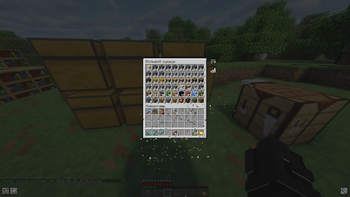

About this Mod
Smart Inventory Manager
Smart Inventory Manager is a client-side Fabric mod that adds fast, safe inventory sorting with clean icon buttons, keybinds, multiple sort modes, JSON config recovery, Mod Menu support, and broad localization.
Author: Matfi1
Features
- Sort the player inventory from the inventory screen.
- Sort common containers: chest, barrel, shulker box, hopper, dispenser, and dropper.
- Use compact icon buttons instead of large text buttons.
- Switch sorting mode from an in-game icon button.
- The mode icon changes to match the selected sort mode.
- Long hover tooltips explain each icon.
- Settings are available from the main/pause menu and with a keybind.
- Sorting respects protected hotbar slots when
ignoreHotbaris enabled. - Sorting respects configured
lockedSlots. - Invalid config files are backed up and replaced with defaults.
- No mixins in the MVP.
Sort Modes
- Item ID
- Category
- Count
- Durability
- Name A-Z
- Name Z-A
Controls
Default keybinds:
I: sort player inventoryO: sort opened containerK: open Smart Inventory Manager settings
You can change these in Minecraft's controls menu.
Supported Versions
Built Modrinth jars are saved in dist/modrinth/.
| Minecraft | Jar |
|---|---|
| 1.21 | SmIm-1.21.jar |
| 1.21.1 | SmIm-1.21.1.jar |
| 1.21.2 | SmIm-1.21.2.jar |
| 1.21.3 | SmIm-1.21.3.jar |
| 1.21.4 | SmIm-1.21.4.jar |
| 1.21.5 | SmIm-1.21.5.jar |
| 1.21.6 | SmIm-1.21.6.jar |
| 1.21.7 | SmIm-1.21.7.jar |
| 1.21.8 | SmIm-1.21.8.jar |
| 1.21.9 | SmIm-1.21.9.jar |
| 1.21.10 | SmIm-1.21.10.jar |
| 1.21.11 | SmIm-1.21.11.jar |
| 26.1 | SmIm-26.1.jar |
| 26.1.2 | SmIm-26.1.2.jar |
Minecraft 26.1 and 26.1.2 require Java 25.
Installation
- Install Fabric Loader for your Minecraft version.
- Install Fabric API for your Minecraft version.
- Put the matching
SmIm-*.jarfile into yourmodsfolder. - Optional: install Mod Menu to open the config screen from the mods list.
This is a client-only mod. It is not required on servers.
Config
The config file is created here:
config/smartinventorymanager.json
Config keys:
enableInventorySortenableContainerSortbuttonSidebuttonScaleanimationEnabledsortModeignoreHotbarlockedSlots
If the JSON is broken, Smart Inventory Manager renames it to a timestamped .broken backup and creates a new default config.
Localization
Included languages:
- English (
en_us) - Russian (
ru_ru) - German (
de_de) - French (
fr_fr) - Spanish (
es_es) - Portuguese, Brazil (
pt_br) - Italian (
it_it) - Polish (
pl_pl) - Ukrainian (
uk_ua) - Turkish (
tr_tr) - Dutch (
nl_nl) - Czech (
cs_cz) - Hungarian (
hu_hu) - Chinese, Simplified (
zh_cn) - Chinese, Traditional (
zh_tw) - Japanese (
ja_jp) - Korean (
ko_kr)
Compatibility
Smart Inventory Manager uses Fabric screen events and avoids unsafe widget-list indexes. If a screen is not recognized, the feature path fails softly instead of crashing the client.
Manual compatibility test targets:
- Sodium
- Iris
- Mod Menu
- Mouse Tweaks
- Shulker Box Tooltip
- JEI
- libIPN
These are manual test targets, not full compatibility certifications. Mods that also move inventory slots may conflict if both mods sort at the same time.
Building
Build all supported Modrinth files:
./scripts/build-modrinth.sh
Build one Minecraft version:
./gradlew clean build -PmcVersion=1.21.11
Build 26.x with Java 25:
JAVA_HOME="$PWD/.jdks/jdk-25" ./gradlew clean build -PmcVersion=26.1
JAVA_HOME="$PWD/.jdks/jdk-25" ./gradlew clean build -PmcVersion=26.1.2
Successful jars are copied to:
dist/modrinth/
Manual Test Plan
- Open the player inventory.
- Confirm the sort and mode icons are outside the inventory GUI, not in the center.
- Open chest, barrel, shulker box, hopper, dispenser, and dropper.
- Click Sort in every supported screen.
- Switch sort modes and confirm the mode icon changes.
- Use keybinds for player inventory and container sorting.
- Change GUI scale and reopen screens.
- Corrupt the config JSON and confirm backup plus default regeneration.
- Launch with Mod Menu and confirm the config screen opens.
- Launch with Sodium/Iris and confirm the GUI still renders.
Roadmap
Planned ideas for future releases:
- Quick Stack
- Restock Hotbar
- Auto Refill
- Interactive Slot Locking UI
- Clean Inventory
License
MIT
Available Versions
How to Install Smart Inventory Manager on Your Server
Order Server
Order a Minecraft Java server with at least 3 GB RAM (4 GB recommended).
Set fabric Loader
In the panel under "Egg", select the fabric loader and matching Minecraft version (26.1.2).
Install Mod
Open the mod browser in the dashboard and search for "Smart Inventory Manager". Click "Install" – done! Alternatively, upload the .jar via SFTP to the /mods folder.
Compatibility
Mod Loaders
Minecraft Versions
26.1.2, 26.1.1, 26.1 (+12 more)
Server-side
✗ UnsupportedRecommended RAM
4 GB(min. 3 GB)Frequently Asked Questions
Smart Inventory Manager server crashes on startup – what to do?
Most common cause: wrong fabric version or insufficient RAM. Check the server log (latest.log) for "OutOfMemoryError" or "Mixin" errors. With Mado Hosting: ensure at least 3 GB RAM is allocated and the loader matches the mod version (26.1.2). You can switch loaders with one click in the panel.
Is Smart Inventory Manager compatible with fabric?
Smart Inventory Manager officially supports fabric for Minecraft 26.1.2, 26.1.1, 26.1. The Mado dashboard automatically detects incompatible loader combinations.
Server lagging with Smart Inventory Manager – how to optimize performance?
Recommended RAM: 4 GB (per 8 players). Use /spark profiler to check if Smart Inventory Manager consumes the most tick time. Common fixes: reduce server view-distance to 8-10, install "performant" or "starlight" as supplementary mods on Forge. With Mado Hosting, your server runs on NVMe SSDs with dedicated CPU cores for minimal latency.
Similar Mods




![[ETF] Entity Texture Features](https://cdn.modrinth.com/data/BVzZfTc1/af683d206d50b05258d865b0d6e4aa2f2cee12f2_96.webp)
![[EMF] Entity Model Features](https://cdn.modrinth.com/data/4I1XuqiY/6e5bbd0d06b1741bfdab6c0cfab6de8fdaf0064c_96.webp)
Rent Modded Server
Install Smart Inventory Manager with just one click on your server.