![[SMS] ShowMySkin!](https://cdn.modrinth.com/data/ntaCRiUj/3010301a533522998505c0f21a96a8ba4c1d0b65.png)
[SMS] ShowMySkin!
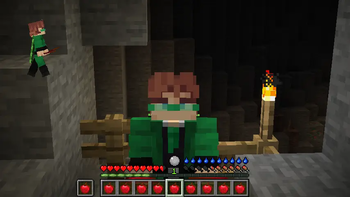
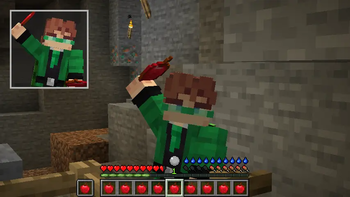
A customizable 3D webcam of your own character on the HUD, inspired by Bedrock's paper doll. Client-side, never changes skins.
Screenshots
![[SMS] ShowMySkin! Screenshot 1](https://cdn.modrinth.com/data/ntaCRiUj/images/29607fce4ebfd082babbcca712111cdff91fc349_350.webp)
About this Mod

ShowMySkin!
A client-side Fabric mod that adds a small, customizable 3D webcam of your
own character to your HUD — inspired by Bedrock Edition's paper doll.
🏮 About
ShowMySkin! shows your current look...

💎 Features
Feature rich
- 🎥 Live 3D preview of your own character on the HUD
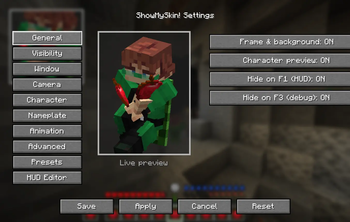
- 🪟 Live preview inside the settings screen — every change shows instantly
- 🖱️ Drag-and-drop HUD editor — move, resize (drag the corner), hold Shift to snap
- 🏷️ Nameplate — your name or custom text above/below the window
Highly customizable
- 👁️ Visibility triggers — Always, Bedrock-like (only while moving), or only while
sprinting / sneaking / swimming / elytra-flying / riding / holding a key - 🧍 Preview pose — Upright (clean webcam look) or Real (your actual pose),
with optional keep-in-frame so swimming/crawling stays centered - 🎛️ Full camera control — angle, pitch, zoom, scale, offset; head can face the camera
- 🎞️ Animations — Real, Idle, Walk, Sprint, Freeze, plus turntable auto-rotate
- 🎨 Presets — Webcam Dark, Minimal Doll, Portrait, Full Body, Bedrock Classic
Convenient
- 🌍 Languages: English, Russian, Ukrainian
- 🧩 Optional Mod Menu integration
- ⌨️ Every keybind unbound by default (no conflicts)
🔧 How to open the settings
Mod Menu → ShowMySkin! → Configure
or bind a key under Options → Controls → Key Binds → ShowMySkin!
⚙️ Compatibility
| Minecraft | Loader | Environment |
|---|---|---|
| 1.21.8 | Fabric | Client-side |
ShowMySkin! draws your real player entity through the vanilla render pipeline, so
custom models (Figura, CPM) and emotes (Emotecraft) can appear automatically. This is
best-effort — per-custom-part control isn't guaranteed, and the mod always falls
back gracefully without crashing.
⚠️ Known limitations
- Per-body-part / armor hiding isn't implemented yet
- Animation-pack support (e.g. FreshMoves) is best-effort — use Real pose for the
most compatible result - Figura / CPM support is best-effort
This is a beta. Some advanced options are planned. Bug reports and feedback welcome!
Available Versions
How to Install [SMS] ShowMySkin! on Your Server
Order Server
Order a Minecraft Java server with at least 3 GB RAM (4 GB recommended).
Set fabric Loader
In the panel under "Egg", select the fabric loader and matching Minecraft version (1.21.11).
Install Mod
Open the mod browser in the dashboard and search for "[SMS] ShowMySkin!". Click "Install" – done! Alternatively, upload the .jar via SFTP to the /mods folder.
Compatibility
Mod Loaders
Minecraft Versions
1.21.11, 1.21.10, 1.21.9 (+1 more)
Server-side
✗ UnsupportedRecommended RAM
4 GB(min. 3 GB)Frequently Asked Questions
[SMS] ShowMySkin! server crashes on startup – what to do?
Most common cause: wrong fabric version or insufficient RAM. Check the server log (latest.log) for "OutOfMemoryError" or "Mixin" errors. With Mado Hosting: ensure at least 3 GB RAM is allocated and the loader matches the mod version (1.21.11). You can switch loaders with one click in the panel.
Is [SMS] ShowMySkin! compatible with fabric?
[SMS] ShowMySkin! officially supports fabric for Minecraft 1.21.11, 1.21.10, 1.21.9. The Mado dashboard automatically detects incompatible loader combinations.
Server lagging with [SMS] ShowMySkin! – how to optimize performance?
Recommended RAM: 4 GB (per 8 players). Use /spark profiler to check if [SMS] ShowMySkin! consumes the most tick time. Common fixes: reduce server view-distance to 8-10, install "performant" or "starlight" as supplementary mods on Forge. With Mado Hosting, your server runs on NVMe SSDs with dedicated CPU cores for minimal latency.
Similar Mods

![[ETF] Entity Texture Features](https://cdn.modrinth.com/data/BVzZfTc1/af683d206d50b05258d865b0d6e4aa2f2cee12f2_96.webp)
![[EMF] Entity Model Features](https://cdn.modrinth.com/data/4I1XuqiY/6e5bbd0d06b1741bfdab6c0cfab6de8fdaf0064c_96.webp)



Rent Modded Server
Install [SMS] ShowMySkin! with just one click on your server.