
smthsModeration
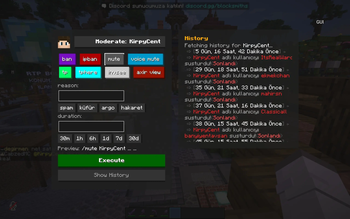
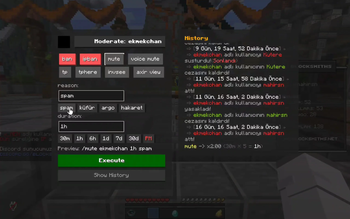
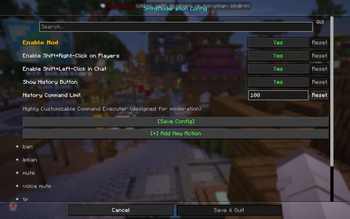
Highly Customizable Command Executer (designed for moderation). Easily create, color-code, and hotkey dynamic moderation actions via fully-flexible configurations.
Screenshots
About this Mod
SmthsModeration
Highly Customizable Command Executer (designed for moderation)
SmthsModeration is a fully dynamic and reflex-oriented Fabric moderation interface mod designed to accelerate in-game management processes for server administrators and moderators. Instead of static, hardcoded commands, it allows you to shape everything from scratch according to your own server infrastructure.
🚀 Key Features
- Fully Dynamic Command Infrastructure: No commands are hardcoded within the mod. All actions, such as
ban,mute,ipban, orinvsee, are fed entirely from a JSON file. - Advanced Variable and Preset Support: You can assign dynamic variables like
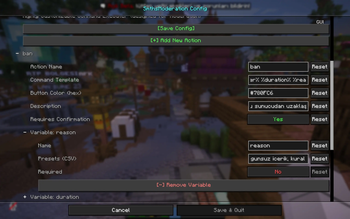
%player%,%duration%, or%reason%to your command templates, and define quick, one-click preset durations (e.g.,30m,1d,30d) and punishment reasons (e.g.,spam,cheating) for these variables. - Tree-Structured Config Screen: With Cloth Config integration, you can easily edit all your commands, their colors (as Hex codes), descriptions, and variables in a vertical tree structure without any clutter.
🛠 What's in the Default Starter Package?
When you launch the mod for the first time, the following popular moderation commands are automatically generated with all their ready-to-use presets:
| Action | Executed Command Template | Ready Presets / Options |
|---|---|---|
| Ban | /ban %player% %duration% %reason% |
Duration: 1d, 7d, 30d | Reason: cheating, inappropriate content... |
| IP Ban | /ipban %player% %duration% %reason% |
Duration: 1h, 3h, 6h, 1d... | Reason: proxy/vpn... |
| Mute | /mute %player% %duration% %reason% |
Duration: 30m, 1h, 6h... | Reason: spam, swearing, slang, insult |
| Voice Mute | /lp user %player% permission settemp voicechat.speak false %duration% |
Duration: 1h, 3h, 6h, 1d, 7d, 30d (LuckPerms integration) |
| Teleport (TP) | /tp %player% |
Direct Teleport |
| TP Here | /tphere %player% |
Pull Player to You |
| Invsee | /invsee %player% |
View Inventory |
| Axir View | /axir view %player% |
Advanced History Check |
📦 Dependencies
The following libraries must be installed on your client for the mod to run smoothly:
- Fabric API
- owo-lib
- Cloth Config API
Available Versions
How to Install smthsModeration on Your Server
Order Server
Order a Minecraft Java server with at least 3 GB RAM (4 GB recommended).
Set fabric Loader
In the panel under "Egg", select the fabric loader and matching Minecraft version (1.21.11).
Install Mod
Open the mod browser in the dashboard and search for "smthsModeration". Click "Install" – done! Alternatively, upload the .jar via SFTP to the /mods folder.
Compatibility
Mod Loaders
Minecraft Versions
1.21.11
Server-side
✗ UnsupportedRecommended RAM
4 GB(min. 3 GB)Frequently Asked Questions
smthsModeration server crashes on startup – what to do?
Most common cause: wrong fabric version or insufficient RAM. Check the server log (latest.log) for "OutOfMemoryError" or "Mixin" errors. With Mado Hosting: ensure at least 3 GB RAM is allocated and the loader matches the mod version (1.21.11). You can switch loaders with one click in the panel.
Is smthsModeration compatible with fabric?
smthsModeration officially supports fabric for Minecraft 1.21.11. The Mado dashboard automatically detects incompatible loader combinations.
Server lagging with smthsModeration – how to optimize performance?
Recommended RAM: 4 GB (per 8 players). Use /spark profiler to check if smthsModeration consumes the most tick time. Common fixes: reduce server view-distance to 8-10, install "performant" or "starlight" as supplementary mods on Forge. With Mado Hosting, your server runs on NVMe SSDs with dedicated CPU cores for minimal latency.
Similar Mods




![[ETF] Entity Texture Features](https://cdn.modrinth.com/data/BVzZfTc1/af683d206d50b05258d865b0d6e4aa2f2cee12f2_96.webp)
![[EMF] Entity Model Features](https://cdn.modrinth.com/data/4I1XuqiY/6e5bbd0d06b1741bfdab6c0cfab6de8fdaf0064c_96.webp)
Rent Modded Server
Install smthsModeration with just one click on your server.