
snapcam
Placeable camera for Minecraft fabric 1.21.1 — enter its view, shoot handheld, or use the self-timer. No commands, no custom keybinds. Inspired by the Education Cam.
Screenshots
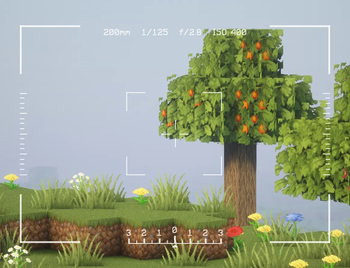
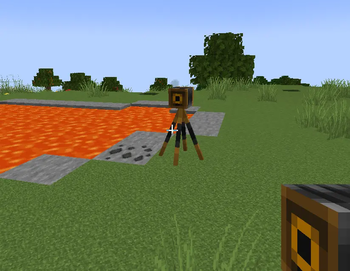
About this Mod
Snapcam
Snapcam adds a placeable camera to Minecraft. Point it at a scene, then shoot in
whichever style suits the moment:
- Handheld — hold the camera item, crouch and press Use to enter handheld
mode, then shoot at any time while crouching. Release crouch to exit. - Live view — place the camera in the world, walk up to it, and step inside:
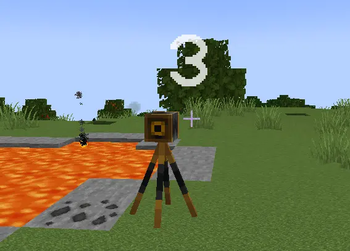
look around freely, zoom in/out, and shoot whenever you're ready. - Self-timer — place the camera, crouch-click it from close range to start a
5-second countdown, then get into the shot before it fires.
No commands. No custom keybinds — only Use and Sneak. Works on controllers and Steam Deck.
Inspired by the Minecraft: Education Edition camera. Requires Fabric on
Minecraft: Java Edition 1.21.1, installed on both server and client.
Features
Placing a camera
Hold the Camera item (creative inventory → Tools & Utilities) and
press Use on any block face:
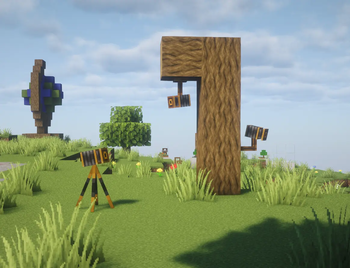
- On a flat surface — places a tripod camera on the ground, lens facing toward
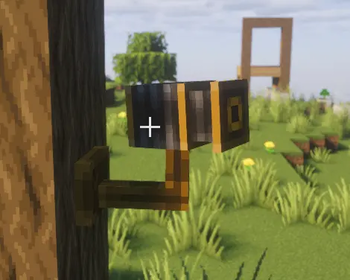
you. - On a side face — mounts the camera to the wall, lens pointing outward.
- On the underside of a block — mounts the camera to the ceiling. A centred
plate grips the block above; a rod hangs down to the pan/tilt head.
The camera is a server-side entity: every player on the server sees it.
Entering camera view
Use an unoccupied camera to switch your POV to it. While inside:
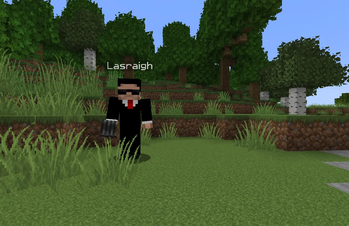
- Your character stays at its original position (visible to other players and in
your own screenshots). - Mouse / stick input rotates the camera view.
- Scroll wheel or W / S zooms in and out (12–200 mm equivalent focal length,
shown in the viewfinder HUD). Zoom is saved per camera and restored the next
time any player enters it. The lens barrel extends on the model as a visual cue. - All movement input is suppressed — the camera is fixed.
- The vanilla HUD (hotbar, crosshair, health bar) is hidden.
- Press Sneak to exit and return to your own body.
Only one player can occupy a camera at a time.
Taking a screenshot
| Situation | Input | Result |
|---|---|---|
| Inside camera view | Use / trigger | Screenshot from camera POV |
| Inside camera view | Scroll / W / S | Zoom in or out |
| Outside, holding Camera item | Hold Shift + Use (not aimed at a camera) | Enters hand-held mode — Use to shoot, release Shift to exit |
| Outside, holding Camera item (within ~20 blocks of a camera) | Shift + Use the camera | 5-second countdown, then auto-shot from that camera |
Screenshots are saved by Minecraft's normal screenshot system
(screenshots/ folder, sequential numbering). A white flash confirms each
shot.
Timed shot (self-timer)
Step close to a placed camera you are not inside and Shift + Use it. A large countdown
number (5 → 1) appears on screen. After five seconds the mod briefly enters the
camera's POV, takes the screenshot, and returns you to normal play — so you can
step in front of the camera before it fires.
The timer cancels automatically if the targeted camera is removed or claimed by
another player.
Removing a camera
Hit the camera entity to break it. It drops the Camera item regardless of who
placed it.
Compatibility
| Mod | Status |
|---|---|
| Xaero's Minimap | Supported — minimap is hidden while in camera view |
| Mod Menu | Supported — mod appears in the list (no config screen yet) |
| Controlify | Supported — set Sneak to held mode (not toggle) in Controlify settings |
| Other HUD mods | May render on top of camera view; MIT licensed, feel free to patch |
Requires the mod on both server and client. The POV switch is coordinated
server-side; clients without the mod cannot accidentally enter camera view on a
modded server.
Recommended server setting — interaction range
Holding the Camera item extends entity interaction range to ~20 blocks on the
client, allowing timed shots to be triggered from across a room. On Paper
servers, raise the server-side limit to match so the extended reach isn't
silently clamped:
# paper-global.yml
misc:
  max-entity-reach: 20.0
On a Fabric server the equivalent is provided by the
Reach Entity Attributes mod.
Dependencies
| Dependency | Side | Required |
|---|---|---|
| Fabric Loader ≥ 0.15 | Both | Yes |
| Fabric API 0.116.x + 1.21.1 | Both | Yes |
| Mod Menu | Client | No (recommended) |
License
MIT — © 2026 Lasrach [email protected]
Available Versions
How to Install snapcam on Your Server
Order Server
Order a Minecraft Java server with at least 3 GB RAM (4 GB recommended).
Set fabric Loader
In the panel under "Egg", select the fabric loader and matching Minecraft version (1.21.1).
Install Mod
Open the mod browser in the dashboard and search for "snapcam". Click "Install" – done! Alternatively, upload the .jar via SFTP to the /mods folder.
Compatibility
Mod Loaders
Minecraft Versions
1.21.1
Server-side
✓ RequiredRecommended RAM
4 GB(min. 3 GB)Frequently Asked Questions
snapcam server crashes on startup – what to do?
Most common cause: wrong fabric version or insufficient RAM. Check the server log (latest.log) for "OutOfMemoryError" or "Mixin" errors. With Mado Hosting: ensure at least 3 GB RAM is allocated and the loader matches the mod version (1.21.1). You can switch loaders with one click in the panel.
Is snapcam compatible with fabric?
snapcam officially supports fabric for Minecraft 1.21.1. The Mado dashboard automatically detects incompatible loader combinations.
Server lagging with snapcam – how to optimize performance?
Recommended RAM: 4 GB (per 8 players). Use /spark profiler to check if snapcam consumes the most tick time. Common fixes: reduce server view-distance to 8-10, install "performant" or "starlight" as supplementary mods on Forge. With Mado Hosting, your server runs on NVMe SSDs with dedicated CPU cores for minimal latency.
Similar Mods

![[ETF] Entity Texture Features](https://cdn.modrinth.com/data/BVzZfTc1/af683d206d50b05258d865b0d6e4aa2f2cee12f2_96.webp)
![[EMF] Entity Model Features](https://cdn.modrinth.com/data/4I1XuqiY/6e5bbd0d06b1741bfdab6c0cfab6de8fdaf0064c_96.webp)



Rent Modded Server
Install snapcam with just one click on your server.