
Sneak Actions
Perform a big jump or safe fall by using your sneak/crouch button!
Screenshots

About this Mod
Sneak Actions
This datapack allows you to perform more actions by using your sneak key. The following shows the actions, as well as how to do the actions:
- Big Jump
- Jump within a fourth of a second after letting go of your sneak button to perform a 2-block jump. The big jump won't perform if you were sneaking for more than 1 second.
- Safe Fall
- Sneak within a fourth of a second before landing to take no fall damage. This only works for falls 20 block or less.
Config
This datapack is highly customizable, with multiple functions that allow you to disable or enable features. The following is a list of commands to toggle or use features:
- /function sneakactions:config/info (shows this list in-game)
- /function sneakactions:config/safe_sneak_fall (toggles safe fall by sneaking)
- /function sneakactions:config/big_jump (toggles big jump)
- /function sneakactions:config/big_jump_particles (toggles big jump particles)
- /function sneakactions:config/big_jump_sound (toggles big jump sound)
- /function sneakactions:config/config_visibility (toggles the visiblity of the config in the sidebar)
In-game Config Information
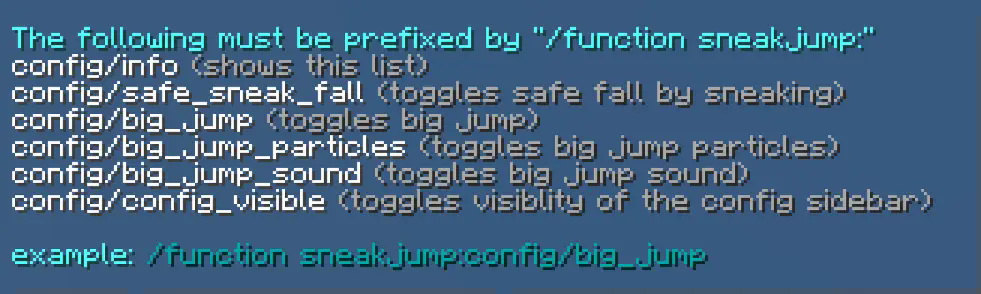
config/config_visible has been updated to config/config_visibility
sneakjump has been updated to sneakactions
Uninstallation Guide
If you decide to remove the datapack from your world, follow this process:
- Run the command "/function sneakactions:uninstall"
- Delete the pack from your world's datapack folder (unless you want to re-enable the datapack later)
To re-enable the pack, make sure you did not do step 2, then run the command "/datapack enable "file/sneak_actions.zip"
Leave comments about this project on it's Planet Minecraft Page.
Available Versions
How to Install Sneak Actions on Your Server
Order Server
Order a Minecraft Java server with at least 3 GB RAM (4 GB recommended).
Set datapack Loader
In the panel under "Egg", select the datapack loader and matching Minecraft version (1.21.4).
Install Mod
Open the mod browser in the dashboard and search for "Sneak Actions". Click "Install" – done! Alternatively, upload the .jar via SFTP to the /mods folder.
Compatibility
Mod Loaders
Minecraft Versions
1.21.4, 1.21.3, 1.21.2 (+4 more)
Server-side
✓ RequiredRecommended RAM
4 GB(min. 3 GB)Frequently Asked Questions
Sneak Actions server crashes on startup – what to do?
Most common cause: wrong datapack version or insufficient RAM. Check the server log (latest.log) for "OutOfMemoryError" or "Mixin" errors. With Mado Hosting: ensure at least 3 GB RAM is allocated and the loader matches the mod version (1.21.4). You can switch loaders with one click in the panel.
Is Sneak Actions compatible with datapack and fabric and forge and neoforge and quilt?
Sneak Actions officially supports datapack, fabric, forge, neoforge, quilt for Minecraft 1.21.4, 1.21.3, 1.21.2. Note: Forge and Fabric mods are NOT cross-compatible – pick one loader and stick with it. The Mado dashboard automatically detects incompatible loader combinations.
Server lagging with Sneak Actions – how to optimize performance?
Recommended RAM: 4 GB (per 8 players). Use /spark profiler to check if Sneak Actions consumes the most tick time. Common fixes: reduce server view-distance to 8-10, install "performant" or "starlight" as supplementary mods on Forge. With Mado Hosting, your server runs on NVMe SSDs with dedicated CPU cores for minimal latency.
Similar Mods




Rent Modded Server
Install Sneak Actions with just one click on your server.