
Snow Control
Now it’s only you and your imagination that decide which blocks will be covered in snow.
Screenshots
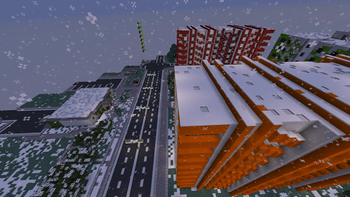
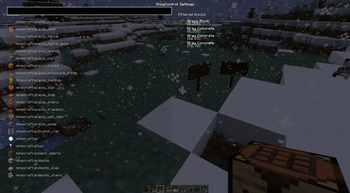
About this Mod
Snow Control is a client‑side utility mod for Minecraft 1.16.5 (Forge) that allows you to decide exactly where snow can and cannot appear. It was designed with usability, safety, and performance in mind.
✨ Features
- Custom GUI: A transparent, modern interface with two lists:
- Left column: All available blocks with search and scroll support.
- Right column: Your active snow rules, editable by double‑click and removable with a delete button.
- Search field: Quickly filter blocks by name.
- Block icons: Each entry shows the actual block icon for clarity.
- Scroll support: Mouse wheel scrolling in both lists.
- Rule editing: Double‑click a rule to adjust min/max Y levels.
- Safe behavior:
- Works only in singleplayer (disabled on servers to avoid anti‑cheat issues).
- Affects only snow generation (falling snow layers), never removes existing snow blocks.
- Persistent config: Rules are saved and reloaded automatically.
🛠️ How to Use
- Press O (default keybind) in singleplayer to open the SnowControl menu.
- Use the search bar to find blocks on the left.
- Click a block to add a rule (appears in the right column).
- Double‑click a rule to edit its Y‑range.
- Click the red X to remove a rule.
- Close the menu — your rules are saved automatically.
🎯 Why Snow Control?
- Prevent snow from covering your builds or farms.
- Fine‑tune snowy biomes for aesthetics or performance.
- Enjoy a clean, intuitive interface with full control.
Available Versions
How to Install Snow Control on Your Server
Order Server
Order a Minecraft Java server with at least 3 GB RAM (4 GB recommended).
Set forge Loader
In the panel under "Egg", select the forge loader and matching Minecraft version (1.16.5).
Install Mod
Open the mod browser in the dashboard and search for "Snow Control". Click "Install" – done! Alternatively, upload the .jar via SFTP to the /mods folder.
Compatibility
Mod Loaders
Minecraft Versions
1.16.5
Server-side
✓ RequiredRecommended RAM
4 GB(min. 3 GB)Frequently Asked Questions
Snow Control server crashes on startup – what to do?
Most common cause: wrong forge version or insufficient RAM. Check the server log (latest.log) for "OutOfMemoryError" or "Mixin" errors. With Mado Hosting: ensure at least 3 GB RAM is allocated and the loader matches the mod version (1.16.5). You can switch loaders with one click in the panel.
Is Snow Control compatible with forge?
Snow Control officially supports forge for Minecraft 1.16.5. The Mado dashboard automatically detects incompatible loader combinations.
Server lagging with Snow Control – how to optimize performance?
Recommended RAM: 4 GB (per 8 players). Use /spark profiler to check if Snow Control consumes the most tick time. Common fixes: reduce server view-distance to 8-10, install "performant" or "starlight" as supplementary mods on Forge. With Mado Hosting, your server runs on NVMe SSDs with dedicated CPU cores for minimal latency.
Similar Mods




Rent Modded Server
Install Snow Control with just one click on your server.