
Social Isolation
A server-side Minecraft SMP mod that subtly incentivises players to spend time together.
Screenshots
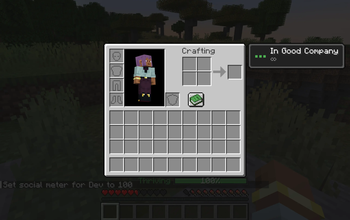
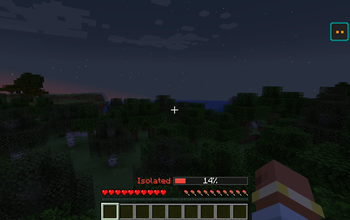
About this Mod
Social Isolation
A server-side proximity mod that ties minor gameplay effects to how close you stay to other players. No client installation required.
Ever feel like multiplayer servers could use a little more incentive to stick together? Social Isolation adds a subtle social meter (0–100) that fills when you're near other players and drains when you're alone. It's not a punishment mod it's a gentle nudge toward not making your base 2 million blocks away.
Concept
Your social meter (0-100) fills when other players are nearby and drains when you're alone. Effects scale across four tiers with hysteresis to prevent flickering. New players start at 70.
| Tier | Range | Effect |
|---|---|---|
| Thriving | 60-100 | +8% block break speed, +8% XP gain |
| Neutral | 40-60 | None |
| Lonely | 15-40 | -6% block break speed |
| Isolated | 0-15 | -12% block break speed, phantom spawning enabled |
Features
- Server-side only. Clients do not need the mod. Effects work transparently.
- Optional client HUD. Players who install the mod locally get a draggable, resizable meter bar with smooth color transitions. Drag to reposition in chat, scroll to resize.
- Familiarity. Familiarity builds between player pairs over ~5 hours together. At maximum, that player stops contributing to your meter. Decays over ~24 hours apart. Toggleable.
- Group multiplier. Logarithmic bonus for larger groups: 1.25x at 2 players, 1.5x cap at 4+.
- Tier hysteresis. Dropping a tier requires overshooting the threshold by 5 points (~90 seconds alone), eliminating flicker from brief separations. Moving up is instant.
- Live configuration. All 12 server settings adjustable via
/social config setwithout restarting. - Performance-conscious. Staggered tick processing, vanilla AABB queries, no mixins.
Commands
| Command | Permission | Description |
|---|---|---|
/social meter |
Everyone | View your social meter |
/social get [player] |
Everyone | View another player's meter |
/social set <player> <0-100> |
OP level 2 | Set a player's meter |
/social regained [player] |
Everyone | View total social points ever gained |
/social config list |
OP level 2 | List all server config values |
/social config get <key> |
OP level 2 | Get a config value |
/social config set <key> <value> |
OP level 2 | Change a config value live |
/socialhud toggle |
Client | Show/hide the HUD bar |
/socialhud pos <x> <y> |
Client | Set HUD bar position |
/socialhud scale <0.25-3.0> |
Client | Set HUD bar scale |
/socialhud reset |
Client | Reset HUD to defaults |
Server Configuration (config/socialisolation-server.toml)
| Key | Default | Description |
|---|---|---|
proximityRadius |
24 | Block radius for detecting nearby players |
meterGainRate |
0.1667 | Meter gained per second near others |
meterDrainRate |
0.0556 | Meter lost per second when alone |
familiarityGainRate |
0.00006 | Familiarity gained per second together |
familiarityDecayRate |
0.00001157 | Familiarity lost per second apart |
thresholdThriving |
60 | Meter threshold for Thriving tier |
thresholdLonely |
40 | Below this is Lonely tier |
thresholdIsolated |
15 | Below this is Isolated tier |
enableBenefits |
true | Master toggle for positive effects |
enablePenalties |
true | Master toggle for negative effects |
enableFamiliarity |
true | Master toggle for anti-AFK familiarity |
phantomSpawnWhenIsolated |
true | Whether isolated players can spawn phantoms |
Requirements
- Minecraft 1.21.1
- NeoForge 21.1.229+
Available Versions
How to Install Social Isolation on Your Server
Order Server
Order a Minecraft Java server with at least 3 GB RAM (4 GB recommended).
Set neoforge Loader
In the panel under "Egg", select the neoforge loader and matching Minecraft version (1.21.1).
Install Mod
Open the mod browser in the dashboard and search for "Social Isolation". Click "Install" – done! Alternatively, upload the .jar via SFTP to the /mods folder.
Compatibility
Mod Loaders
Minecraft Versions
1.21.1
Server-side
✓ RequiredRecommended RAM
4 GB(min. 3 GB)Frequently Asked Questions
Social Isolation server crashes on startup – what to do?
Most common cause: wrong neoforge version or insufficient RAM. Check the server log (latest.log) for "OutOfMemoryError" or "Mixin" errors. With Mado Hosting: ensure at least 3 GB RAM is allocated and the loader matches the mod version (1.21.1). You can switch loaders with one click in the panel.
Is Social Isolation compatible with neoforge?
Social Isolation officially supports neoforge for Minecraft 1.21.1. The Mado dashboard automatically detects incompatible loader combinations.
Server lagging with Social Isolation – how to optimize performance?
Recommended RAM: 4 GB (per 8 players). Use /spark profiler to check if Social Isolation consumes the most tick time. Common fixes: reduce server view-distance to 8-10, install "performant" or "starlight" as supplementary mods on Forge. With Mado Hosting, your server runs on NVMe SSDs with dedicated CPU cores for minimal latency.
Similar Mods




Rent Modded Server
Install Social Isolation with just one click on your server.