
Sodium Options API
Config API for adding Sodium options with a better categories menu
Screenshots
About this Mod

This mod adds cross-platform events for adding Sodium/Embeddium options menu integration. For example, you can add an option page to Embeddium on Forge, Fabric Sodium 0.5 on 1.20.1, and Fabric/NeoForge Sodium 0.6 on 1.21.1 with one event:
OptionGUIConstruction.EVENT.register((pages) -> pages.add(new TestOptionPage()));
If you're an end user, and you don't have this mod installed already as a library for another Sodium addon, you can install it alongside Reese's Options to get improved category menu, with drop-down support so that it's easier to navigate. This will take effect even for mods that don't use this API and inject into Sodium options directly.
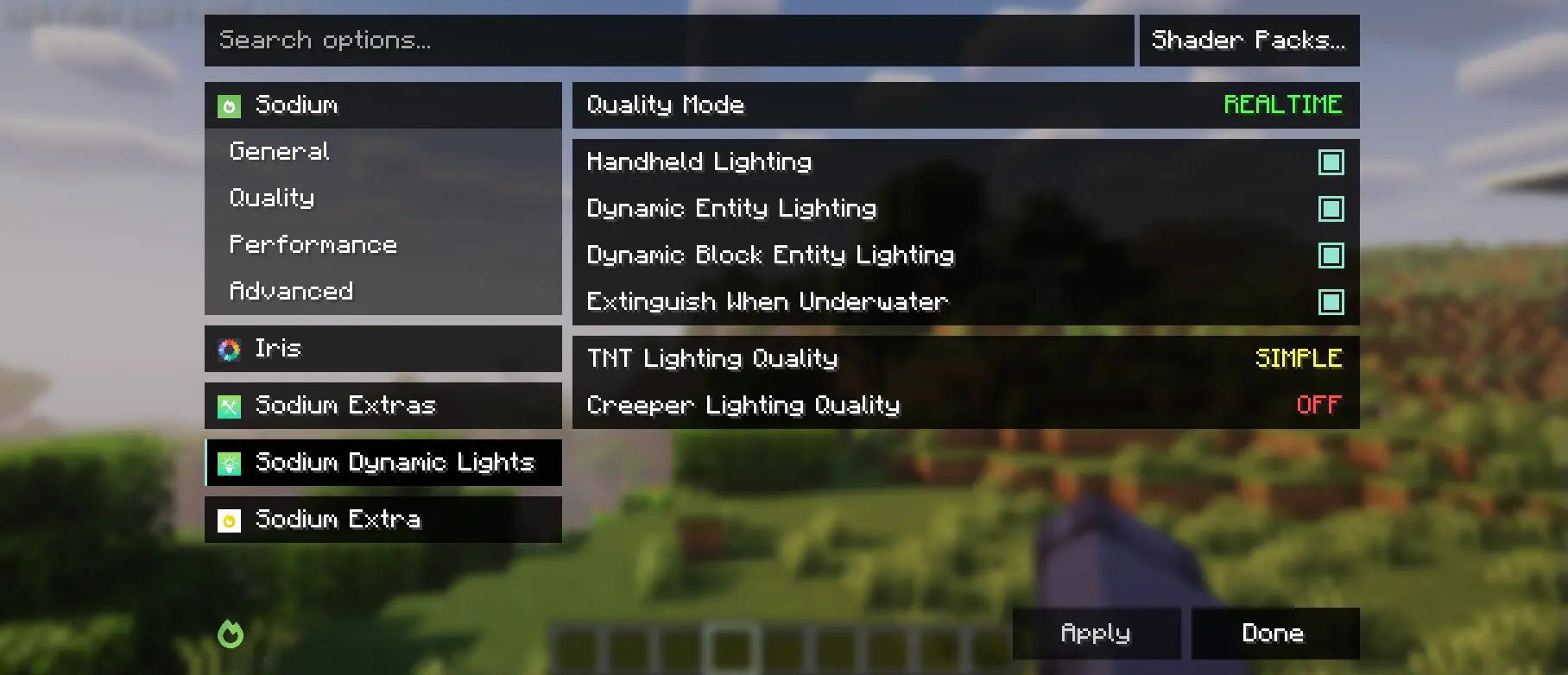
This mod is partially a fork of the Embeddium categories API and options events, with heavy changes to support upstream Sodium. While it makes changes to the Reese's Sodium Options menu, it does so via mixin for compatibility reasons, so you will need to install both.
Using the API
First, you will need to add this mod to your dev environment, using the Maven release for Curseforge or Modrinth.
modImplementation("maven.modrinth:sodium-options-api:version")
Then, this mod provides three events in toni.sodiumoptionsapi.api:
OptionGUIConstruction.EVENT, called once in the GUI constructor, allows adding entire pages. This is probably the one you want.OptionPageConstruction.EVENT, called for each OptionPage. Use this if you want to add a group of toggles to the performance tab or something.OptionGroupConstruction.EVENT, called for each group of options. Use this if you want to insert a single option into an existing group, or modify the vanilla ones.
Available Versions
How to Install Sodium Options API on Your Server
Order Server
Order a Minecraft Java server with at least 3 GB RAM (4 GB recommended).
Set fabric Loader
In the panel under "Egg", select the fabric loader and matching Minecraft version (1.21.5).
Install Mod
Open the mod browser in the dashboard and search for "Sodium Options API". Click "Install" – done! Alternatively, upload the .jar via SFTP to the /mods folder.
Compatibility
Mod Loaders
Minecraft Versions
1.21.5, 1.21.4, 1.21.1 (+2 more)
Server-side
✗ UnsupportedRecommended RAM
4 GB(min. 3 GB)Frequently Asked Questions
Sodium Options API server crashes on startup – what to do?
Most common cause: wrong fabric version or insufficient RAM. Check the server log (latest.log) for "OutOfMemoryError" or "Mixin" errors. With Mado Hosting: ensure at least 3 GB RAM is allocated and the loader matches the mod version (1.21.5). You can switch loaders with one click in the panel.
Is Sodium Options API compatible with fabric and forge and neoforge?
Sodium Options API officially supports fabric, forge, neoforge for Minecraft 1.21.5, 1.21.4, 1.21.1. Note: Forge and Fabric mods are NOT cross-compatible – pick one loader and stick with it. The Mado dashboard automatically detects incompatible loader combinations.
Server lagging with Sodium Options API – how to optimize performance?
Recommended RAM: 4 GB (per 8 players). Use /spark profiler to check if Sodium Options API consumes the most tick time. Common fixes: reduce server view-distance to 8-10, install "performant" or "starlight" as supplementary mods on Forge. With Mado Hosting, your server runs on NVMe SSDs with dedicated CPU cores for minimal latency.
Similar Mods


Rent Modded Server
Install Sodium Options API with just one click on your server.