
Sol's AuthLogin
A server-side authentication mod. It provides a complete login/registration system for servers that require an additional layer of account security.
Screenshots

About this Mod
Sol's AuthLogin System
Overview
Sol’s AuthLogin is a powerful and secure authentication system designed for Minecraft servers, now upgraded with a modern token-based auto-login system for improved security and player experience.
Note: Required to install into server/mods folder and is recommended to be installed on client-side as well for auto-login feature & stable authstate restrictions.
Need help, want to suggest a feature, or found a bug?
Join our community to catch exclusive early previews and upcoming changelogs before they go live!

🔐 Key Features
🆕 Secure Token-Based Auto-Login
- Replaces outdated IP-based sessions with a secure token authentication system
- Players receive a unique login token after
/loginor/register - Enables safe and seamless auto-login on future joins
- Falls back to manual login if client mod is not installed
✔ Requires mod on both client & server for full functionality
🔑 Core Authentication System
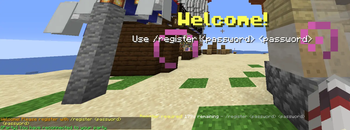
/register <password> <confirm>— Create a new account/login <password>— Authenticate returning players/change_password <old> <new> <confirm>— Update credentials securely
🛡 Advanced Security Features
- SHA-256 password hashing with per-user unique salt
- Rate limiting to prevent brute-force login attempts
- Temporary account lockout after failed attempts (configurable)
- Multiple session prevention (one account = one player)
- Optional session caching fallback for compatibility
🚫 Strict Pre-Authentication Protection
Until a player is authenticated, they are fully restricted:
- No movement (frozen state)
- No block breaking or placing
- No inventory or container access
- No item pickup
- No combat interaction
- No chat (except auth commands)
- No command usage (except
/login&/register) - Perspective switching is blocked
⏱ Smart Timeout System
- Configurable login timeout with auto-kick
- Grace period before teleporting after login
- Action bar + title reminders at configurable intervals
📍 Spawn & Return System
- Optional spawn teleport on join
- Automatically returns players to their original position after login
- Crash-safe position persistence
- Supports world spawn or custom coordinates
🧩 Admin Commands (/auth_admin)
reload— Reload configurationresetpassword <player> <newPassword>— Reset player passwordunregister <player>— Remove player accountforcelogin <player>— Authenticate player manuallyforcelogout <player>— De-authenticate playerinfo <player>— View auth statuslist— List all registered players
⚙ Highly Configurable
- Authentication timeout & session settings
- Password rules (length, complexity, requirements)
- Fully customizable messages
- Flexible spawn/teleport behavior
🎯 Who Is This For?
✅ Ideal for Offline-Mode (Cracked) Servers
- No Mojang authentication → anyone can use any username
- Prevents account impersonation and griefing
- Ensures only registered users can access their accounts
- Essential for protecting player progress and data
⚠ On Online-Mode Servers
- Mojang already verifies player identity and UUID
- No risk of impersonation
- Using this mod may cause double authentication (Mojang + mod)
👉 Still usable, but generally redundant unless extra security layers are needed
🚀 Why Choose Sol’s AuthLogin?
- Strong protection against common exploits
- Smooth player experience with auto-login
- Built for stability, configurability, and real server environments
Author: Solmochi
Found a bug or have a suggestion? Don't hesitate to leave a comment! I will answer it as fast as I could :)
Available Versions
How to Install Sol's AuthLogin on Your Server
Order Server
Order a Minecraft Java server with at least 3 GB RAM (4 GB recommended).
Set forge Loader
In the panel under "Egg", select the forge loader and matching Minecraft version (1.20.1).
Install Mod
Open the mod browser in the dashboard and search for "Sol's AuthLogin". Click "Install" – done! Alternatively, upload the .jar via SFTP to the /mods folder.
Compatibility
Mod Loaders
Minecraft Versions
1.20.1, 1.16.5
Server-side
✓ RequiredRecommended RAM
4 GB(min. 3 GB)Frequently Asked Questions
Sol's AuthLogin server crashes on startup – what to do?
Most common cause: wrong forge version or insufficient RAM. Check the server log (latest.log) for "OutOfMemoryError" or "Mixin" errors. With Mado Hosting: ensure at least 3 GB RAM is allocated and the loader matches the mod version (1.20.1). You can switch loaders with one click in the panel.
Is Sol's AuthLogin compatible with forge?
Sol's AuthLogin officially supports forge for Minecraft 1.20.1, 1.16.5. The Mado dashboard automatically detects incompatible loader combinations.
Server lagging with Sol's AuthLogin – how to optimize performance?
Recommended RAM: 4 GB (per 8 players). Use /spark profiler to check if Sol's AuthLogin consumes the most tick time. Common fixes: reduce server view-distance to 8-10, install "performant" or "starlight" as supplementary mods on Forge. With Mado Hosting, your server runs on NVMe SSDs with dedicated CPU cores for minimal latency.
Similar Mods




Rent Modded Server
Install Sol's AuthLogin with just one click on your server.