
Solute Extras
More enchants, better craft and smelt recipes and fair mob drops in an expansion of Solute.
Screenshots
About this Mod
Solute Collection
Solute Extras will not be updated anymore after 1.21.11, its features will be split off into separate mods which you can find in the Solute Collection.

Modules
Crafting Table: Improving on and adding recipes
Added smelting and blasting of raw metal blocks.
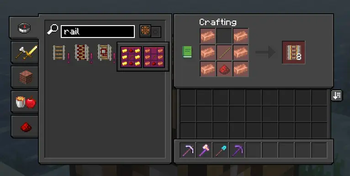
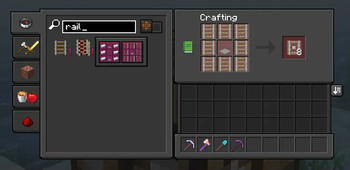
Made powered rail crafted with gold give 16 rails.
Made powered rail crafted with copper give 8 rails.
Added recipes to change rails into detector and activator rails.
Enchantment: Make mining quite a bit quicker
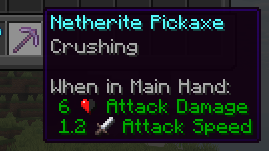
Crusher [pickaxe]
- Crushes blocks into their 'crushed' version
- Cobblestone -> Gravel
- (Red) Sandstone -> (Red) Sand
- Concrete -> Concrete Powder
- Fortune increase the amount of drops (with gravel and sand)
- Can not be combined with Silk Touch
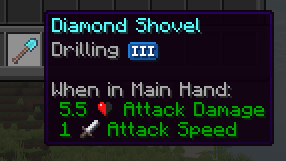
Drilling [pickaxe, shovel]
- Increases depth per level, up to level 3
- Mine deeper when mining compatible blocks with similar hardness
- Can be gotten in an enchanting table from level 8, with +8 per level
- Can not be combined with Excavation
- Can be canceled by sneaking
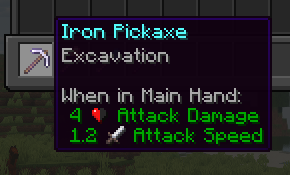
Excavation [pickaxe, shovel]
- Mine a 3x3 area when mining compatible blocks with similar hardness
- Can be gotten in an enchanting table from level 30
- Can not be combined with Drilling
- Can be canceled by sneaking
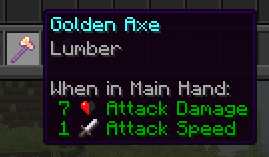
Lumber [axe]
- Chop down a whole tree by mining the bottom block
- Can be gotten in an enchanting table from level 15
- The bottom must be a single block. For a 2x2 tree, first mine the 3 other blocks
- Can be canceled by sneaking
Shulker: Shulkers are a way to solve Minecraft's inventory issue...
Shulkers drop a higher amount of shells.
With a minimum of 2 and a max of 3, shulker boxes are way easier and quicker to get.
Available Versions
How to Install Solute Extras on Your Server
Order Server
Order a Minecraft Java server with at least 3 GB RAM (4 GB recommended).
Set fabric Loader
In the panel under "Egg", select the fabric loader and matching Minecraft version (1.21.11).
Install Mod
Open the mod browser in the dashboard and search for "Solute Extras". Click "Install" – done! Alternatively, upload the .jar via SFTP to the /mods folder.
Compatibility
Mod Loaders
Minecraft Versions
1.21.11, 1.21.10, 1.21.9 (+2 more)
Server-side
✓ RequiredRecommended RAM
4 GB(min. 3 GB)Frequently Asked Questions
Solute Extras server crashes on startup – what to do?
Most common cause: wrong fabric version or insufficient RAM. Check the server log (latest.log) for "OutOfMemoryError" or "Mixin" errors. With Mado Hosting: ensure at least 3 GB RAM is allocated and the loader matches the mod version (1.21.11). You can switch loaders with one click in the panel.
Is Solute Extras compatible with fabric?
Solute Extras officially supports fabric for Minecraft 1.21.11, 1.21.10, 1.21.9. The Mado dashboard automatically detects incompatible loader combinations.
Server lagging with Solute Extras – how to optimize performance?
Recommended RAM: 4 GB (per 8 players). Use /spark profiler to check if Solute Extras consumes the most tick time. Common fixes: reduce server view-distance to 8-10, install "performant" or "starlight" as supplementary mods on Forge. With Mado Hosting, your server runs on NVMe SSDs with dedicated CPU cores for minimal latency.
Similar Mods




Rent Modded Server
Install Solute Extras with just one click on your server.