
Song Player for Simple Voice Chat
Song Player for Simple Voice Chat is a Fabric addon for Simple Voice Chat that lets players play YouTube audio through proximity voice chat in Minecraft 1.21.11.
Screenshots
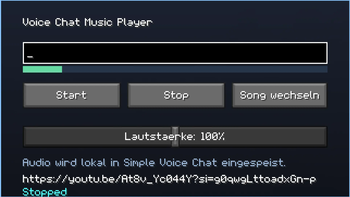
About this Mod
Song Player for Simple Voice Chat is a Fabric addon for Simple Voice Chat that lets players stream YouTube audio directly through proximity voice chat. Paste a YouTube video or music link into the in-game GUI, start playback, and nearby players will hear the audio in real time using the existing voice chat system. Designed for Minecraft 1.21.11 with seamless integration into Simple Voice Chat’s native audio pipeline.
You need to install yt-dlp and Gyan.FFmpeg for the mod to work.
On windows you can open powershell and run these commands:
"winget install yt-dlp.yt-dlp"
"winget install Gyan.FFmpeg"
Known Issues / Notes:
- Audio may stutter briefly when tabbing out of the game
- The GUI opens with the "I" key by default and can be changed in Minecraft keybind settings
- The GUI is currently only available in German
- Audio may occasionally lag
- Audio quality is currently limited
Available Versions
How to Install Song Player for Simple Voice Chat on Your Server
Order Server
Order a Minecraft Java server with at least 3 GB RAM (4 GB recommended).
Set fabric Loader
In the panel under "Egg", select the fabric loader and matching Minecraft version (1.21.11).
Install Mod
Open the mod browser in the dashboard and search for "Song Player for Simple Voice Chat". Click "Install" – done! Alternatively, upload the .jar via SFTP to the /mods folder.
Compatibility
Mod Loaders
Minecraft Versions
1.21.11
Server-side
~ OptionalRecommended RAM
4 GB(min. 3 GB)Frequently Asked Questions
Song Player for Simple Voice Chat server crashes on startup – what to do?
Most common cause: wrong fabric version or insufficient RAM. Check the server log (latest.log) for "OutOfMemoryError" or "Mixin" errors. With Mado Hosting: ensure at least 3 GB RAM is allocated and the loader matches the mod version (1.21.11). You can switch loaders with one click in the panel.
Is Song Player for Simple Voice Chat compatible with fabric?
Song Player for Simple Voice Chat officially supports fabric for Minecraft 1.21.11. The Mado dashboard automatically detects incompatible loader combinations.
Server lagging with Song Player for Simple Voice Chat – how to optimize performance?
Recommended RAM: 4 GB (per 8 players). Use /spark profiler to check if Song Player for Simple Voice Chat consumes the most tick time. Common fixes: reduce server view-distance to 8-10, install "performant" or "starlight" as supplementary mods on Forge. With Mado Hosting, your server runs on NVMe SSDs with dedicated CPU cores for minimal latency.
Similar Mods




Rent Modded Server
Install Song Player for Simple Voice Chat with just one click on your server.