
Sophisticated Gamemodes
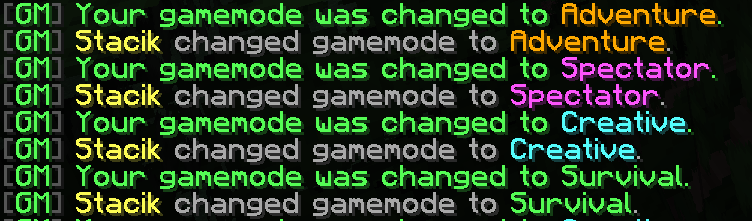
This plugin remakes the way gamemodes work in Minecraft! Sophisticated Gamemodes makes it easier to control who can be in different gamemodes, and can also alert other admins when a player switches into another gamemode
Screenshots

About this Mod
Sophisticated Gamemodes

This plugin completely changes the way Gamemodes work in Minecraft, by adding simpler commands (/gm 1) instead of longer ones (/gamemode creative).
Main feature is Customisation, the plugin is fully customisable,
Config file (config.yml)
# Supports legacy color codes like &a, &c, &l, etc.
# Placeholders:
# %player% - player name
# %gamemode% - lowercase gamemode name
# %gamemode_display% - configured gamemode display name

messages:
  prefix: "&8[&aGM&8]&r "
  usage: "&cUsage: /gm <0|1|2|3|survival|creative|adventure|spectator|reload>"
  only-players: "&cOnly players can use this command."
  no-permission: "&cYou do not have permission to use that gamemode."
  changed: "&aYour gamemode was changed to &f%gamemode_display%&a."
  alert: "&e%player% &7changed gamemode to &f%gamemode_display%&7."
  reloaded: "&aSophisticatedGamemodes config reloaded."

permissions:
  survival: "sophisticatedgamemodes.use.survival"
  creative: "sophisticatedgamemodes.use.creative"
  adventure: "sophisticatedgamemodes.use.adventure"
  spectator: "sophisticatedgamemodes.use.spectator"
  alert: "sophisticatedgamemodes.alert"
  reload: "sophisticatedgamemodes.reload"

gamemode-display-names:
  survival: "&aSurvival"
  creative: "&bCreative"
  adventure: "&6Adventure"
  spectator: "&dSpectator"

settings:
  # If false, the player who changed gamemode will not see their own alert,
  # even if they have the alert permission.
  send-alert-to-self: false
When a player switches gamemodes, it gets announced to all admins who have the permission specified in config.yml
FAQ
Why would I ever use this?
It's more faster to type, has admin logs and also if you are using plugins like EssentialsX it will override their commands for you to have a better gamemode system
Just use Essentials!
It doesn't have that deep of customisation and alerts
Does it have Discord webhook support?
Not yet, but I will add it in the future
Is it bug free?
During testing, I didn't spot any bugs, but no project is perfect. If you spot a bug, please DM me on discord stacik_
Can you make it a mod for servers also?
That's also available on the Download page, even though its less maintaned it should work perfectly
Do I need to give any credit?
No, absolutely! You can give us credit though and we will appreciate it a lot, but you aren't required to credit us anywhere.
What is the license you're using
We use a custom license called CTK Minecraft Creations license, it allows personal and public use of our creations but doesn't allow reuploading and reselling our creations.
Available Versions
How to Install Sophisticated Gamemodes on Your Server
Order Server
Order a Minecraft Java server with at least 3 GB RAM (4 GB recommended).
Set bukkit Loader
In the panel under "Egg", select the bukkit loader and matching Minecraft version (1.21.11).
Install Mod
Open the mod browser in the dashboard and search for "Sophisticated Gamemodes". Click "Install" – done! Alternatively, upload the .jar via SFTP to the /mods folder.
Compatibility
Mod Loaders
Minecraft Versions
1.21.11, 1.21.10, 1.21.9 (+9 more)
Server-side
✗ UnsupportedRecommended RAM
4 GB(min. 3 GB)Frequently Asked Questions
Sophisticated Gamemodes server crashes on startup – what to do?
Most common cause: wrong bukkit version or insufficient RAM. Check the server log (latest.log) for "OutOfMemoryError" or "Mixin" errors. With Mado Hosting: ensure at least 3 GB RAM is allocated and the loader matches the mod version (1.21.11). You can switch loaders with one click in the panel.
Is Sophisticated Gamemodes compatible with bukkit and fabric and paper and spigot?
Sophisticated Gamemodes officially supports bukkit, fabric, paper, spigot for Minecraft 1.21.11, 1.21.10, 1.21.9. The Mado dashboard automatically detects incompatible loader combinations.
Server lagging with Sophisticated Gamemodes – how to optimize performance?
Recommended RAM: 4 GB (per 8 players). Use /spark profiler to check if Sophisticated Gamemodes consumes the most tick time. Common fixes: reduce server view-distance to 8-10, install "performant" or "starlight" as supplementary mods on Forge. With Mado Hosting, your server runs on NVMe SSDs with dedicated CPU cores for minimal latency.
Similar Mods




![[ETF] Entity Texture Features](https://cdn.modrinth.com/data/BVzZfTc1/af683d206d50b05258d865b0d6e4aa2f2cee12f2_96.webp)
![[EMF] Entity Model Features](https://cdn.modrinth.com/data/4I1XuqiY/6e5bbd0d06b1741bfdab6c0cfab6de8fdaf0064c_96.webp)
Rent Modded Server
Install Sophisticated Gamemodes with just one click on your server.