
Soulflow
A social-based soul-exchanging Mod!
Screenshots

About this Mod
Soulflow

The Soulflow Mod uses the Impersonate library to add a variety of items that let you swap identities with other players! You can find these items in structures or from mob drops, and you can also craft them at the Alchemy Table.
Soulexchanging Items:

Totem of Transference
The Totem of Transference will exchange your soul with that of a targeted player!
Obtained from:
- The Alchemy Table
- Killing Witches
- Woodland Mansions
- Pillager Outposts

Totem of the Void
The Totem of the Void exchanges your soul with someone random nearby!
Obtained from:
- The Alchemy Table
- End Cities
- Strongholds

Totem of Spores
The Totem of Spores mimics another player's appearance!
Obtained from:
- The Alchemy Table
- Killing Mooshrooms

Sunken Grimoire
The Sunken Grimoire will turn you back into your real self!
Obtained from:
- Killing Drowneds
- Buried Treasure
- Shipwrecks
Crafting Items:

Hollow Totem
Used as a base totem for the Alchemy Table!
Obtained from:
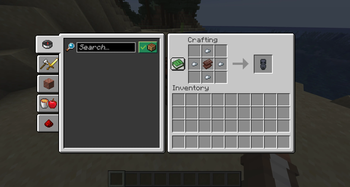
- Crafting it! (1 Netherite Scrap, 4 Iron Nuggets)
- Mineshafts
- Mob Spawners
- Ruined Portals
- Woodland Mansions

Soul
Used for crafting things in the Alchemy Table!
A soul is only obtained by smelting Soul Sand or Soul Soil!

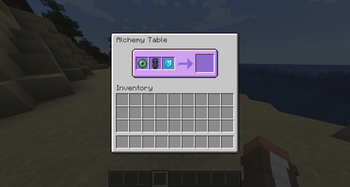
Alchemy Table
Used to craft totems!
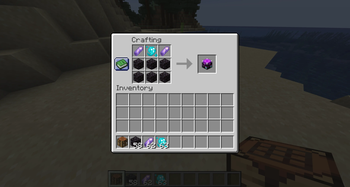
It can only be obtained from crafting it! (6 Blackstone, 2 Amethyst Shards, 1 Soul)
Recipes:
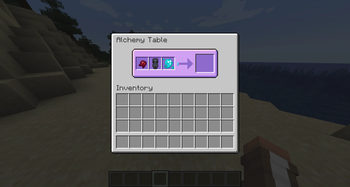
- Fermented Spider Eye + Hollow Totem + Soul -> Totem of Transference
- Ender Eye + Hollow Totem + Soul -> Totem of the Void
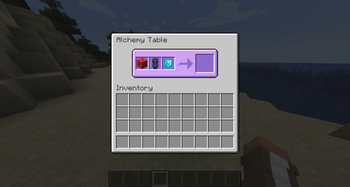
- Red Mushroom Block + Hollow Totem + Soul -> Totem of Spores
Commands
/soultransform
A command exclusive to operators! It lets you set/clear anyone's appearance!
The Impersonate Library brings its own command to do this, however it is recommended to use this one!
Gamerules:
| Gamerule | Purpose |
|---|---|
soulflow:exchangeInventories |
Whether a soul exchange will swap the inventories of players! |
soulflow:exchangeEnderchest |
Whether a soul exchange will swap the contents of players' ender chests! |
soulflow:exchangeHealth |
Whether a soul exchange will swap the health of players! |
soulflow:exchangeEffects |
Whether a soul exchange will swap the effects of players! |
soulflow:disablePrivateMessages |
Disables the /msg command, so that it's harder to tell who's who! |
On Default, all Gamerules are enabled!
However, the Impersonate Library adds its own gamerules!
| Gamerule | Purpose |
|---|---|
impersonate:fakeCapes |
Whether impersonators should get the cape and elytra of impersonated players. |
impersonate:opRevealImpersonations |
Whether ongoing impersonations should be revealed to online server operators. |
impersonate:logRevealImpersonations |
Whether ongoing impersonations should be revealed in the server logs. |
Libraries
This project uses Impersonate by Pyrofab, licensed under LGPL-3.0-only.
The library's source code can be obtained from: https://github.com/Ladysnake/Impersonate
Available Versions
How to Install Soulflow on Your Server
Order Server
Order a Minecraft Java server with at least 3 GB RAM (4 GB recommended).
Set fabric Loader
In the panel under "Egg", select the fabric loader and matching Minecraft version (1.21.4).
Install Mod
Open the mod browser in the dashboard and search for "Soulflow". Click "Install" – done! Alternatively, upload the .jar via SFTP to the /mods folder.
Compatibility
Mod Loaders
Minecraft Versions
1.21.4
Server-side
✓ RequiredRecommended RAM
4 GB(min. 3 GB)Frequently Asked Questions
Soulflow server crashes on startup – what to do?
Most common cause: wrong fabric version or insufficient RAM. Check the server log (latest.log) for "OutOfMemoryError" or "Mixin" errors. With Mado Hosting: ensure at least 3 GB RAM is allocated and the loader matches the mod version (1.21.4). You can switch loaders with one click in the panel.
Is Soulflow compatible with fabric?
Soulflow officially supports fabric for Minecraft 1.21.4. The Mado dashboard automatically detects incompatible loader combinations.
Server lagging with Soulflow – how to optimize performance?
Recommended RAM: 4 GB (per 8 players). Use /spark profiler to check if Soulflow consumes the most tick time. Common fixes: reduce server view-distance to 8-10, install "performant" or "starlight" as supplementary mods on Forge. With Mado Hosting, your server runs on NVMe SSDs with dedicated CPU cores for minimal latency.
Similar Mods




Rent Modded Server
Install Soulflow with just one click on your server.