
Sound Pulse
A minimalist client-side mod that visualizes sound direction through distance-scaling HUD waves and critical threat alerts for enhanced tactical awareness.
About this Mod
🔊 SoundPulse
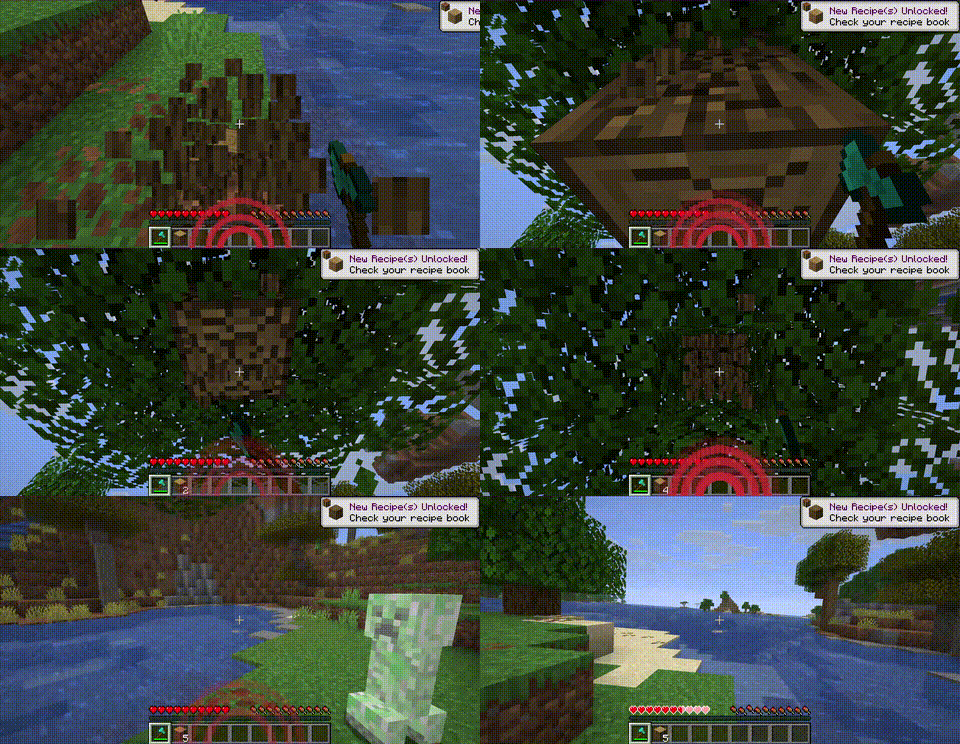
SoundPulse is a lightweight, high-performance client-side utility mod for Minecraft Fabric 26.1.x. It visualizes in-game sounds as minimalist, directional waves on your HUD, providing a tactical edge and enhanced spatial awareness without the clutter of vanilla subtitles.
Whether you are playing with your own music, have hearing difficulties, or simply want a cleaner way to track threats, SoundPulse delivers a sleek, modern solution.
✨ Key Features
🧭 8-Way Directional Tracking
SoundPulse doesn't just tell you a sound happened — it shows you exactly where it came from. The HUD displays curved wave icons pointing to 8 specific directions:
- Front, Back, Left, Right
- Front-Right, Front-Left, Back-Right, Back-Left
📏 Distance-Based Scaling
The visual intensity of the waves adapts to the proximity of the sound source:
- Near: Thick, aggressive lines for immediate threats
- Far: Thin, subtle lines for distant background noises
⚠️ Critical Threat Alerts (Strobe Effect)
Never get blindsided by a Creeper again. High-priority sounds like Creeper hissing or TNT priming trigger a rapid red strobe/flash effect on the corresponding direction of the HUD.
🛡️ Smart Filtering & Presets
To keep your screen clean, SoundPulse starts with Hostile sounds enabled by default. You can easily toggle other categories (Blocks, Players, Ambient, Music, Weather, Neutral, Voice) to suit your playstyle.
🎨 Category Colors
Each sound category has a distinct color:
| Category | Color |
|---|---|
| Hostile | Red |
| Blocks | Orange |
| Ambient | Green |
| Players | Blue |
| Music | Purple |
| Weather | Cyan |
| Neutral | Yellow |
| Voice | Gray |
💻 Commands
SoundPulse is fully configurable in-game. Every change you make is instantly saved to your configuration file.
| Command | Description |
|---|---|
/soundpulse toggle |
Enable or disable the mod entirely |
/soundpulse config |
View your current settings and active categories in chat |
/soundpulse category <name> <true/false> |
Toggle entire sound categories on or off |
/soundpulse color <category> <hex> |
Change the wave color for a specific category |
/soundpulse ignore add <id> |
Add a specific sound to the ignore list |
/soundpulse ignore remove <id> |
Remove a sound from the ignore list |
/soundpulse ignore list |
List all ignored sounds |
⚙️ Configuration
Settings are saved to config/soundpulse.json:
{
  "enabled": true,
  "maxOpacity": 0.65,
  "enabledCategories": ["HOSTILE"],
  "categoryColors": {},
  "ignoredSounds": []
}
Only the HOSTILE category is enabled by default. Use /soundpulse category to enable others.
📄 License
MIT © Cukkoo
Available Versions
How to Install Sound Pulse on Your Server
Order Server
Order a Minecraft Java server with at least 3 GB RAM (4 GB recommended).
Set fabric Loader
In the panel under "Egg", select the fabric loader and matching Minecraft version (26.1.2).
Install Mod
Open the mod browser in the dashboard and search for "Sound Pulse". Click "Install" – done! Alternatively, upload the .jar via SFTP to the /mods folder.
Compatibility
Mod Loaders
Minecraft Versions
26.1.2, 26.1.1, 26.1
Server-side
✗ UnsupportedRecommended RAM
4 GB(min. 3 GB)Frequently Asked Questions
Sound Pulse server crashes on startup – what to do?
Most common cause: wrong fabric version or insufficient RAM. Check the server log (latest.log) for "OutOfMemoryError" or "Mixin" errors. With Mado Hosting: ensure at least 3 GB RAM is allocated and the loader matches the mod version (26.1.2). You can switch loaders with one click in the panel.
Is Sound Pulse compatible with fabric and forge and neoforge?
Sound Pulse officially supports fabric, forge, neoforge for Minecraft 26.1.2, 26.1.1, 26.1. Note: Forge and Fabric mods are NOT cross-compatible – pick one loader and stick with it. The Mado dashboard automatically detects incompatible loader combinations.
Server lagging with Sound Pulse – how to optimize performance?
Recommended RAM: 4 GB (per 8 players). Use /spark profiler to check if Sound Pulse consumes the most tick time. Common fixes: reduce server view-distance to 8-10, install "performant" or "starlight" as supplementary mods on Forge. With Mado Hosting, your server runs on NVMe SSDs with dedicated CPU cores for minimal latency.
Similar Mods




![[ETF] Entity Texture Features](https://cdn.modrinth.com/data/BVzZfTc1/af683d206d50b05258d865b0d6e4aa2f2cee12f2_96.webp)

Rent Modded Server
Install Sound Pulse with just one click on your server.