
Sound Tweaks
Per-sound and per-block volume control. Silence, or fine-tune any Minecraft sound individually. Create presets and bind shortcuts.
Screenshots
About this Mod
SoundTweaks
A client-side Fabric mod for adjusting the volume of individual sounds and blocks, independent of each other and the game's master volume.
What it does
Per-sound volume control
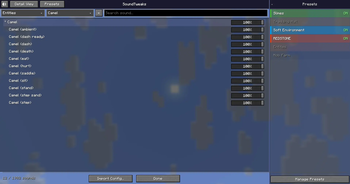
Every sound event gets its own volume slider, from 0% (silent) to 100% (default). Changing one sound doesn't affect anything else.
Per-block volume control
Some blocks make sounds that Minecraft's built-in categories can't separate — pistons, dispensers, note blocks, observers, and others. SoundTweaks adds its own volume layer for those. Block volumes run from 0% to 100%.
Category and object filtering
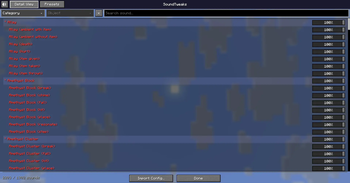
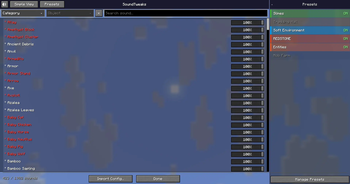
The main screen has two dropdown filters: Category (Block, Entity, Item, Ambient, Music, Music Disc, UI, Weather, Enchant, Event, Redstone, Others) and Object (the specific entity, item, or block within that category). There's a text search bar too.
Redstone is a cross-cutting category — it groups sounds from redstone-adjacent blocks (pistons, comparators, levers, note blocks, dispensers, sculk sensors, etc.) regardless of their base sound prefix.
Simple View / Detail View
Two ways to browse the list:
- Simple View — one entry per sound event
- Detail View — the individual
.oggfiles within each event, so you can target the exact sounds that play
Mute button
The speaker icon in the top-left mutes everything currently visible (based on your active filters). Click again to restore. Nothing gets written to your saved config — it's a temporary layer.
Presets
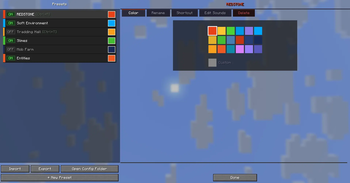
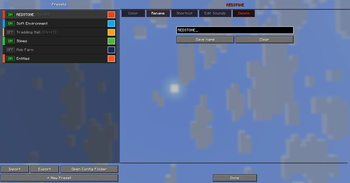
A preset stores a set of sound and block volume overrides. When active, its values take priority over the base config. If multiple presets are active and both define a value for the same sound, whichever deviates most from 100% wins.
Creating a preset: go to the Presets screen and click "New Preset". It starts as a copy of your current base config — only entries that aren't at 100% get carried over.
Editing a preset: select it from the list to open the detail panel. Available tabs:- Open Config Folder (Presets screen footer): opens the .minecraft/config/ folder in the system file manager.
Config files
All config is stored in .minecraft/config/ as plain JSON:
| File | Contents |
|---|---|
soundtweaks.json |
Base sound volumes (key: sound event ID, value: float 0–1) |
soundtweaks_blocks.json |
Base block volumes (key: block ID, value: float 0–1) |
soundtweaks_presets.json |
All presets, active state, and favorites list |
Config is saved automatically ~300ms after the last change. You can also edit the JSON files directly while the game is closed.
Volume resolution order
For any given sound, the effective volume is determined in this order:
- Volatile mute layer — set by the mute button; cleared when toggled off or the game restarts
- Active presets — if multiple presets define the same sound, the one with the biggest deviation from 100% wins
- Base config —
soundtweaks.json/soundtweaks_blocks.json - Default — 100% (no change)
How to open the UI
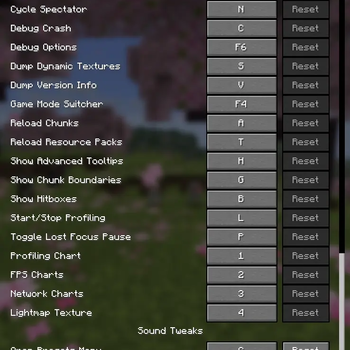
Press K (default keybind, rebindable in Minecraft's controls settings) to open the SoundTweaks screen.
Compatibility
- Client-side only — the server doesn't need the mod installed
- Fabric loader only
- Minecraft 26.1.2
- Does not replace or wrap the sound engine — intercepts volume at playback time via mixin
*Made by scr0ols — MIT
Available Versions
How to Install Sound Tweaks on Your Server
Order Server
Order a Minecraft Java server with at least 3 GB RAM (4 GB recommended).
Set fabric Loader
In the panel under "Egg", select the fabric loader and matching Minecraft version (26.1.2).
Install Mod
Open the mod browser in the dashboard and search for "Sound Tweaks". Click "Install" – done! Alternatively, upload the .jar via SFTP to the /mods folder.
Compatibility
Mod Loaders
Minecraft Versions
26.1.2
Server-side
✗ UnsupportedRecommended RAM
4 GB(min. 3 GB)Frequently Asked Questions
Sound Tweaks server crashes on startup – what to do?
Most common cause: wrong fabric version or insufficient RAM. Check the server log (latest.log) for "OutOfMemoryError" or "Mixin" errors. With Mado Hosting: ensure at least 3 GB RAM is allocated and the loader matches the mod version (26.1.2). You can switch loaders with one click in the panel.
Is Sound Tweaks compatible with fabric and neoforge?
Sound Tweaks officially supports fabric, neoforge for Minecraft 26.1.2. The Mado dashboard automatically detects incompatible loader combinations.
Server lagging with Sound Tweaks – how to optimize performance?
Recommended RAM: 4 GB (per 8 players). Use /spark profiler to check if Sound Tweaks consumes the most tick time. Common fixes: reduce server view-distance to 8-10, install "performant" or "starlight" as supplementary mods on Forge. With Mado Hosting, your server runs on NVMe SSDs with dedicated CPU cores for minimal latency.
Similar Mods




Rent Modded Server
Install Sound Tweaks with just one click on your server.