
Sound Control
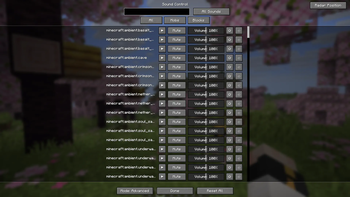
This mod lets you control all in-game sounds. Press V to open the menu and adjust each sound individually. Increasing a sound above 100% doesn’t make it louder, but expands the distance it can be heard.
Screenshots

About this Mod
🔊 Sound Control







Complete per-sound control, 3D spatial zones, and real-time discovery tools — for Fabric, NeoForge, and Quilt.
Ever wondered which sound is coming from where? Tired of that one machine noise? Sound Control lets you manage every sound individually, pin overrides to zones in 3D space, and identify unknown sounds on the fly — including sounds from other mods.
⚓ Sound Anchors — Spatial Audio Zones
No other Minecraft sound mod has this. · Currently available on Minecraft 26.1.x and 26.2 only · Support for older versions is planned.
Create sound override zones directly in your world:
| Feature | Details |
|---|---|
| Shape modes | Sphere (radius) or Box (W × H × D) |
| Sound overrides | Sounds auto-mute inside the zone |
| 3D boundaries | Toggle visible outlines of each zone |
| Management | Enable/disable and rename anchors freely |
| Persistence | Zones survive restarts and world reloads |
| Mod support | Works with any modded sound |
Real use cases:
- 🔇 Mute the nether portal hum only inside your base
- 🏭 Silence a noisy Create factory without affecting the area around it
- 🌙 Build quiet zones for custom maps or roleplay servers
🎛️ Complete Sound Management
Press V to open the main menu and switch between three control modes:
| Mode | Best for |
|---|---|
| Basic | Adjusting sound groups (e.g. all zombie sounds at once) |
| Advanced | Individual control of every sound event in the game |
| Mods | Auto-groups sounds from installed mods (Create, Farmer's Delight, etc.) into a sidebar |
Inside the menu:
- ⚡ Global Toggles — mute all footsteps / block breaks / mob hurt sounds in one click
- ⭐ Favorites — star your most-used sounds, persisted across sessions
- 🔍 Smart Filter — switch between All / Edited Only / Favorites Only
- ▶️ In-menu Playback — preview any sound before changing its volume
- 📋 Copy Sound ID — click a sound name to copy its ID to clipboard (green ✔ confirms)
🕐 Recent Sounds
Automatically tracks every sound played during your session:
- Full per-entry controls: Play/Stop · Mute · Volume · Favorite ⭐ · Reset ⟲
- Add sounds directly to Anchors — heard an annoying sound? One click to zone-mute it
- Clear history at any time
🔍 Discovery Tools
Never think "what IS that sound?" again.
Press Y to cycle through three overlay states:
| State | What you see |
|---|---|
| 1st press | 3D Sound Radar — spatial overlay of all sounds playing around you |
| 2nd press | SoundList Overlay — all sounds the block/entity at your crosshair can emit |
| 3rd press | All overlays off |
The SoundList Overlay pulls directly from the game registry — works for vanilla blocks, mobs, and any modded entity.
🌐 Version & Platform Support
Quilt uses the same file as Fabric — if Fabric is supported, Quilt is too.
| Minecraft | Fabric / Quilt | NeoForge |
|---|---|---|
| 26.2 | ✅ | — |
| 26.1.x | ✅ | ✅ |
| 1.21.9–1.21.11 | ✅ | ✅ |
| 1.21.6–1.21.8 | ✅ | — |
| 1.21.4–1.21.5 | ✅ | — |
| 1.21.2–1.21.3 | ✅ | — |
| 1.21–1.21.1 | ✅ | ✅ |
| 1.20–1.20.1 | ✅ | ✅ |
📊 Feature Support by Version
✅ Available · 🔄 In development · — Not available
| Feature | 1.20–1.20.1 | 1.21.x | 26.1.x / 26.2 |
|---|---|---|---|
| Sound Menu (V) — Basic / Advanced / Mods | ✅ | ✅ | ✅ |
| Global Toggles · Favorites · Smart Filter | ✅ | ✅ | ✅ |
| In-menu Sound Playback (▶) | ✅ | ✅ | ✅ |
| 3D Sound Radar (Y) | ✅ | ✅ | ✅ |
| Copy Sound ID to clipboard | — | ✅ | ✅ |
| SoundList Overlay — sounds at crosshair | — | ✅ | ✅ |
| Recent Sounds screen | — | ✅ | ✅ |
| ⚓ Sound Anchors — spatial audio zones | — | 🔄 | ✅ |
Note for 1.20–1.20.1 users: the newest feature available is the 3D Sound Radar. Newer features are actively being ported — follow the project for updates.
📖 Sound Wiki
Not sure what a sound ID looks like or where to find it? The Sound Wiki is a complete reference of all 1808 vanilla Minecraft sounds, organized by category — Blocks, Mobs, UI, Ambient, and more.
Use it to find the exact Sound ID you need, then manage it directly in the mod.
Fully translated into 12 languages:
🇺🇦 Ukrainian · 🇬🇧 English · 🇩🇪 German · 🇪🇸 Spanish · 🇫🇷 French · 🇵🇱 Polish · 🇨🇳 Chinese (Simplified) · 🇧🇷 Portuguese (BR) · 🇷🇺 Russian · 🇯🇵 Japanese · 🇰🇷 Korean · 🇮🇹 Italian
⌨️ Default Controls
| Key | Action |
|---|---|
V |
Open Sound Control menu |
Y |
Cycle overlays: Radar → SoundList → Off |
Both keys are fully rebindable in Minecraft's standard Controls menu.
Found a bug or want a new feature? Open an issue on GitHub or join the Discord.
Available Versions
How to Install Sound Control on Your Server
Order Server
Order a Minecraft Java server with at least 3 GB RAM (4 GB recommended).
Set fabric Loader
In the panel under "Egg", select the fabric loader and matching Minecraft version (26.2).
Install Mod
Open the mod browser in the dashboard and search for "Sound Control". Click "Install" – done! Alternatively, upload the .jar via SFTP to the /mods folder.
Compatibility
Mod Loaders
Minecraft Versions
26.2, 26.1.2, 26.1.1 (+15 more)
Server-side
✗ UnsupportedRecommended RAM
4 GB(min. 3 GB)Frequently Asked Questions
Sound Control server crashes on startup – what to do?
Most common cause: wrong fabric version or insufficient RAM. Check the server log (latest.log) for "OutOfMemoryError" or "Mixin" errors. With Mado Hosting: ensure at least 3 GB RAM is allocated and the loader matches the mod version (26.2). You can switch loaders with one click in the panel.
Is Sound Control compatible with fabric and neoforge and quilt?
Sound Control officially supports fabric, neoforge, quilt for Minecraft 26.2, 26.1.2, 26.1.1. The Mado dashboard automatically detects incompatible loader combinations.
Server lagging with Sound Control – how to optimize performance?
Recommended RAM: 4 GB (per 8 players). Use /spark profiler to check if Sound Control consumes the most tick time. Common fixes: reduce server view-distance to 8-10, install "performant" or "starlight" as supplementary mods on Forge. With Mado Hosting, your server runs on NVMe SSDs with dedicated CPU cores for minimal latency.
Similar Mods




Rent Modded Server
Install Sound Control with just one click on your server.