
SoundSwitcher
Backport the switching audio device from 21w37a to 1.7.10
Screenshots
About this Mod
SoundSwitcher
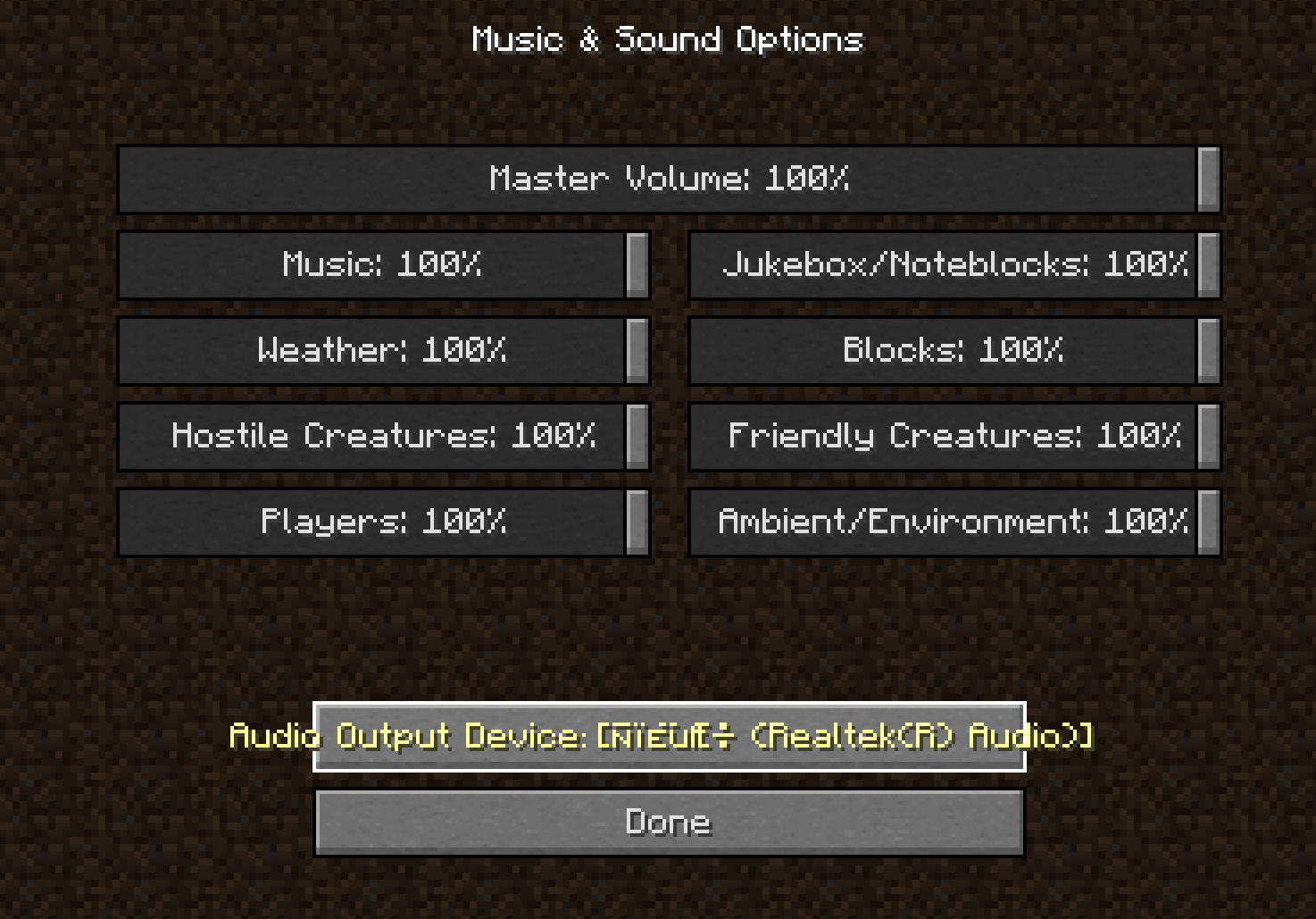
SoundSwitcher brings the "Device" button from the Minecraft 21w37a snapshot's or newer version's Music & Sounds menu to older versions of the game. Switch your headphones, speakers, or any other audio output on the fly — no restart required.
How It Works
- Device Enumeration – On game startup, SoundSwitcher queries OpenAL to build a list of all currently available audio output devices. This list is presented right inside the in-game sound settings.
- Live Switching – Selecting a device immediately reinitializes the OpenAL context, redirecting all game audio to your chosen output. No restart, no reload.
- Fallback Safety – If the selected device becomes disconnected or unavailable during gameplay, the mod automatically falls back to the system's default device, preventing silent game audio.
Important Notes & Limitations
- New devices after launch won't appear – Just like the original 21w37a implementation, the device list is captured at startup. If you plug in or pair a new audio device (e.g., Bluetooth headphones) while the game is running, you'll need to restart Minecraft for it to show up in the list.
While I tried a lot to add the ability to dynamically refresh the device list when new audio hardware is connected, I found that the required implementation is extremely complex. Current platform restrictions also make it impossible to deliver a fully working solution, so I have decided to abandon the development of this feature. - For other non-English-speaking players – This mod displays device names exactly as they appear in OpenAL, so you may encounter garbled text. Please be aware of this.
- Client‑side only – SoundSwitcher is entirely client‑side and safe to use on any server, vanilla or modded.
Why use SoundSwitcher?
- Finally get the 21w37a device switcher on 1.7.10 .
- Instantly move game audio from speakers to a headset without interrupting your gameplay.
- Avoid the hassle of editing configs or restarting just to change your output device.
Creadits
Mojang Studio for the modern minecraft device switcher idea.
Nieobie for the logo icon.
Available Versions
How to Install SoundSwitcher on Your Server
Order Server
Order a Minecraft Java server with at least 3 GB RAM (4 GB recommended).
Set forge Loader
In the panel under "Egg", select the forge loader and matching Minecraft version (1.7.10).
Install Mod
Open the mod browser in the dashboard and search for "SoundSwitcher". Click "Install" – done! Alternatively, upload the .jar via SFTP to the /mods folder.
Compatibility
Mod Loaders
Minecraft Versions
1.7.10
Server-side
✗ UnsupportedRecommended RAM
4 GB(min. 3 GB)Frequently Asked Questions
SoundSwitcher server crashes on startup – what to do?
Most common cause: wrong forge version or insufficient RAM. Check the server log (latest.log) for "OutOfMemoryError" or "Mixin" errors. With Mado Hosting: ensure at least 3 GB RAM is allocated and the loader matches the mod version (1.7.10). You can switch loaders with one click in the panel.
Is SoundSwitcher compatible with forge?
SoundSwitcher officially supports forge for Minecraft 1.7.10. The Mado dashboard automatically detects incompatible loader combinations.
Server lagging with SoundSwitcher – how to optimize performance?
Recommended RAM: 4 GB (per 8 players). Use /spark profiler to check if SoundSwitcher consumes the most tick time. Common fixes: reduce server view-distance to 8-10, install "performant" or "starlight" as supplementary mods on Forge. With Mado Hosting, your server runs on NVMe SSDs with dedicated CPU cores for minimal latency.
Similar Mods




![[ETF] Entity Texture Features](https://cdn.modrinth.com/data/BVzZfTc1/af683d206d50b05258d865b0d6e4aa2f2cee12f2_96.webp)
![[EMF] Entity Model Features](https://cdn.modrinth.com/data/4I1XuqiY/6e5bbd0d06b1741bfdab6c0cfab6de8fdaf0064c_96.webp)
Rent Modded Server
Install SoundSwitcher with just one click on your server.