![SpaceworldMons [Cobblemon]](https://cdn.modrinth.com/data/yJEn7EQ4/4be421b26c0e2fcc4a9ce280513f5dc2084e9775.png)
SpaceworldMons [Cobblemon]
Adds in Beta Pokémon into your Cobblemon world!
Screenshots


![SpaceworldMons [Cobblemon] Screenshot 3](https://cdn.modrinth.com/data/yJEn7EQ4/images/a03534e84d73d7a9bffcc3c11f7e33cd9323f349_350.webp)

About this Mod
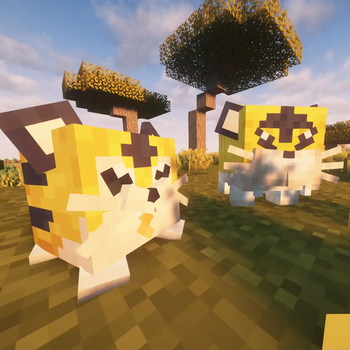
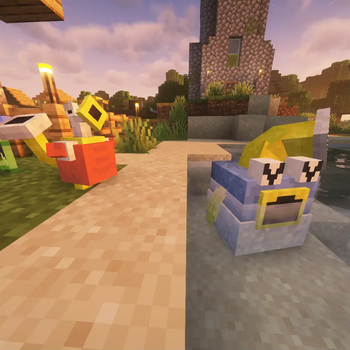
SpaceworldMons adds over 70 Beta Pokémon from an era long gone to your Cobblemon world!
There's too many mons to list all of them and their evo methods, so here's the roster from the previous update!
List of Pokémon available
Generation 1
- Barunda the Balloon Pokémon!
- Kotora, who evolves into Raitora at Level 31
- Gorochu - Evolves from Raichu with via Trade
Generation 2
- Kindachi, a curious looking Racoon Pokémon
- Norowara, who can evolve into Pangshi at any time
- Plux - Evolves from Pinsir when traded with a Metal Coat
- Tsubomitto - Evolves from Weepinbel with a Sun Stone
- Turbann - Evolves from Shellder when Slowpoke is in the Party
- Madamuu - Evolves from Farfetch'd with High Friendship
- Animon - Evolves from Ditto while being traded with a Metal Coat
- Shibirefugu - Evolves from Qwilfish at Level 18
- Koma-Inu, a potental Legendary Pokémon that rarely spawns in Cherry Groves...
Generation 3
- Evolotto, who has the mysterious ability to evolve into ANY Pokémon with High Friendship!
- Psykou, who evolves into Psyking at Level 30
- Ponku, who evolves into Tanpu at Level 31
- Kakogame, Warabbit, Penpen, Komari and Ascenshark - All single-stage 'Mons
Generation 5
- Kaburion - Evolves from Karrablast at Level 30
How to Install
Place the .jar file in your Mods folder! This counts as a datapack/resource pack combo, and installing like this lets it work in all your worlds!
Help Section
Help! /pokespawn isn't working!
'Mons in this pack are stored the same in the files as regional variants for compatability with other Datapacks. The command to properly spawn in the models is listed below.
/pokespawn [species] spaceworldmons
Other commands like /pokegive and natural spawning/evolving work as intended, so no worries there!
Help! The Beta Johto Starters don't show up in the starter selection!
We decided not to include data in the base pack for this, as if you play the pack with other datapacks that also include their own starters, one will overwrite the other. Here's how you can add the Beta Johto starters in yourself!
- Go to your mods menu and search for Cobblemon, and click on the 'Configure...' button.
- From there, search "starter" in the search bar. You will see a label titled "Export Starter Config". You will want this set to Yes
- Open the installation of Minecraft you have your game set up in, now you should have a 'starter.json' file inside the config/cobblemon folder.
- If you don't see it, go to your worlds screen and select 'Create a New World', you don't have to create a new world, this should just generate the file.
- Wherever you want the starters to show up (ideally before Johto and after Kanto), paste the JSON below in-between the entries:
    {
      "name": "SW97",
      "displayName": "SW97",
      "pokemon": [
        "Chikorita spaceworld_bias=beta_johto level=10",
        "Honoguma spaceworldmons level=10",
        "Kurusu spaceworldmons level=10"
      ]
    },

Save, and you're done! They should now appear as starter options in any world you create.
Include this in your server's configs to have them show up if you're planning on adding the pack in your multiplayer worlds.
Available Versions
How to Install SpaceworldMons [Cobblemon] on Your Server
Order Server
Order a Minecraft Java server with at least 3 GB RAM (4 GB recommended).
Set datapack Loader
In the panel under "Egg", select the datapack loader and matching Minecraft version (1.21.1).
Install Mod
Open the mod browser in the dashboard and search for "SpaceworldMons [Cobblemon]". Click "Install" – done! Alternatively, upload the .jar via SFTP to the /mods folder.
Compatibility
Mod Loaders
Minecraft Versions
1.21.1, 1.20.1
Server-side
✓ RequiredRecommended RAM
4 GB(min. 3 GB)Frequently Asked Questions
SpaceworldMons [Cobblemon] server crashes on startup – what to do?
Most common cause: wrong datapack version or insufficient RAM. Check the server log (latest.log) for "OutOfMemoryError" or "Mixin" errors. With Mado Hosting: ensure at least 3 GB RAM is allocated and the loader matches the mod version (1.21.1). You can switch loaders with one click in the panel.
Is SpaceworldMons [Cobblemon] compatible with datapack and fabric and neoforge?
SpaceworldMons [Cobblemon] officially supports datapack, fabric, neoforge for Minecraft 1.21.1, 1.20.1. The Mado dashboard automatically detects incompatible loader combinations.
Server lagging with SpaceworldMons [Cobblemon] – how to optimize performance?
Recommended RAM: 4 GB (per 8 players). Use /spark profiler to check if SpaceworldMons [Cobblemon] consumes the most tick time. Common fixes: reduce server view-distance to 8-10, install "performant" or "starlight" as supplementary mods on Forge. With Mado Hosting, your server runs on NVMe SSDs with dedicated CPU cores for minimal latency.
Similar Mods




Rent Modded Server
Install SpaceworldMons [Cobblemon] with just one click on your server.