
Spawn After Achievement
Let you configure to allow spawn entity after some achievement events
Screenshots
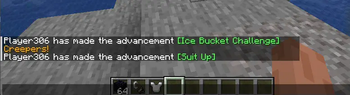
About this Mod
You wanna allow some mob spawning after player reach some game progress, similar to Terraria? Now it's possible with this mod. You can easily make it just by using config file.
Here is example of rules
[
  {
    "example": true, //delete this value or make it false to apply rule
    "entities": ["minecraft:zombie", "minecraft:zombie_villager", "minecraft:husk"],
    "achievement": "minecraft:story/enter_the_nether",
    "messages": {
      "en_us": ["Now zombies arise in the dark", "Beware of the night!"],
      "uk_ua": ["Тепер зомбі з'являються в темряві", "Остерігайтесь ночі!"]
    },
    "messagesColor": "GOLD"
  },
  {
    "entities": [...],
    "achievement": "...",
    "messages": {
      ...
    },
    "messagesColor": "..."
  }
]
Here you can find all achievements to configure
Here colors for chat message
Update
With new update now you can block entity to spawn with another config file block-after-achievement.json
!!! Important
"messagesColor" is white by default,
"messages" let you set few messages that will displaced accidentally,
Both parameters "messages" and "messagesColor" are not required
Set "example" to false or delete it to make rule work
I recommend to check all the config files of this mod
The most delicious that it's fully works with any entity from another mod
Nerkin
Available Versions
How to Install Spawn After Achievement on Your Server
Order Server
Order a Minecraft Java server with at least 3 GB RAM (4 GB recommended).
Set fabric Loader
In the panel under "Egg", select the fabric loader and matching Minecraft version (1.20.1).
Install Mod
Open the mod browser in the dashboard and search for "Spawn After Achievement". Click "Install" – done! Alternatively, upload the .jar via SFTP to the /mods folder.
Compatibility
Mod Loaders
Minecraft Versions
1.20.1
Server-side
✓ RequiredRecommended RAM
4 GB(min. 3 GB)Frequently Asked Questions
Spawn After Achievement server crashes on startup – what to do?
Most common cause: wrong fabric version or insufficient RAM. Check the server log (latest.log) for "OutOfMemoryError" or "Mixin" errors. With Mado Hosting: ensure at least 3 GB RAM is allocated and the loader matches the mod version (1.20.1). You can switch loaders with one click in the panel.
Is Spawn After Achievement compatible with fabric?
Spawn After Achievement officially supports fabric for Minecraft 1.20.1. The Mado dashboard automatically detects incompatible loader combinations.
Server lagging with Spawn After Achievement – how to optimize performance?
Recommended RAM: 4 GB (per 8 players). Use /spark profiler to check if Spawn After Achievement consumes the most tick time. Common fixes: reduce server view-distance to 8-10, install "performant" or "starlight" as supplementary mods on Forge. With Mado Hosting, your server runs on NVMe SSDs with dedicated CPU cores for minimal latency.
Similar Mods




Rent Modded Server
Install Spawn After Achievement with just one click on your server.