
Special Nametags
Adds many new special names, like Jeb_ or Dinnerbone, to give to mobs!
Screenshots
About this Mod
Special NameTags V1.4
Adds many new special names, like Jeb_ or Dinnerbone, to give to mobs!
This presentation refers to the latest Data Pack release: Version 1.4.x.
For previous releases, check the "Older Versions" section at the bottom of the page.
📥How to Install
Choose if you want to download the pure Data Pack version or the Mod version and follow the steps accordingly.
Data Pack
- 1) Download the Data Pack
- 2) Chose the world you want to install the Data Pack in and navigate to its "datapacks" folder
- 3) Copy the downloaded Data Pack file (Special Nametags) into this folder
- 4) Join the world and run
/reloadcommand
Mod
- 1) Download the Mod
- 2) Navigate to your
modsfolder (for the vanilla launcher the path is.minecraft/mods - 3) Put the downloaded .jar file (Special Nametags) into this folder
- 4) Join the world and run
/reloadcommand
⚠ Mod version is available starting from Minecraft 1.21 and up
📖Features
This Data Pack adds many new special names to give to mobs! (Like Dinnerbone and Jeb_)
How to use
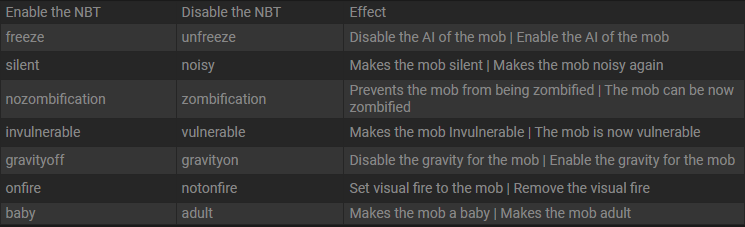
Simply rename a mob with one of the names in the list below, and the corresponding effect will be applied!
Special Names and Effects
| Special Name Tag | Effect |
|---|---|
Speedy Ghast(NEW) |
Happy Ghast will have its flying speed increased by 3x (+200%) |
Lazy Ghast(NEW) |
Happy Ghast flying speed will be restored to default |
freeze |
Mob will no longer move and won't suffer any damage |
unfreeze |
Mob will move normally and you'll be able to hit it again |
silent |
Mob will no longer emit sounds |
noisy |
Mob will emit sounds normally |
noname |
Mob Custom Name will be removed |
nozombification |
Piglin and hoglin will no longer zombificate in the Overworld |
zombification |
Piglin and hoglin will be able to zombificate in the Overworld |
invulnerable |
Mob will be invulnerable to any non-creative mode damage |
vulnerable |
Mob will become vulnerable to any damage source |
gravityoff |
Mob will no longer be affected by gravity |
gravityon |
Mob will be affected by gravity |
onfire |
Mob will visually be set on fire |
notonfire |
Mob will no longer have visual fire |
baby |
Mob will stay in baby form / Will became baby if is an adult already |
adult |
Mob will grow up |
sit |
Mob will sit on the ground |
unsit |
Mob will stand up |
YouTube Showcase
📤How to Uninstall
Data Pack
To uninstall the Data Pack run the command /function tags-nbt:uninstall. When the uninstallation process is completed a confirmation message will be sent in the chat.
Mod
To uninstall the Mod version you need to run /function tags-nbt:uninstall command. Then you close the game and remove the jar file from your .minecraft/mods folder.
🔗External links


💾Older Versions
Version 1.3 to 1.3.2 (for Minecraft 1.21.4-1.21.8)
Special NameTags
Adds many new special names, like Jeb_ or Dinnerbone, to give to mobs!
This presentation concerns about the latest release.
For older ones, check the "Older Versions" section, at the bottom of the page.
📥How to Install
Choose if you want to download the pure Data Pack version or the Mod version and follow the steps accordingly.
Data Pack
- 1) Download the Data Pack
- 2) Chose the world you want to install the Data Pack in and navigate to its "datapacks" folder
- 3) Copy the downloaded Data Pack file (Special Nametags) into this folder
- 4) Join the world and run
/reloadcommand
Mod
- 1) Download the Mod
- 2) Navigate to your
modsfolder (for the vanilla launcher the path is.minecraft/mods - 3) Put the downloaded .jar file (Special Nametags) into this folder
- 4) Join the world and run
/reloadcommand
⚠ Mod version is available starting from Minecraft 1.21 and up
📖Features
This Data Pack adds many new special names to give to mobs! (Like Dinnerbone and Jeb)
How to use
Simply rename a mob with one of the name in the list below, and the corresponding effect will be applied!
Special Names and Effects (1.21.4+)
| Special Name Tag | Effect |
|---|---|
freeze |
Mob will no longer move and won't suffer any damage |
unfreeze |
Mob will move normally and you'll be able to hit it again |
silent |
Mob will no longer emit sounds |
noisy |
Mob will emit sounds normally |
noname |
Mob Custom Name will be removed |
nozombification |
Piglin and hoglin will no longer zombificate in the Overworld |
zombification |
Piglin and hoglin will be able to zombificate in the Overworld |
invulnerable |
Mob will be invulnerable to any non-creative mode damage |
vulnerable |
Mob will become vulnerable to any damage source |
gravityoff |
Mob will no longer be affected by gravity |
gravityon |
Mob will be affected by gravity |
onfire |
Mob will visually be set on fire |
notonfire |
Mob will no longer have visual fire |
baby |
Mob will stay in baby form / Will became baby if is an adult already |
adult |
Mob will grow up |
sit |
Mob will sit on the ground |
unsit |
Mob will stand up |
YouTube Showcase
📤How to Uninstall
Data Pack
To uninstall the Data Pack run the command /function tags-nbt:uninstall. When the uninstallation process is completed a confirmation message will be sent in the chat.
Mod
To uninstall the Mod version you need to run /function tags-nbt:uninstall command. Then you close the game and remove the jar file from your .minecraft/mods folder.
🔗External links
Version 1.3 and below (for Minecraft 1.18-1.21.3)
Special NameTags
Adds many Special Name Tags that allows more customization and control over mobs!
📥How to Install
Decide if you want to download the pure Data Pack version or the Mod version and follow the steps accordingly.
Data Pack
- 1) Download the Data Pack
- 2) Chose the world you want to install the Data Pack in and navigate to its "datapacks" folder
- 3) Copy the downloaded Data Pack file (Special Nametags) into this folder
- 4) Join the world and run
/reloadcommand
Mod
- 1) Download the Mod
- 2) Navigate to your
modsfolder (for the vanilla launcher the path is.minecraft/mods - 3) Put the downloaded .jar file (Special Nametags) into this folder
- 4) Join the world and run
/reloadcommand
⚠ Mod version is available starting from Minecraft 1.21 and up
📖Features
This Data Pack allows you to have more special names to give to mobs!
NameTags Effects 1.20.3-1.21.3
⚠ IMPORTANT!
Due to a bug fix made in 1.20.3, removing a mob's name has become almost impossible. This means that, when using a special name tag, the mob's name will no longer disapper as it did before. As a temporary workaround (until MC-128225 is fixed) a new name tag has been added:noname.
| NameTag | Effect |
|---|---|
noname (new) | Mob custom name will be removed (new) |
freeze | Mob will no longer move and you won't be able to hit it |
unfreeze | Mob will move normally and you'll be able to hit it again |
silent | Mob will no longer emit sounds |
noisy | Mob will emit sound normally |
nozombification | Piglin and hoglin will no longer zombificate in the Overworld |
zombification | Piglin and hoglin will be able to zombificate in the Overworld |
zombification | Mob will be invulnerable to non creative damage |
vulnerable | Mob will become vulnerable to any damage source |
gravityoff | Mob will no longer be affected by gravity |
gravityon | Mob will be affected by gravity |
onfire | Mob will visually be set on fire |
notonfire | Mob will no longer have visual fire |
baby | Mob will stay in baby form / Will became baby if is an adult already |
adult | Mob will grow up |
sit | Mob will sit on the ground |
unsit | Mob will stand up |
NameTags Effects 1.20 - 1.20.2
| NameTag | Effect |
|---|---|
freeze | Mob will no longer move and you won't be able to hit it |
unfreeze | Mob will move normally and you'll be able to hit it again |
silent | Mob will no longer emit sounds |
noisy | Mob will emit sound normally |
nozombification | Piglin and hoglin will no longer zombificate in the Overworld |
zombification | Piglin and hoglin will be able to zombificate in the Overworld |
invulnerable | Mob will be invulnerable to non creative damage |
vulnerable | Mob will become vulnerable to any damage source |
gravityoff | Mob will no longer be affected by gravity |
gravityon | Mob will be affected by gravity |
onfire | Mob will visually be set on fire |
notonfire | Mob will no longer have visual fire |
baby | Mob will stay in baby form / Will became baby if is an adult already |
adult | Mob will grow up |
sit | Mob will sit on the ground (New) |
unsit | Mob will stand up (New) |
NameTags Effects 1.18 - 1.19
| NameTag | Effect |
|---|---|
freeze | Mob will no longer move and you won't be able to hit it |
unfreeze | Mob will move normally and you'll be able to hit it again |
silent | Mob will no longer emit sounds |
noisy | Mob will emit sound normally |
nozombification | Piglin and hoglin will no longer zombificate in the Overworld |
zombification | Piglin and hoglin will be able to zombificate in the Overworld |
invulnerable | Mob will be invulnerable to non creative damage |
vulnerable | Mob will become vulnerable to any damage source |
gravityoff | Mob will no longer be affected by gravity |
gravityon | Mob will be affected by gravity |
onfire | Mob will visually be set on fire |
notonfire | Mob will no longer have visual fire |
baby | Mob will stay in baby form / Will became baby if is an adult already |
adult | Mob will grow up |
YouTube Showcase
📤How to Uninstall (1.20 +)
Data Pack
To uninstall the Data Pack run the command /function tags-nbt:uninstall. When the uninstallation process is completed a confirmation message will be sent in the chat.
Mod
To uninstall the Mod version you need to run /function tags-nbt:uninstall command. Then you close the game and remove the jar file from your .minecraft/mods folder.
🔗External links
Available Versions
How to Install Special Nametags on Your Server
Order Server
Order a Minecraft Java server with at least 3 GB RAM (4 GB recommended).
Set datapack Loader
In the panel under "Egg", select the datapack loader and matching Minecraft version (26.1.2).
Install Mod
Open the mod browser in the dashboard and search for "Special Nametags". Click "Install" – done! Alternatively, upload the .jar via SFTP to the /mods folder.
Compatibility
Mod Loaders
Minecraft Versions
26.1.2, 26.1.1, 26.1 (+27 more)
Server-side
✓ RequiredRecommended RAM
4 GB(min. 3 GB)Frequently Asked Questions
Special Nametags server crashes on startup – what to do?
Most common cause: wrong datapack version or insufficient RAM. Check the server log (latest.log) for "OutOfMemoryError" or "Mixin" errors. With Mado Hosting: ensure at least 3 GB RAM is allocated and the loader matches the mod version (26.1.2). You can switch loaders with one click in the panel.
Is Special Nametags compatible with datapack and fabric and forge and neoforge and quilt?
Special Nametags officially supports datapack, fabric, forge, neoforge, quilt for Minecraft 26.1.2, 26.1.1, 26.1. Note: Forge and Fabric mods are NOT cross-compatible – pick one loader and stick with it. The Mado dashboard automatically detects incompatible loader combinations.
Server lagging with Special Nametags – how to optimize performance?
Recommended RAM: 4 GB (per 8 players). Use /spark profiler to check if Special Nametags consumes the most tick time. Common fixes: reduce server view-distance to 8-10, install "performant" or "starlight" as supplementary mods on Forge. With Mado Hosting, your server runs on NVMe SSDs with dedicated CPU cores for minimal latency.
Similar Mods

![[ETF] Entity Texture Features](https://cdn.modrinth.com/data/BVzZfTc1/af683d206d50b05258d865b0d6e4aa2f2cee12f2_96.webp)
![[EMF] Entity Model Features](https://cdn.modrinth.com/data/4I1XuqiY/6e5bbd0d06b1741bfdab6c0cfab6de8fdaf0064c_96.webp)



Rent Modded Server
Install Special Nametags with just one click on your server.